> For the complete documentation index, see [llms.txt](https://documentation.opencrvs.org/llms.txt). Markdown versions of documentation pages are available by appending `.md` to page URLs; this page is available as [Markdown](https://documentation.opencrvs.org/v2.0/technical/guides/configuration/integrations/create-a-client.md).
# Create a client
#### Introduction
In order to interoperate with OpenCRVS' via APIs, you must create a system client.
You can create a system client to perform record search & event notifications from a health system via the National System Administrator UI.
From 1.9.16 & 2.0.1 you can also create clients with whatever scopes you wish from your country configuration, without going through the UI. See [Process of creation via the country configuration](#process-of-creation-via-the-country-configuration) below.
The option to create clients for managing Locations, Importing Legacy Records or integrating with Citizen Portals via the UI has been deprecated for security reasons in 2.0, as these clients are extremely powerful.
Docs will be updated in this section by Aug 2026 to include information on the creation of those types of client.
***
#### Process of creation via the UI
Click **+ Create client**
You will see a modal overlay where you can select the type of client you wish to create. The business functionality available for each client is explained in subsequent pages in this section of our documentation.
**The type of client you create is important and can only perform API requests associated with the business functionality relevant to that type.** A Record Search client is not authorized to perform an Event Notification for example.
You must give each client a unique name.
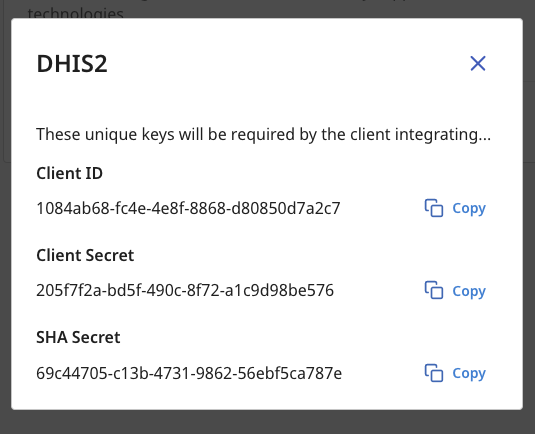
When you click "Create", you will be shown the authentication details for the client along with a SHA Secret used to sign, encrypt, decrypt and verify the authenticity of payloads.
{% hint style="warning" %}
**You must copy these keys now! The Client Secret will never be displayed to you again and it cannot be retrieved from our database as it is encrypted. It can only be refreshed in the UI.**
{% endhint %}
6\. You can manage existing clients by using the **3 dots** menu after the client has been created. You can **reveal the Client ID and SHA Secret keys** at any time and **refresh the Client Secret** to create a new one by selecting "**Reveal Keys**".
{% hint style="warning" %}
When you refresh a Client Secret, the old secret will no longer work for authentication.
{% endhint %}
You can also temporarily "**Deactivate**" and "**Enable**" a client or alternatively "**Delete**" it.
{% hint style="danger" %}
All client behaviour is audited and is ultimately the personal responsibility of the National System Administrator of OpenCRVS that created the client. Protect citizen data and do not expose access unnecessarily, as you may be in breach of local privacy laws.
{% endhint %}
***
#### Process of creation via the country configuration
{% hint style="info" %}
Available from OpenCRVS **2.0.1**. The same capability exists in the 1.9 line from **1.9.16**, where the country configuration registers integrations through the user management service instead of the events service. See the v1.9 documentation for that version.
{% endhint %}
A client created in the UI is limited to the permissions that come with its type. When an integration needs a different set — a national ID system that registers birth and death records on its own authority, for example — declare it in your country configuration instead.
The reason to give an integration its own client, rather than letting it reuse the access token of whichever user triggered the call, is the audit trail. A client that authenticates as itself is recorded as itself in a record's history. One that borrows a registrar's token is indistinguishable from that registrar afterwards.
Clients registered this way appear in the Integrations list alongside the ones created in the UI, where a National System Administrator can reveal their keys, deactivate them or delete them.
**1. Implement the system ready trigger**
Your country configuration exposes a `GET /triggers/system/ready` endpoint. It ships as a stub that answers `501 Not Implemented`, which OpenCRVS reads as "this country has no integrations to register":
```typescript
// src/index.ts
server.route({
method: 'GET',
path: '/triggers/system/ready',
handler: (_request, h) => {
// Not implemented by default
// You can use this endpoint to for instance set up integration clients
return h.response().code(501)
},
options: {
tags: ['api', 'triggers'],
description: 'System ready endpoint'
}
})
```
OpenCRVS calls this endpoint during provisioning and passes a bearer token that already carries the `integration.create` scope. Your handler should forward that token rather than authenticating again.
**2. Register each integration**
Replace the stub with a handler that posts each integration to `POST /integrations` on the events service. Nothing needs to be stored in your country configuration — the credentials are generated by OpenCRVS and returned in the response.
```typescript
// src/api/integration/handler.ts
import * as Hapi from '@hapi/hapi'
import fetch from 'node-fetch'
import { logger } from '@countryconfig/logger'
import { EVENTS_URL } from '@countryconfig/constants'
const INTEGRATIONS = [
{
name: 'MOSIP',
scopes: ['record.register[event=birth|death]']
}
]
export async function systemReadyHandler(
request: Hapi.Request,
h: Hapi.ResponseToolkit
) {
for (const integration of INTEGRATIONS) {
const res = await fetch(new URL('/integrations', EVENTS_URL).toString(), {
method: 'POST',
headers: {
'Content-Type': 'application/json',
Authorization: request.headers.authorization
},
body: JSON.stringify(integration)
})
if (!res.ok) {
logger.warn(
`Registering "${integration.name}" failed: ${res.status} ${await res.text()}`
)
}
}
return h.response().code(200)
}
```
`EVENTS_URL` is not one of the variables the reference country configuration ships with — add it yourself, pointing at the events service on the internal network (`http://events:5555` in the default Docker Compose deployment).
**Request payload**
| Parameter | Type | Description |
| --------- | --------- | ------------------------------------------------------------ |
| `name` | string | A unique name for the client, shown in the Integrations list |
| `scopes` | string\[] | At least one encoded scope string (see below) |
**Response**
```json
{
"clientId": "2fd153ab-86c8-45fb-990d-721140e46061",
"clientSecret": "8636abe2-affb-4238-8bff-200ed3652d1e",
"shaSecret": "b0d5e0a1-1f57-4f2e-9c9e-0c7d1a3f2b44"
}
```
The `clientSecret` is returned only in this response and is not retrievable afterwards. Either hand it to the integrating system from your handler, or discard it and have a National System Administrator use **Reveal keys** → **Refresh secret** on the Integrations page to issue a new one.
**Scopes**
Scopes are passed as encoded strings of the form `type[option=value|value]`. For record permissions the option is `event`, listing the event identifiers declared in your event configuration — `birth`, `death`, `tennis-club-membership` and so on. For example, `record.register[event=birth|death]`.
The available record scope types are:
| Scope type | Grants the integration the ability to |
| -------------------------------------- | ---------------------------------------------- |
| `record.create` | Create a new record |
| `record.read` | Read a record |
| `record.declare` | Submit a complete declaration |
| `record.notify` | Submit an incomplete notification |
| `record.declared.validate` | Validate a declared record |
| `record.declared.reject` | Send a declared record back for updates |
| `record.declared.archive` | Archive a declared record |
| `record.declared.review-duplicates` | Review records flagged as potential duplicates |
| `record.register` | Register a record |
| `record.registered.request-correction` | Request a correction to a registered record |
| `record.registered.correct` | Apply a correction to a registered record |
| `record.unassign-others` | Unassign a record assigned to another user |
{% hint style="danger" %}
Grant only the scopes the integration genuinely needs. A client that can register records is as powerful as a registrar, and the caution above about client behaviour being the responsibility of the National System Administrator applies here too.
{% endhint %}
**3. Authenticate as the integration**
Nothing special: the integration exchanges its client id and secret for an access token exactly like a client created in the UI. See [Authenticate a client](/v2.0/technical/guides/configuration/integrations/authenticate-a-client.md).
---
# Agent Instructions
This documentation is published with GitBook. GitBook is the documentation platform designed so that both humans and AI agents can read, navigate, and reason over technical content effectively. Learn more at gitbook.com.
## Querying This Documentation
If you need additional information that is not directly available in this page, you can query the documentation by asking a question.
Perform an HTTP GET request on the following URL with the `ask` and `goal` query parameters:
```
GET https://documentation.opencrvs.org/v2.0/technical/guides/configuration/integrations/create-a-client.md?ask=&goal=
```
`ask` is the immediate question: it should be specific, self-contained, and written in natural language.
`goal` is what the user is ultimately trying to achieve, the reason they need the answer. Sharing it helps GitBook give you a better, more relevant answer. A goal is most helpful when it describes the outcome the user wants rather than restating the question. For example, with `ask=how do I create an API token`, a goal like `automate deployments from our CI pipeline` lets GitBook tailor the answer to that use case.
The response will contain a direct answer to the question and relevant excerpts and sources from the documentation.
Use this mechanism when the answer is not explicitly present in the current page, you need clarification or additional context, or you want to retrieve related documentation sections.