> For the complete documentation index, see [llms.txt](https://documentation.opencrvs.org/llms.txt). Markdown versions of documentation pages are available by appending `.md` to page URLs; this page is available as [Markdown](https://documentation.opencrvs.org/v2.0/technical/guides/configuration/events/declaration-and-forms/form-validations.md).
# Form validations
Configuring form field validations
All form fields support custom validations, which are configured with the `validation` property. **If a validation does not pass, it means the form is filled incorrectly and a validation error is displayed.**
The `validation` property takes an array of validations, and all of them must pass for the validation of that field to succeed.
{% hint style="info" %}
Validators are conditionals. Each `validator` has the similar expressions you would write for a `SHOW` / `ENABLE` conditional — most commonly built from the `field(...)` chain, optionally combined with `and` / `or` / `not`. See [Conditionals](/v2.0/technical/guides/configuration/events/conditionals.md) for the full list of helpers.
{% endhint %}
The `validation` property is only used for content checks on a filled-in value. To mark a field as mandatory, use the separate `required` property on the field configuration.
**Example:**
In this example, we have a father's date-of-birth field with two custom validations:
1. The inputted date must be before today.
2. The inputted date must be before the inputted child's date of birth, `child.dob`.
1. For the validation to work correctly, we expect that the `child.dob` field is configured on the form (but it may be on a different page).
```typescript
import { field, defineFormPage, FieldType } from '@opencrvs/toolkit/events'
export const father = defineFormPage({
id: 'father',
title: {
defaultMessage: "Father's details",
description: 'Form section title for fathers details',
id: 'form.section.father.title'
},
fields: [
// ... other fields
{
id: 'father.dob',
type: FieldType.DATE,
validation: [
{
message: {
defaultMessage: 'Must be a valid Birthdate',
description: 'This is the error message for invalid date',
id: 'event.birth.action.declare.form.section.person.field.dob.error'
},
validator: field('father.dob').isBefore().now()
},
{
message: {
defaultMessage: "Birth date must be before child's birth date",
description:
"This is the error message for a birth date after child's birth date",
id: 'event.birth.action.declare.form.section.person.dob.afterChild'
},
validator: field('father.dob').isBefore().date(field('child.dob'))
}
]
}
]
})
```
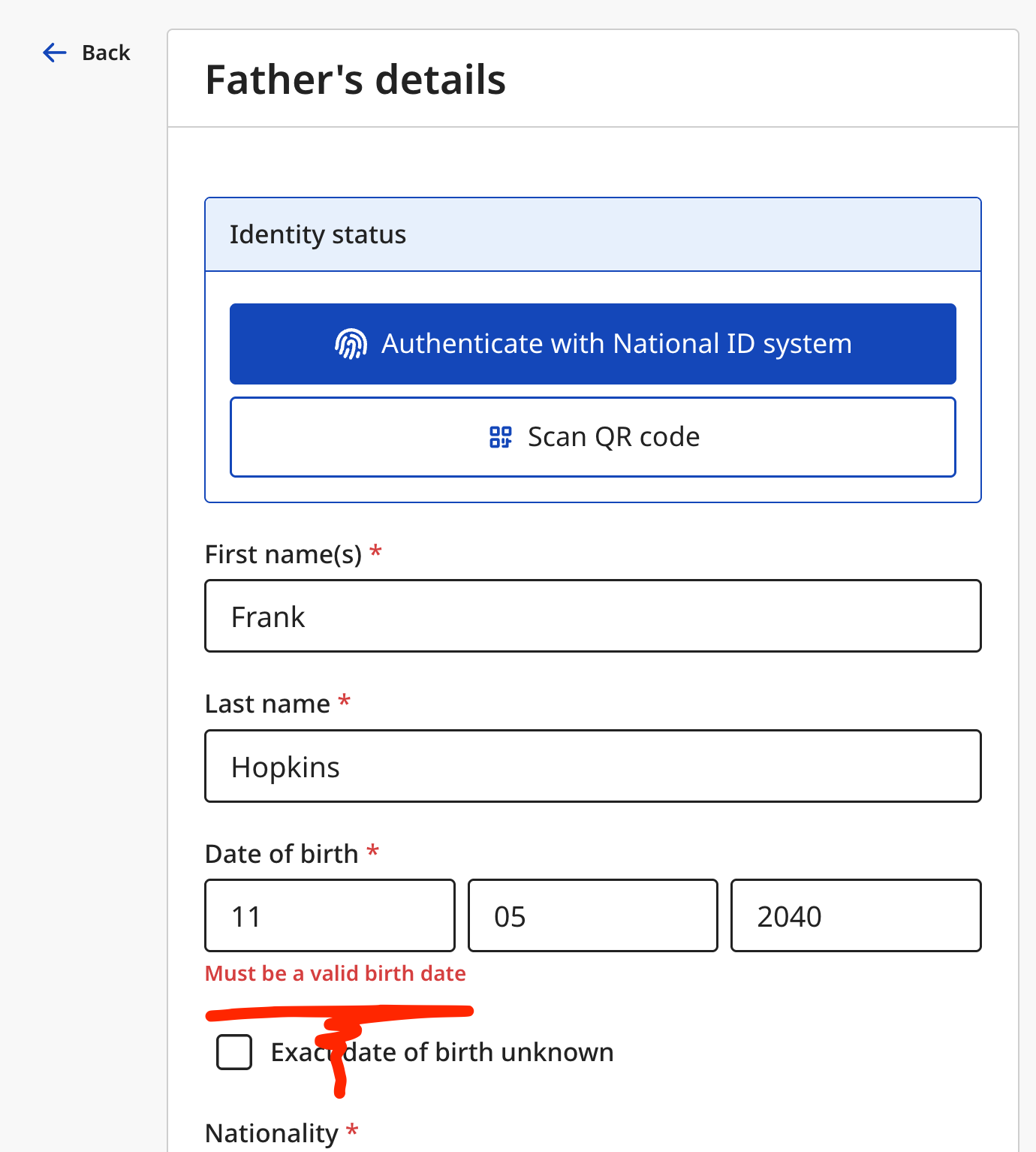
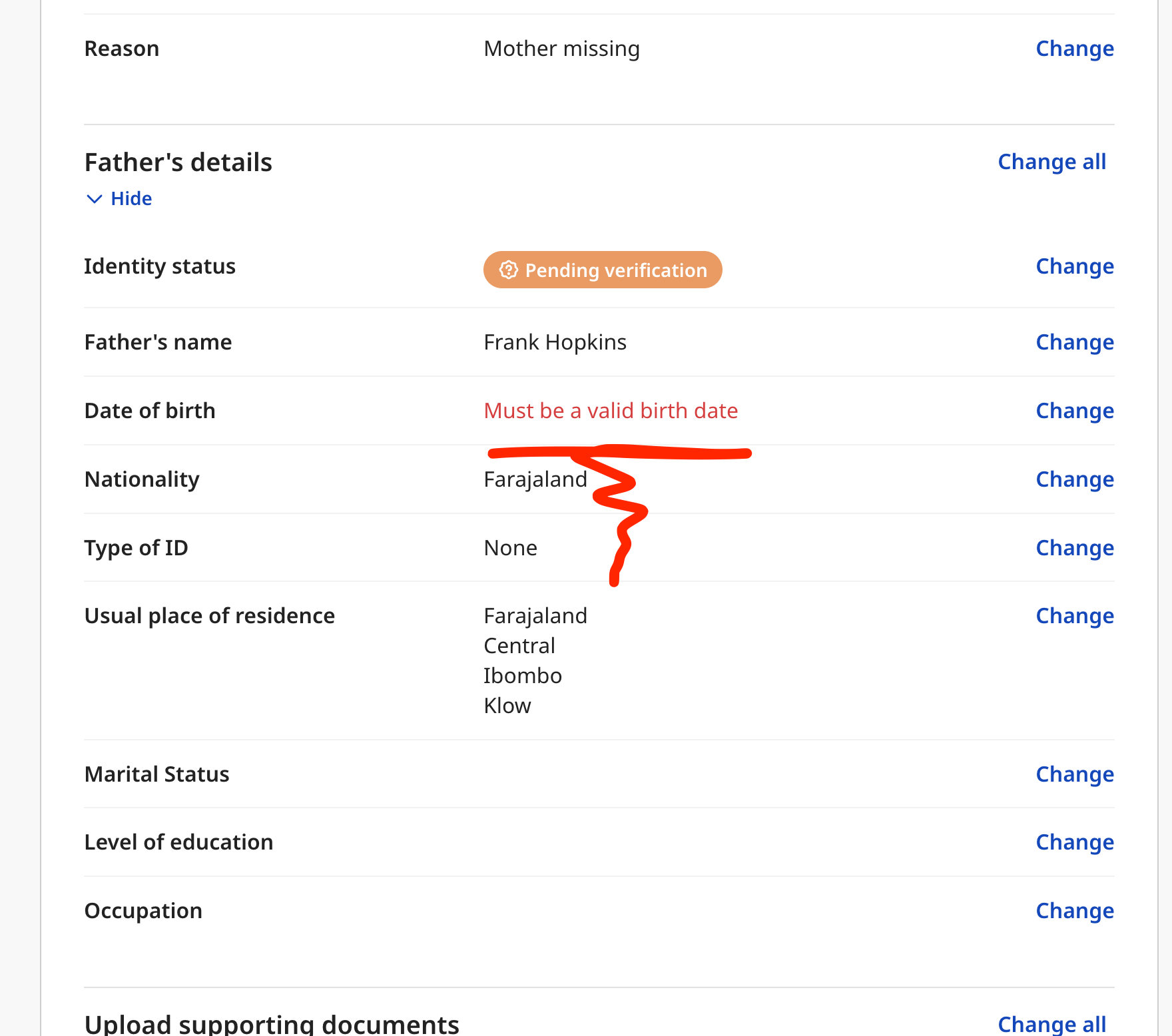
Now both validations must succeed for the validation to pass, otherwise we will display a validation error on the UI and consider the declaration as incomplete.
Validation errors on the declaration form are shown both on the form page, and the review page:
{% columns %}
{% column %}
Form page
{% endcolumn %}
{% column %}
Review page
{% endcolumn %}
{% endcolumns %}
### ValidationConfig schema
## The ValidationConfig object
```json
{"openapi":"3.1.0","info":{"title":"OpenCRVS API","version":"2.0.0"},"components":{"schemas":{"ValidationConfig":{"type":"object","properties":{"validator":{"description":"Conditional expression that must hold for the field value to be considered valid.","$ref":"#/components/schemas/Conditional"},"message":{"description":"Error message displayed when the validator does not hold.","$ref":"#/components/schemas/TranslationConfigOutput"}},"required":["validator","message"],"additionalProperties":false,"description":"Validation rule applied to a form field. The validator is a conditional expression that must hold for the field value to be considered valid."},"Conditional":{"description":"JSON schema conditional configuration"},"TranslationConfigOutput":{"type":"object","properties":{"id":{"type":"string","description":"The identifier of the translation referred in translation CSV files"},"defaultMessage":{"type":"string","description":"Default translation message"},"description":{"type":"string","description":"Describe the translation for a translator to be able to identify it."}},"required":["id","defaultMessage","description"],"additionalProperties":false,"description":"Translation configuration"}}}}
```
### Common validators
#### isValidEnglishName()
Validates that a text field contains only Latin-script characters. Accepts letters (including accented Latin characters such as é, ñ, ü), digits, and the special characters `', ., and -`. Words may be separated by a single space. Parenthetical suffixes such as (Jr) or (II) are permitted. The validation only runs when the field has a value — it does not imply required.
```typescript
// A field config
{
id: 'child.firstname',
type: FieldType.TEXT,
validation: [
{
message: {
id: 'event.birth.',
defaultMessage:
'Name must contain only letters, numbers, and the special characters \' . -',
description: 'Error message for invalid English name'
},
validator: field('child.firstname').isValidEnglishName()
}
]
}
```
#### isValidAdministrativeLeafLevel()
For address fields, validates that the user has selected a location down to the lowest configured administrative level. When addressType is DOMESTIC, the administrativeArea subfield is\
required and must resolve to a leaf-level location (e.g. ward or village) in the administrative hierarchy. For non-domestic addresses the check is relaxed — administrativeArea is validated\
if present but not required.
```typescript
// A field config
{
id: 'mother.address',
type: FieldType.ADDRESS,
validation: [
{
message: {
id: 'event.birth.action.declare.form.section.mother.field.address.error',
defaultMessage:
'Please select a location down to the lowest administrative level',
description:
'Error message shown when a domestic address does not reach the lowest administrative division'
},
validator: field('mother.address').isValidAdministrativeLeafLevel()
}
]
}
```
---
# Agent Instructions
This documentation is published with GitBook. GitBook is the documentation platform designed so that both humans and AI agents can read, navigate, and reason over technical content effectively. Learn more at gitbook.com.
## Querying This Documentation
If you need additional information that is not directly available in this page, you can query the documentation by asking a question.
Perform an HTTP GET request on the following URL with the `ask` and `goal` query parameters:
```
GET https://documentation.opencrvs.org/v2.0/technical/guides/configuration/events/declaration-and-forms/form-validations.md?ask=&goal=
```
`ask` is the immediate question: it should be specific, self-contained, and written in natural language.
`goal` is what the user is ultimately trying to achieve, the reason they need the answer. Sharing it helps GitBook give you a better, more relevant answer. A goal is most helpful when it describes the outcome the user wants rather than restating the question. For example, with `ask=how do I create an API token`, a goal like `automate deployments from our CI pipeline` lets GitBook tailor the answer to that use case.
The response will contain a direct answer to the question and relevant excerpts and sources from the documentation.
Use this mechanism when the answer is not explicitly present in the current page, you need clarification or additional context, or you want to retrieve related documentation sections.