> For the complete documentation index, see [llms.txt](https://documentation.opencrvs.org/llms.txt). Markdown versions of documentation pages are available by appending `.md` to page URLs; this page is available as [Markdown](https://documentation.opencrvs.org/v2.0/functional/markdown.md).
# Functional Architecture
### 1. Introduction
The OpenCRVS **functional architecture** is a generic, country-agnostic model of how the application works. It describes the system in terms of its **functional building blocks** rather than its infrastructure, so that the same core product can be configured to meet the specific civil registration needs of any country.
This page:
* Defines the **core concepts and vocabulary** used throughout the documentation.
* Describes the main **functional modules** — Events, Workflows, Records, Search, Access, Aggregate Data, Interoperability, and Legacy Data.
* Summarises the **record lifecycle**, from notification through to certification and beyond.
* Clarifies the boundary between **configuration** and **customisation**.
The focus is deliberately on the **functional model**. Infrastructure, deployment, and technology choices are covered in other sections of the documentation.
***
### 2. How to read this section
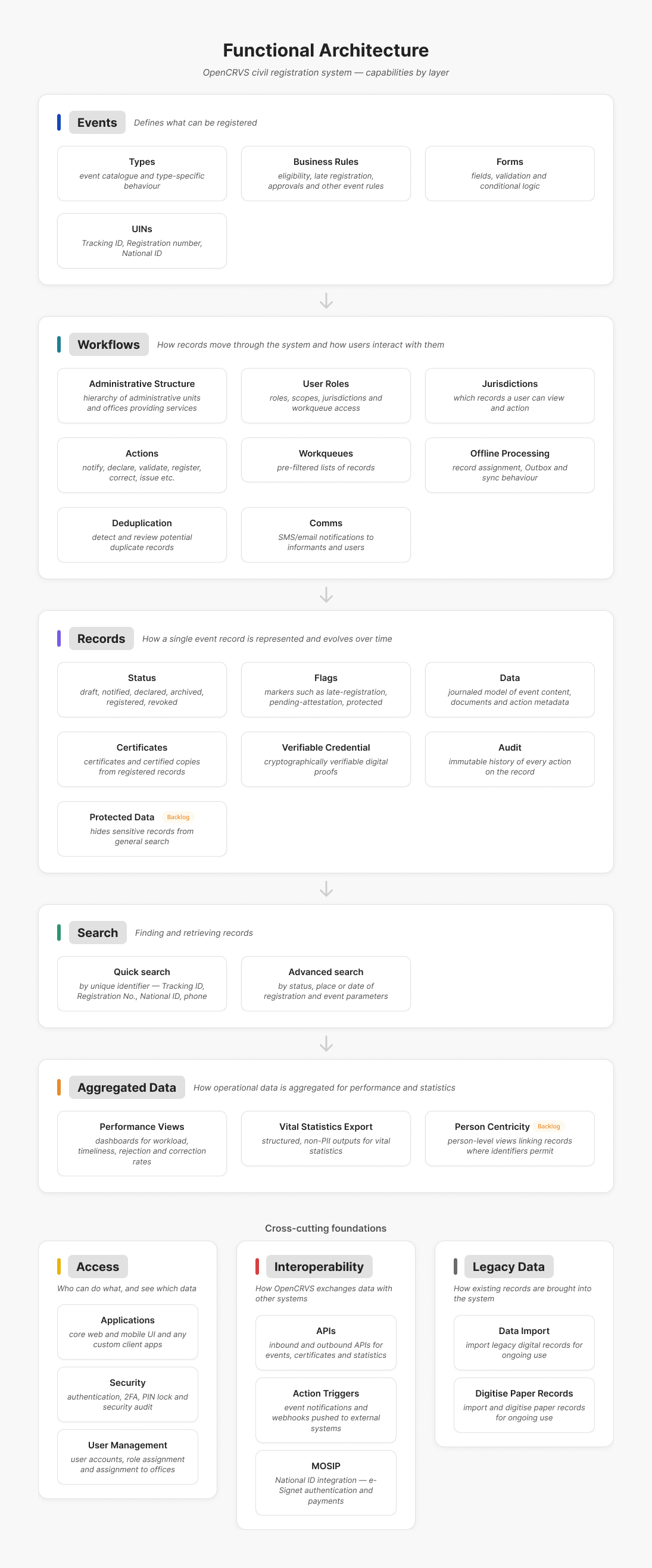
The architecture is organised into a small number of **modules**, shown in the diagram below. The first five modules describe the journey of a record — from the definition of an event, through the workflow that moves it, to the record itself, how it is found, and how its data is aggregated. The remaining modules — Access, Interoperability, and Legacy Data — are **cross-cutting foundations** that support the whole system rather than sitting at a single point in the lifecycle.
Each module summarised here has its own documentation section with fuller detail.
***
### 3. Audience
The functional architecture is written for:
* **Product owners** defining the civil registration solution.
* **Business analysts** translating law and policy into requirements.
* **Solution architects** designing how OpenCRVS fits into the wider digital ecosystem.
* **Implementation teams** configuring and operating OpenCRVS for a country.
No prior knowledge of the OpenCRVS codebase is assumed; the concepts below are sufficient to reason about the product.
***
### 4. Core concepts and vocabulary
OpenCRVS uses a consistent vocabulary across every module. The terms below recur throughout the documentation.
| Term | Meaning |
| -------------------------------- | --------------------------------------------------------------------------------------------------------------------------------------------- |
| **Event** | A civil registration event type, such as a birth, death, or marriage. |
| **Record** | The data instance for a single occurrence of an event. |
| **Notification** | A preliminary capture of event details that may form the basis of a formal declaration. |
| **Declaration** | A formal statement that an event has taken place. |
| **Registration** | The process by which an event record is reviewed and legally registered. |
| **Certificate / certified copy** | An official document representing a registered event. |
| **Informant** | The person who formally reports the event. |
| **Workflow** | The ordered steps and rules that govern a record through its lifecycle. |
| **Status** | The state of a record within the workflow (for example Draft, Notified, Declared, Registered). |
| **Action** | A user or system operation that changes a record or its status (for example Notify, Declare, Validate, Register, Correct, Issue certificate). |
| **Form** | The structured data capture for an event, defined by fields, conditional logic, and validations. |
| **Business rule** | A configurable rule that validates data or controls workflow behaviour. |
| **Administrative unit** | An organisational unit responsible for delivering services to a specific area. |
| **User / role** | An authenticated user and the permission set (scopes) attached to their role. |
These concepts underpin the modules described below.
***
### 5. Functional modules
#### 5.1 Events module — *defines what can be registered*
The Events module is the configurable catalogue of everything OpenCRVS can register and the rules that shape each event type.
* **Types** — the event catalogue and the type-specific behaviour for each registrable event.
* **Forms** — event forms built from fields, conditional logic, and validation, used for Notify/Declare, Correct, and other actions.
* **Business rules** — configurable rules that control eligibility, late registration, approvals, and other event-specific behaviour.
#### 5.2 Workflows module — *how records move through the system and how users interact with them*
The Workflows module governs the path a record takes and what each user is permitted to do with it.
* **Administrative structure** — the hierarchy of administrative units and offices responsible for delivering services in each area.
* **Users** — roles, scopes, jurisdictions, and the workqueue access that determine what each user can see and do.
* **Jurisdictions** — the geographic and organisational boundaries that control which records a user can view and action.
* **Actions** — the configured operations users can perform on records (Notify, Declare, Validate, Register, Correct, Issue, and so on).
* **Workqueues** — pre-filtered lists of records that require a user's attention or action.
* **Offline working** — record assignment, the Outbox, and predictable synchronisation behaviour when devices reconnect.
* **Deduplication** — detection and review of potential duplicate records before they are registered.
* **Comms** — SMS and email notifications to informants and users, linked to actions.
#### 5.3 Records module — *how a single event record is represented and evolves over time*
The Records module describes the record itself: its data, its state, and its complete history.
* **Record data** — the journaled data model holding event content, supporting documents, and action metadata.
* **Statuses** — lifecycle states such as Draft, Notified, Declared, Validated, Registered, and Corrected.
* **Flags** — additional workflow markers that complement status, such as late-registration, pending-attestation, or protected.
* **Certificates** — official certificates and certified copies generated from registered records.
* **Verifiable Credentials** — cryptographically verifiable digital proofs issued from registered records.
* **Protected data** — mechanisms for hiding sensitive records or fields from general search and view.
* **Audit** — an immutable history of every action taken on the record.
#### 5.4 Search module — *finding and retrieving records*
A civil registration system must reliably store, file, archive, and retrieve records. The Search module lets users narrow the search scope to find a record quickly.
* **Quick search** — look up a record by a unique identifier, such as a Tracking ID, Registration number, National ID, or phone number.
* **Advanced search** — used when no unique identifier is available; search by record status, place of registration, date of registration, and any configurable event parameters (for example child, mother, or father details).
Search results respect the user's scope: a user may be permitted to search all records of an event type, or only those within their own jurisdiction.
#### 5.5 Access module — *who can do what, and see which data*
The Access module governs authentication, accounts, and security.
* **User management** — user accounts, role assignment, and assignment to offices.
* **Applications** — the client applications through which users reach OpenCRVS, including the core web and mobile interfaces and any country-specific custom apps.
* **Security** — authentication, two-factor authentication, screen-lock PIN, and the audit of security-relevant actions.
#### 5.6 Aggregate Data module — *how operational data is aggregated for performance and statistics*
The Aggregate Data module turns the record store into operational insight and statistical output.
* **Performance views** — operational dashboards covering workload, timeliness, and rejection and correction rates.
* **Vital statistics export** — structured, non-personally-identifiable outputs for the production of vital statistics.
* **Person centricity** — person-level views that link multiple records together where identifiers permit.
#### 5.7 Interoperability module — *how OpenCRVS exchanges data with other systems*
The Interoperability module connects OpenCRVS to the wider digital government ecosystem.
* **APIs** — ...
* **Action triggrers** — ...
* **MOSIP** — ...
#### 5.8 Legacy data module — *how existing records are brought into the system*
The Legacy Data module covers the transformation of pre-existing records so they can be used within OpenCRVS.
* **Legacy data import** — import existing digital records for ongoing use.
* **Legacy paper import** — capture and digitise paper records for ongoing use.
***
### 6. Lifecycle model
Each event type has a **state machine** that describes how its records move through the system. A typical flow is:
> **Draft → Notified → Declared → Registered**
with auxiliary flows for:
* **Editing** — amending a declared record before registration.
* **Correction** — correcting data after registration through a governed process.
* **Archiving** — archiving erroneous or invalid declarations.
* **Revocation** — revoking erroneous or invalid registrations.
**Business rules** determine, at every step:
* Which actions are available in each status.
* Who can perform those actions, based on role, scope, and jurisdiction.
* Which flags are set or cleared when an action completes.
***
### 7. Configuration vs customisation
Country implementations should meet their requirements primarily through the **configuration package**, which covers:
* Event types, forms, and validation rules.
* Business rules and workflows.
* Roles, scopes, and administrative structure.
* Certificates, communications, and aggregate data views.
* Deduplication logic and offline behaviour.
**Custom code** should be considered only when configuration cannot reasonably meet a requirement. When customisation is necessary, it should:
* Follow the core architecture patterns.
* Minimise divergence from the standard product.
* Be designed so that future upgrades remain feasible.
***
### 8. Cross-cutting concerns
Several concerns apply across every module:
* **Security and privacy** — role-based access, audit trails for all changes, data minimisation, field-level validation, and configurable retention policies.
* **Offline and synchronisation** — predictable sync behaviour, idempotent writes, and conflict resolution when devices come back online.
* **Internationalisation and localisation** — support for multiple languages and country-specific formatting.
* **Accessibility and usability** — consistent, usable interfaces for every type of user.
* **Logging, monitoring, and performance** — observability of system health and adherence to performance expectations.
Together, these modules and cross-cutting concerns form the OpenCRVS functional architecture that the rest of the documentation builds upon.
---
# Agent Instructions
This documentation is published with GitBook. GitBook is the documentation platform designed so that both humans and AI agents can read, navigate, and reason over technical content effectively. Learn more at gitbook.com.
## Querying This Documentation
If you need additional information that is not directly available in this page, you can query the documentation by asking a question.
Perform an HTTP GET request on the following URL with the `ask` and `goal` query parameters:
```
GET https://documentation.opencrvs.org/v2.0/functional/markdown.md?ask=&goal=
```
`ask` is the immediate question: it should be specific, self-contained, and written in natural language.
`goal` is what the user is ultimately trying to achieve, the reason they need the answer. Sharing it helps GitBook give you a better, more relevant answer. A goal is most helpful when it describes the outcome the user wants rather than restating the question. For example, with `ask=how do I create an API token`, a goal like `automate deployments from our CI pipeline` lets GitBook tailor the answer to that use case.
The response will contain a direct answer to the question and relevant excerpts and sources from the documentation.
Use this mechanism when the answer is not explicitly present in the current page, you need clarification or additional context, or you want to retrieve related documentation sections.