> For the complete documentation index, see [llms.txt](https://documentation.opencrvs.org/llms.txt). Markdown versions of documentation pages are available by appending `.md` to page URLs; this page is available as [Markdown](https://documentation.opencrvs.org/v1.8/technology/interoperability/fhir-location-rest-api.md).
# APIs for system administrators
Create, read, update or archive administrative areas, civil registration offices or health facilities using FHIR.
### FHIR Location REST API
You need access to the FHIR Location API for 3 important reasons...
#### 1. In order to get FHIR IDs for locations required in Event Notification or deciphering location information from FHIR IDs returned from a Record Search or Webhook response
This API will help you configure integrating clients to understand the relationship to places referenced by [FHIR Location](https://build.fhir.org/location.html) ids in payloads such as "Place of birth", "Place of registration", or "Jurisdiction" such as [Webhooks](/v1.8/technology/interoperability/create-a-client/webhook-clients.md) and [National ID](/v1.8/technology/interoperability/national-id-client.md) clients.
For an [Event Notification](/v1.8/technology/interoperability/create-a-client/event-notification-clients.md) client, you must submit the correct FHIR Location id for the health facility that OpenCRVS understands in order to correctly track the place of birth.
For a [Record Search](/v1.8/technology/interoperability/create-a-client/record-search-clients.md) client, you need the correct FHIR Location id when performing advanced searches depending on your parameters.
{% hint style="info" %}
All FHIR objects such as Location are ["FHIR Resources"](https://hl7.org/fhir/resource.html) and have a unique uuid: [**"id"**](https://hl7.org/fhir/resource-definitions.html#Resource.id) property that never changes.
{% endhint %}
**2. Changing administrative areas, civil registration offices or facilities**
During the configuration step of OpenCRVS you import all administrative areas, civil registration offices and health facilities in CSV files. But over the years of operation, changes occur to your infrastructure and jurisdictional operations.
Sometimes you may wish to add a new office or health facility.
Sometimes you may wish to change the name of an area or health facility.
Sometimes a location may no longer be in use and you want it to not appear as a valid place of birth or death, or a valid area in an address in new event declaration forms.
{% hint style="warning" %}
Note, in OpenCRVS a FHIR Location cannot be deleted entirely, only archived. This is to protect the integrity of any older event registrations where the historical name of the facility or administrative area must be always remembered. That can only be changed via the [correct record](/v1.8/product-specifications/core-functions/8.-correct-record.md) procedure.
{% endhint %}
**3. Updating population and crude-birth-rate statistics to power the registration "completion rate" performance**
During the configuration step of OpenCRVS you import all administrative areas with [statistics](/v1.8/product-specifications/core-functions/11.-vital-statistics-export.md) that are used to calculate changing [**completeness rates**](https://www.vitalstrategies.org/wp-content/uploads/Estimating-Completeness-of-Birth-and-Death-Registration.pdf) over time. This calculation depends upon the yearly population of that area and its associated, and ever changing, "crude birth rate". These values are collected by statistical departments in government. To provide accurate performance analytics, the previous year's statistics should be added via this API on a yearly basis.
### Using the FHIR Location REST API
{% hint style="info" %}
You can use our [Postman collections](https://github.com/opencrvs/opencrvs-countryconfig/tree/master/postman) to test FHIR Location API functionality. [Postman](https://www.postman.com/) is a tool you can download to test API access before building your integrations.
{% endhint %}
{% hint style="warning" %}
Getting all FHIR Locations or getting a single FHIR Location by its id, can be performed by any client, publicly on the internet with no authorization headers necessary. If you wish to whitelist access for whatever reason, you can do so via Traefik in Docker compose files.
{% endhint %}
{% hint style="danger" %}
Only a National System Administrator's JWT token can be used to perform these actions as they are potentially destructive and can affect business operations. **An Interoperability client does not have permission.**
{% endhint %}
You can also use the FHIR API URL parameters to search using [**FHIR identifiers**](https://build.fhir.org/datatypes.html#Identifier) or other FHIR properties such as [**type**](https://build.fhir.org/datatypes-definitions.html#Identifier.type).
By adding the FHIR **status=active** property, you can filter out any deactivated locations that are no longer in use.
## GET /locations
> Get all locations
```json
{"openapi":"3.0.0","info":{"title":"Opencrvs FHIR Location API Documentation","version":"1.8.0"},"tags":[{"name":"endpoints"}],"servers":[{"url":"http://localhost:7070"}],"paths":{"/locations":{"get":{"summary":"Get all locations","operationId":"getLocations","parameters":[{"name":"type","in":"query","schema":{"type":"string","enum":["ADMIN_STRUCTURE","CRVS_OFFICE","HEALTH_FACILITY"]}},{"name":"identifier","in":"query","schema":{"type":"string","pattern":"^[a-zA-Z0-9_]+$"},"description":"The unique identifier for a location"},{"name":"name","in":"query","schema":{"type":"string","pattern":"^[a-zA-Z0-9_,.\\s]+$"}},{"name":"status","in":"query","schema":{"type":"string","enum":["active","inactive"]}},{"name":"_count","in":"query","schema":{"type":"number"},"description":"Number of locations to return per page, Use 0 to return all locations"}],"tags":["endpoints"],"responses":{"200":{"description":"OK","content":{"application/json":{"schema":{"type":"object","properties":{"resourceType":{"type":"string","enum":["Bundle"]},"id":{"type":"string","format":"uuid"},"meta":{"type":"object","properties":{"lastUpdated":{"type":"string","format":"date-time"}}},"type":{"type":"string","enum":["searchset"]},"total":{"type":"integer"},"link":{"type":"array","items":{"type":"object","properties":{"relation":{"type":"string"},"url":{"type":"string"}}}},"entry":{"type":"array","items":{"type":"object","properties":{"fullUrl":{"type":"string"},"resource":{"type":"object","properties":{"resourceType":{"type":"string","enum":["Location"]},"identifier":{"type":"array","items":{"type":"object","properties":{"system":{"type":"string"},"value":{"type":"string"}}}},"name":{"type":"string"},"alias":{"type":"array","items":{"type":"string"}},"status":{"type":"string"},"mode":{"type":"string"},"partOf":{"type":"object","properties":{"reference":{"type":"string"}}},"type":{"type":"object","properties":{"coding":{"type":"array","items":{"type":"object","properties":{"system":{"type":"string"},"code":{"type":"string"}}}}}},"physicalType":{"type":"object","properties":{"coding":{"type":"array","items":{"type":"object","properties":{"code":{"type":"string"},"display":{"type":"string"}}}}}},"meta":{"type":"object","properties":{"lastUpdated":{"type":"string","format":"date-time"},"versionId":{"type":"string"}}},"id":{"type":"string","format":"uuid"}}}}}}}}}}}}}}}}
```
## GET /locations/{locationId}
> Get a single location
```json
{"openapi":"3.0.0","info":{"title":"Opencrvs FHIR Location API Documentation","version":"1.8.0"},"tags":[{"name":"endpoints"}],"servers":[{"url":"http://localhost:7070"}],"paths":{"/locations/{locationId}":{"get":{"summary":"Get a single location","operationId":"getLocationsLocationid","parameters":[{"name":"locationId","in":"path","schema":{"type":"string"},"required":true}],"tags":["endpoints"],"responses":{"200":{"description":"OK","content":{"application/json":{"schema":{"type":"object","properties":{"resourceType":{"type":"string","enum":["Bundle"]},"id":{"type":"string","format":"uuid"},"meta":{"type":"object","properties":{"lastUpdated":{"type":"string","format":"date-time"}}},"type":{"type":"string","enum":["searchset"]},"total":{"type":"integer"},"link":{"type":"array","items":{"type":"object","properties":{"relation":{"type":"string"},"url":{"type":"string","format":"uri"}}}},"entry":{"type":"array","items":{"type":"object","properties":{"fullUrl":{"type":"string"},"resource":{"type":"object","properties":{"resourceType":{"type":"string","enum":["Location"]},"identifier":{"type":"array","items":{"type":"object","properties":{"system":{"type":"string"},"value":{"type":"string"}}}},"name":{"type":"string"},"alias":{"type":"array","items":{"type":"string"}},"status":{"type":"string"},"mode":{"type":"string"},"partOf":{"type":"object","properties":{"reference":{"type":"string"}}},"type":{"type":"object","properties":{"coding":{"type":"array","items":{"type":"object","properties":{"system":{"type":"string"},"code":{"type":"string"}}}}}},"physicalType":{"type":"object","properties":{"coding":{"type":"array","items":{"type":"object","properties":{"code":{"type":"string"},"display":{"type":"string"}}}}}},"meta":{"type":"object","properties":{"lastUpdated":{"type":"string","format":"date-time"},"versionId":{"type":"string"}}},"id":{"type":"string","format":"uuid"}}}}}}}}}}}}}}}}
```
When creating a new location, **statisticalID** is the **adminPCode** or **custom id** you set when importing administrative areas or facility CSVs respectively. We call that a statisticalID because it is generally used by statistics departments in government as opposed to a FHIR id.
## POST /locations
> Create a location
```json
{"openapi":"3.0.0","info":{"title":"Opencrvs FHIR Location API Documentation","version":"1.8.0"},"tags":[{"name":"endpoints"}],"servers":[{"url":"http://localhost:7070"}],"paths":{"/locations":{"post":{"summary":"Create a location","operationId":"postLocations","tags":["endpoints"],"requestBody":{"content":{"application/json":{"schema":{"anyOf":[{"type":"object","properties":{"statisticalID":{"type":"string","description":"The unique identifier for the location"},"name":{"type":"string"},"alias":{"type":"string","description":"Optional secondary name for the location"},"partOf":{"type":"string","description":"The parent location ID to which this location belongs"},"code":{"type":"string","enum":["ADMIN_STRUCTURE","CRVS_OFFICE","HEALTH_FACILITY"]},"jurisdictionType":{"type":"string","enum":["DISTRICT","STATE","LOCATION_LEVEL_1","LOCATION_LEVEL_2","LOCATION_LEVEL_3","LOCATION_LEVEL_4","LOCATION_LEVEL_5"]},"statistics":{"type":"array","items":{"type":"object","properties":{"year":{"type":"number"},"male_population":{"type":"number"},"female_population":{"type":"number"},"population":{"type":"number"},"crude_birth_rate":{"type":"number"}},"required":["year","male_population","female_population","population","crude_birth_rate"]}}},"required":["statisticalID","name","partOf","code"]},{"type":"array","items":{"type":"object","properties":{"statisticalID":{"type":"string","description":"The unique identifier for the location"},"name":{"type":"string"},"alias":{"type":"string","description":"Optional secondary name for the location"},"partOf":{"type":"string","description":"The parent location ID to which this location belongs"},"code":{"type":"string","enum":["ADMIN_STRUCTURE","CRVS_OFFICE","HEALTH_FACILITY"]},"jurisdictionType":{"type":"string","enum":["DISTRICT","STATE","LOCATION_LEVEL_1","LOCATION_LEVEL_2","LOCATION_LEVEL_3","LOCATION_LEVEL_4","LOCATION_LEVEL_5"]},"statistics":{"type":"array","items":{"type":"object","properties":{"year":{"type":"number"},"male_population":{"type":"number"},"female_population":{"type":"number"},"population":{"type":"number"},"crude_birth_rate":{"type":"number"}},"required":["year","male_population","female_population","population","crude_birth_rate"]}}},"required":["statisticalID","name","partOf","code"]}}]}}}},"responses":{"200":{"description":"OK"}}}}}}
```
## PUT /locations/{locationId}
> Update a location
```json
{"openapi":"3.0.0","info":{"title":"Opencrvs FHIR Location API Documentation","version":"1.8.0"},"tags":[{"name":"endpoints"}],"servers":[{"url":"http://localhost:7070"}],"paths":{"/locations/{locationId}":{"put":{"summary":"Update a location","operationId":"putLocationsLocationid","parameters":[{"name":"locationId","in":"path","schema":{"type":"string"},"required":true}],"tags":["endpoints"],"requestBody":{"content":{"application/json":{"schema":{"type":"object","properties":{"name":{"type":"string"},"alias":{"type":"string","description":"Optional secondary name for the location"},"status":{"type":"string","enum":["active","inactive"]},"statistics":{"type":"object","properties":{"year":{"type":"number"},"male_population":{"type":"number"},"female_population":{"type":"number"},"population":{"type":"number"},"crude_birth_rate":{"type":"number"}},"required":["year","male_population","female_population","population","crude_birth_rate"]}}}}}},"responses":{"200":{"description":"OK"}}}}}}
```
{% hint style="info" %}
To reinstate a location, set the status prop to **"active"**
{% endhint %}
{% hint style="info" %}
To archive a location, set the status prop to **"inactive"**
{% endhint %}
### Authorization to create, update and archive a FHIR Location
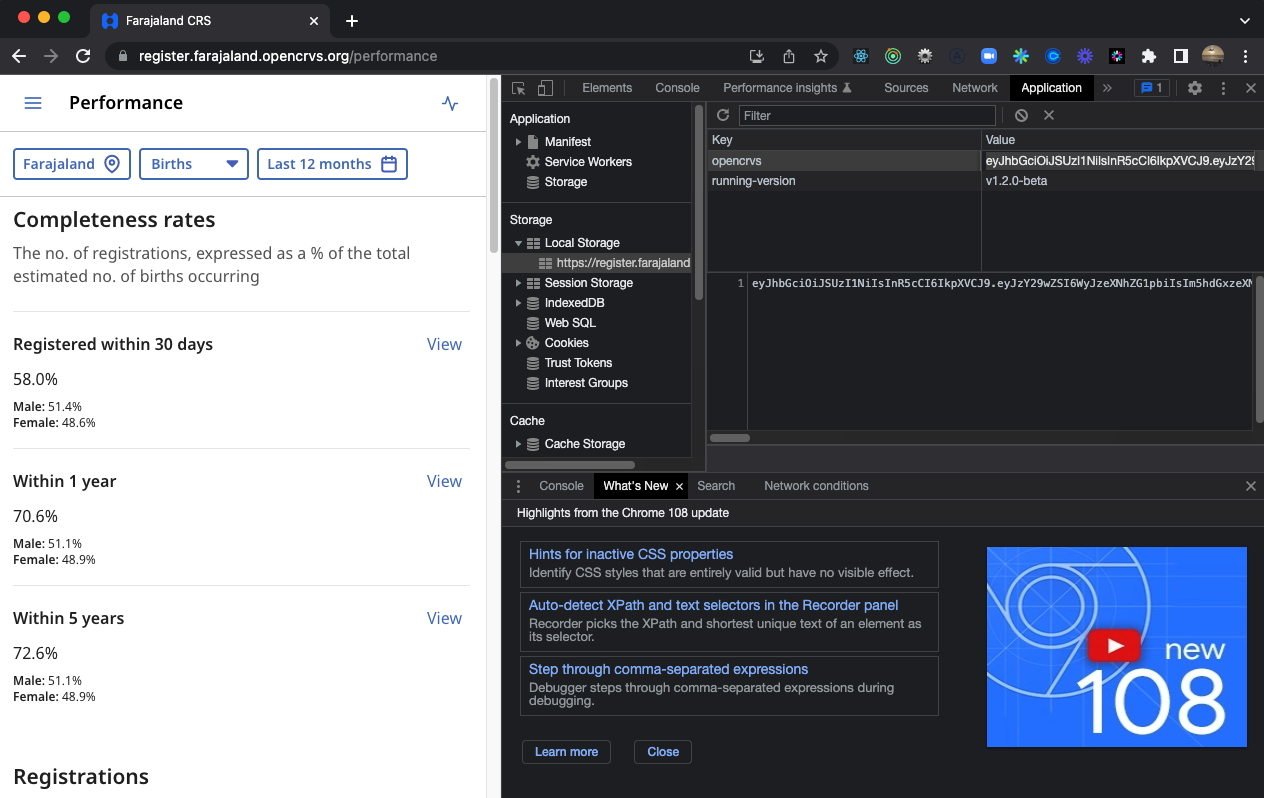
To retrieve a National System Administrators JWT token, login as the national system administrator. In our example, this is the user **j.campbell**.
In **Chrome**, right click anywhere on the page, choose **"Inspect"**, and open **"Chrome Developer Tools."**
Open the **"Application"** tab and expand **"Local Storage"**.
The JWT is the value for the key **"opencrvs"**
**Double click inside the value** and type **Ctrl+A** to select all, then **Ctrl+C** to copy the JWT into your clipboard.
**Update or Archive a FHIR Location**
---
# Agent Instructions
This documentation is published with GitBook. GitBook is the documentation platform designed so that both humans and AI agents can read, navigate, and reason over technical content effectively. Learn more at gitbook.com.
## Querying This Documentation
If you need additional information that is not directly available in this page, you can query the documentation by asking a question.
Perform an HTTP GET request on the following URL with the `ask` and `goal` query parameters:
```
GET https://documentation.opencrvs.org/v1.8/technology/interoperability/fhir-location-rest-api.md?ask=&goal=
```
`ask` is the immediate question: it should be specific, self-contained, and written in natural language.
`goal` is what the user is ultimately trying to achieve, the reason they need the answer. Sharing it helps GitBook give you a better, more relevant answer. A goal is most helpful when it describes the outcome the user wants rather than restating the question. For example, with `ask=how do I create an API token`, a goal like `automate deployments from our CI pipeline` lets GitBook tailor the answer to that use case.
The response will contain a direct answer to the question and relevant excerpts and sources from the documentation.
Use this mechanism when the answer is not explicitly present in the current page, you need clarification or additional context, or you want to retrieve related documentation sections.