# 4.2.5.1.1 Informant and staff notifications

In **production**, OpenCRVS sends automated messages at important times to staff and informants. In **development** and **qa** environments, messages are not delivered. You can edit the languages and content of all messages.

{% hint style="info" %}
You can choose any method of communications from Email, SMS, WhatsApp etc. Examples are provided for Email and & SMS (In Farajaland, we have supplied example SMS code integrating with [Infobip](https://www.infobip.com/) and example Email code integrating with [SendGrid](https://sendgrid.com/).
{% endhint %}

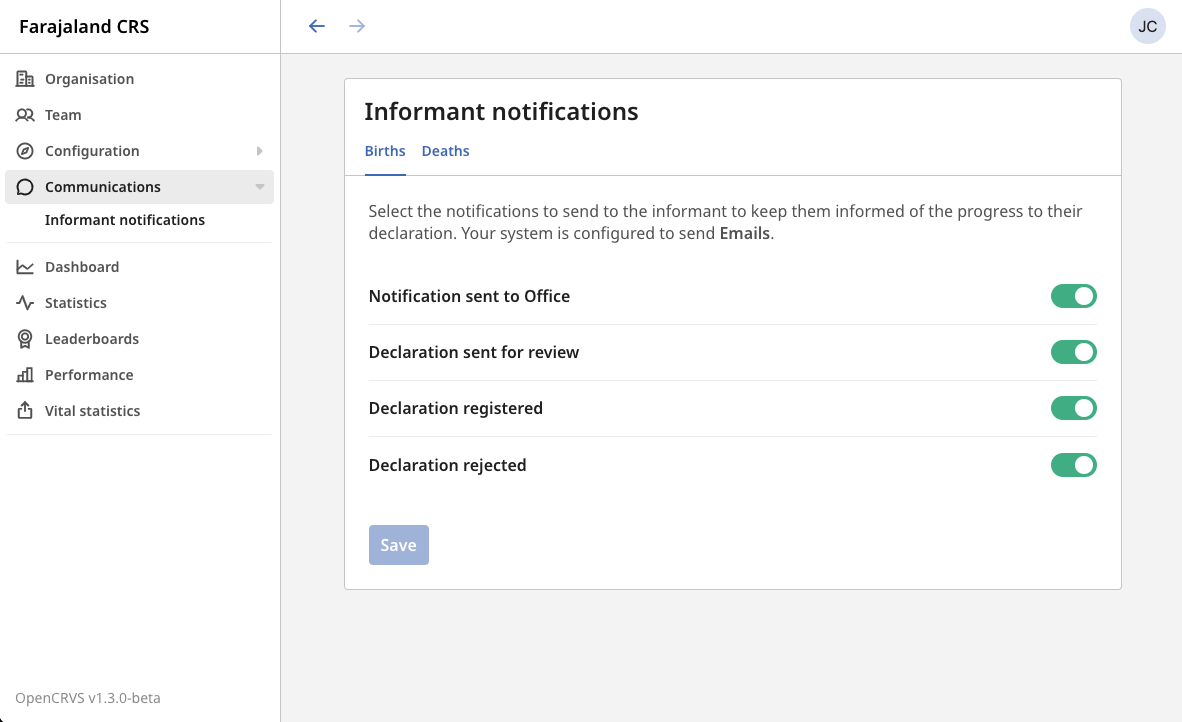
The following messages are sent to staff members and beneficiaries by default and the staff messages are essential. A **National System Administrator** user can configure **on/off** whether or not the beneficiary messages are sent in the following user interface at any time.

<figure><img src="/files/VosPOhv7MpJddLSUKRVr" alt=""><figcaption></figcaption></figure>

<table><thead><tr><th width="142">Message</th><th>Configurable on or off</th><th>Description</th><th></th><th>Recipient</th></tr></thead><tbody><tr><td>authenticationCodeNotification</td><td>No</td><td>Received by a staff member when logging in. Used to send the 2FA code for authentication during login <strong>REQUIRED IN PRODUCTION FOR SECURITY REASONS!!</strong> In <strong>development</strong> and <strong>qa</strong> environments, the 2FA code is always six zeros: 000000</td><td>Your OpenCRVS authentication code is: {{authCode}}</td><td>OpenCRVS Staff</td></tr><tr><td>&#x3C;event>InProgressNotification</td><td>Yes</td><td>Received by a beneficiary when a hospital submits an automated "notification", or a Field Agent submits an in-complete "declaration"</td><td>&#x3C;event> registration tracking ID is {{trackingId}}. You must visit {{crvsOffice}} to complete the declaration</td><td>Citizen (Informant) using their mobile number.</td></tr><tr><td>&#x3C;event>DeclarationNotification</td><td>Yes</td><td>Received by a beneficiary when a Field Agent or Registration agent submits a complete "declaration" for review by a Registrar.</td><td>&#x3C;event> registration tracking ID for {{name}} is {{trackingId}}. You will get an SMS within 2 days with progress and next steps.</td><td>Citizen (Informant) using their mobile number.</td></tr><tr><td>&#x3C;event>RegistrationNotification</td><td>Yes</td><td>Received by a beneficiary when the event is officially "registered" by a Registrar</td><td>Congratulations, the &#x3C;event> of {{name}} has been registered. Visit your local registration office in 5 days with your ID to collect the certificate. Your tracking ID is {{trackingId}}.</td><td>Citizen (Informant) using their mobile number.</td></tr><tr><td>&#x3C;event>RejectionNotification</td><td>Yes</td><td>Received by a beneficiary when the event is "rejected" by a Registrar due to an error such as mistaken spelling or incomplete supporting documentation.</td><td>&#x3C;event> registration declaration for {{name}} ( Tracking ID: {{trackingId}} ) has been rejected. Please visit your local registration office for more information.</td><td>Citizen (Informant) using their mobile number.</td></tr><tr><td>userCredentialsNotification</td><td>No</td><td>Received by a staff member when their OpenCRVS account has been created by a System Administrator</td><td>Your OpenCRVS account has been created. Please login with your username: {{username}} and temporary password: {{password}}</td><td>OpenCRVS Staff</td></tr><tr><td>retrieveUserNameNotification</td><td>No</td><td>Received by staff when they have forgotten their username</td><td>Your username for OpenCRVS is: {{username}}</td><td>OpenCRVS Staff</td></tr><tr><td>updateUserNameNotification</td><td>No</td><td>Received by staff when a System Administrator has changed their username</td><td>Your OpenCRVS username has been updated to: {{username}}. Your password has not changed.</td><td>OpenCRVS Staff</td></tr><tr><td>resetUserPasswordNotification</td><td>No</td><td>Received by staff when a System Administrator has changed their password</td><td>Your password has been reset. Please login to {{applicationName}} with the temporary password: {{password}}.</td><td>OpenCRVS Staff</td></tr></tbody></table>

{% hint style="danger" %}
You must enable a communication method for the authenticationCodeNotification message in production otherwise your staff will not be able to log in. **REMOVING 2FA MAKES OPENCRVS INSECURE. PROTECTING CITIZEN DATA IS NOT AN OPTION!!** [What is two-factor authentication (2FA)?](https://authy.com/what-is-2fa/)
{% endhint %}


---

# Agent Instructions: Querying This Documentation

If you need additional information that is not directly available in this page, you can query the documentation dynamically by asking a question.

Perform an HTTP GET request on the current page URL with the `ask` query parameter:

```
GET https://documentation.opencrvs.org/v1.8/setup/3.-installation/3.2-set-up-your-own-country-configuration/3.2.5-set-up-application-settings/3.2.9.1-managing-language-content/3.3.3-provision-a-comms-gateway.md?ask=<question>
```

The question should be specific, self-contained, and written in natural language.
The response will contain a direct answer to the question and relevant excerpts and sources from the documentation.

Use this mechanism when the answer is not explicitly present in the current page, you need clarification or additional context, or you want to retrieve related documentation sections.