> For the complete documentation index, see [llms.txt](https://documentation.opencrvs.org/llms.txt). Markdown versions of documentation pages are available by appending `.md` to page URLs; this page is available as [Markdown](https://documentation.opencrvs.org/v1.5/setup/3.-installation/3.2-set-up-your-own-country-configuration/3.2.7-configure-declaration-forms/4.2.7.1-configuring-an-event-form.md).
# 4.2.7.1 Configuring an event form
Take a brief look at the [directory structure](https://github.com/opencrvs/opencrvs-countryconfig/tree/develop/src/form/birth) for a form configuration for an event:

The [index.ts](https://github.com/opencrvs/opencrvs-countryconfig/blob/develop/src/form/birth/index.ts) file shows you how a form is configured.
### Sections
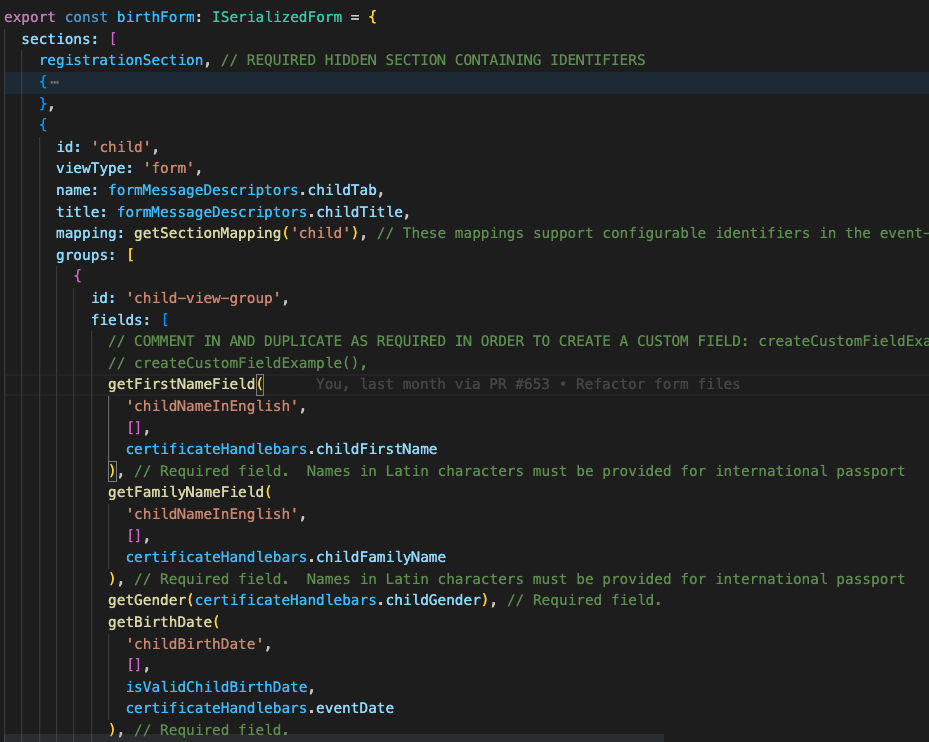
A registration form is made up of **pages** or "**Sections**".
{% hint style="warning" %}
It is required that a birth form must have a "child", "mother", "father", "informant", "registration" & "documents" section.
{% endhint %}
You can create more sections if you want to.
We have abstracted away 2 complex sections: "registration" & "documents", into dedicated functions in the [required-sections.ts](https://github.com/opencrvs/opencrvs-countryconfig/blob/develop/src/form/birth/required-sections.ts) file.
{% hint style="danger" %}
You should not edit the registration section function. It is a required hidden section to store vital identifiers for the draft.
{% endhint %}
{% hint style="info" %}
Feel free to edit the [documents](https://github.com/opencrvs/opencrvs-countryconfig/blob/551e864ab59d59ae2e65eec8d1d0d9651ae0a3d7/src/form/birth/required-sections.ts#L38) section function to configure the supporting documentation you wish to be uploaded by users for each registration.
{% endhint %}
### Groups
A "Section" can be split over multiple **sub-pages**, users can gradually click through using "**Groups**". 1 Group must exist in each section.
{% hint style="info" %}
In our example form, there is only 1 group per section.
{% endhint %}
### Fields
Groups contain a **fields** array and each field is rendered by an abstracted **form field function**.
These are the functions that actually render the fields.
{% hint style="info" %}
You can move form field functions up and down within the fields array, to change the vertical order of fields.
{% endhint %}
#### Required fields
Required field functions are imported from the [required-fields.ts ](https://github.com/opencrvs/opencrvs-countryconfig/blob/develop/src/form/birth/required-fields.ts)file. Some required fields are replicated for any event in order to reduce repeated code. These common required fields are imported from the [common-required-fields.ts](https://github.com/opencrvs/opencrvs-countryconfig/blob/develop/src/form/common/common-required-fields.ts) file situated up a directory in the common folder.
Required fields are marked by a comment after each function closure like this:
```
// Required field
```
A required field in the birth form
{% hint style="danger" %}
Required field functions must be included **AS IS** for OpenCRVS civil registration functionality to operate. They **CANNOT** **BE CUSTOMISED.** They are U.N. standard fields. If you are receiving direction to customise them from civil registration authorities, please get in touch with us at We can liaise with your authorities to explain why they are configured the way they are, usually for [standardisation](/v1.5/technology/standards.md) and [interoperability](/v1.5/technology/interoperability.md) requirements. **Customising these fields inhibits your government's ability to interoperate between departments.**
{% endhint %}
#### Optional fields
Optional fields are imported from the [optional-fields.ts](https://github.com/opencrvs/opencrvs-countryconfig/blob/develop/src/form/birth/optional-fields.ts) file. They can be commented out or removed if you dont want them.
Optional fields in the birth form
Some optional fields are replicated for any event in order to reduce repeated code. These common optional fields are imported from the [common-optional-fields.ts](https://github.com/opencrvs/opencrvs-countryconfig/blob/develop/src/form/common/common-optional-fields.ts) file.
Each optional form field function looks a bit like this:
```
export const attendantAtBirth: SerializedFormField = {
name: 'attendantAtBirth',
type: 'SELECT_WITH_OPTIONS',
label: formMessageDescriptors.attendantAtBirth,
required: false,
initialValue: '',
validator: [],
conditionals: [],
placeholder: formMessageDescriptors.formSelectPlaceholder,
options: attendantAtBirthOptions,
mapping: getFieldMapping(
'attendantAtBirth',
certificateHandlebars.attendantAtBirth
)
}
```
{% hint style="danger" %}
You **MUST NOT** edit the **name**, **type** or **mapping** properties of an optional field.
{% endhint %}
The properties handle many things ...
For example, how the field renders multi-lingual [content](/v1.5/setup/3.-installation/3.2-set-up-your-own-country-configuration/3.2.5-set-up-application-settings/3.2.9.1-managing-language-content.md) for example with "**label**" and "**placeholder**".
You can configure recognisable HTML input properties such as "**required**" & "**options**"
You can edit how the field validates using the "**validator**" property.
You can edit how the field hides depending on some logic such as the value of another field with the "**conditional**" property
There are OpenCRVS specific props such as "**mapping**" regarding how these fields map to and from GraphQL/FHIR. The mapping function points to the certificate handlebar prop you use when adding the user inputted value onto a [certificate](/v1.5/setup/3.-installation/3.2-set-up-your-own-country-configuration/3.2.6-configure-certificate-templates.md). All available required and optional field certificate handlebars are listed in the [certificate-handlebars.ts](https://github.com/opencrvs/opencrvs-countryconfig/blob/develop/src/form/birth/certificate-handlebars.ts) file.
Developer notes for all possible form props are in the [README.md](https://github.com/opencrvs/opencrvs-countryconfig/blob/develop/src/form/README.md) file.
#### Custom fields
You can create your own input fields using custom field functions. Create these in the [custom-fields.ts](https://github.com/opencrvs/opencrvs-countryconfig/blob/develop/src/form/custom-fields.ts) file. There are notes in the file to instruct you how to do this.
{% hint style="warning" %}
Every custom field must have a unique "**name**". This is so that you can use the field value on a certificate.
{% endhint %}
```
export function createCustomFieldExample(): SerializedFormField {
// GIVE THE FIELD A UNIQUE NAME. IF THE NAME IS ALREADY IN USE, YOU WILL NOTICE AN ERROR ON PAGE LOAD IN DEVELOPMENT
const fieldName: string = 'favoriteColor'
// THE fieldId STRING IS A DOT SEPARATED STRING AND IS IMPORTANT TO SET CORRECTLY DEPENDING ON WHERE THE CUSTOM FIELD IS LOCATED
// THE FORMAT IS event.sectionId.groupId.uniqueFieldName
const fieldId: string = `birth.child.child-view-group.${fieldName}`
// IN ORDER TO USE THE VALUE ON A CERTIFICATE
// THE groupId IS IGNORED AND THE HANDLEBAR WILL LOG IN THE CONSOLE
// IN THIS EXAMPLE, IT WILL RESOLVE IN CAMELCASE TO "{{birthChildFavouriteColor}}"
return {
name: fieldName,
customQuesstionMappingId: fieldId,
custom: true,
required: true,
...
```
### Validators & Conditionals
The "**validator**" array prop points to existing Javascript validation operation [functions](https://github.com/opencrvs/opencrvs-core/blob/e34fe4b99616817d66402d4933172735515d4a76/packages/client/src/utils/validate.ts#L58) that exist in core and optional parameters that pass to them. This allows you to add form field validation and display errors to the user for invalid input. You can configure as many validation rules per input field as you like.
If you do not find a validation function in core that is right for your use case, you can create new, custom validator functions in this file: [custom-validators.ts](https://github.com/opencrvs/opencrvs-countryconfig/blob/develop/src/form/common/custom-validation-conditionals/custom-validators.ts)
The "**conditionals**" array prop allows you to configure if fields or groups show or hide depending on user input. There are many examples of how you can do this by referring to how conditionals are used on provided default fields. Refer to: [default-validation-conditionals.ts](https://github.com/opencrvs/opencrvs-countryconfig/blob/develop/src/form/common/default-validation-conditionals.ts)
It should be quite straight forward to review the provided conditionals in that file and create conditionals for your needs. However, should you find that you cannot do want you require, you can extend and create custom conditonals in this file: [custom-conditionals.ts](https://github.com/opencrvs/opencrvs-countryconfig/blob/develop/src/form/common/custom-validation-conditionals/custom-conditionals.ts)
### Addresses
When you are wanting to create address fields in your form in order to track places of birth or death, or in order to record the physical addresses for parents or informants for example, it is very important that there exists a standardised approach so that you can interoperate successfully with other government departments.
Therefore, in OpenCRVS you configure the address structure in **one location** and then the address fields are replicated across all vital events thanks to a [*decorator*](https://github.com/opencrvs/opencrvs-countryconfig/blob/93a58dd80867e8613c12b9767ea7b4ca80953929/src/form/index.ts#L55) function.
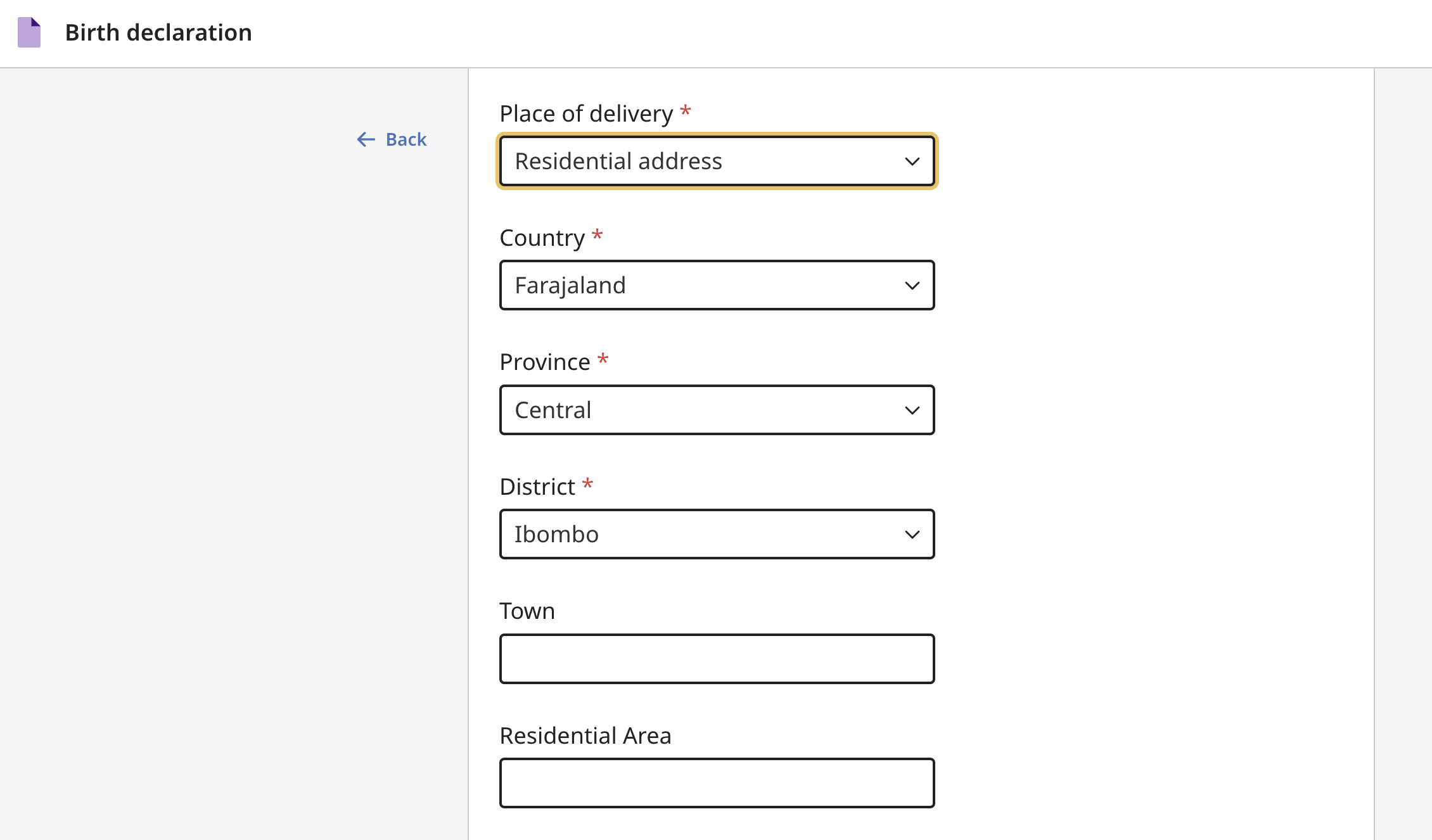
So that OpenCRVS can programatically create a powerful search and analytics capability calculating for example statistical information disaggregated by location (state/province/district/municipality), location level selects are dynamically generated from the administrative structure you prepared in [step 3.2.2](/v1.5/setup/3.-installation/3.2-set-up-your-own-country-configuration/3.2.2-set-up-administrative-address-divisions.md). Selects as an input type are particularly powerful in the user experience because they make it impossible for human error (spelling mistakes) when capturing the address.
You will notice that every location level imported in step 3.2.2 is mandatory
{% hint style="info" %}
The 4 tasks involved in address configuration are deciding a) setting the number of standardised selects that should appear, b) after which field in vertical order should an address render c) customising address fields themselves *generally those fields which render after the selects.* & d) Setting initial value and global application settings for the selected country
{% endhint %}
The 3 tasks of configuration of addresses as explained in the hint above takes place in the following locations:
a) You must set the number of standardised selects that will appear equal to the number of administrative levels that you plan to seed in step 3.2.2 Set up administrative address divisions. For example, if your country has 2 standard levels "state" & "district", ADMIN\_LEVELS should be set to 2 [here](https://github.com/opencrvs/opencrvs-countryconfig/blob/b3ee310aaaaa616ce0a41a6eb69a403afc2e50bb/src/form/addresses/index.ts#L37).
b) You configure after which field in vertical order addresses will render in the [*defaultAddressConfiguration*](https://github.com/opencrvs/opencrvs-countryconfig/blob/93a58dd80867e8613c12b9767ea7b4ca80953929/src/form/addresses/index.ts#L43C14-L43C41) property of this file: [addresses/index.ts](https://github.com/opencrvs/opencrvs-countryconfig/blob/develop/src/form/addresses/index.ts)
For each configuration, edit the ***precedingFieldId*** property to set this.
c) You configure the replicated address fields themselves in this file: [addresses/address-fields.ts](https://github.com/opencrvs/opencrvs-countryconfig/blob/develop/src/form/addresses/address-fields.ts)
d) Finally ensure you have changed the country code from "FAR" to your country code in the [JS application settings](/v1.5/setup/3.-installation/3.2-set-up-your-own-country-configuration/3.2.5-set-up-application-settings.md) and the default [initialValue](https://github.com/opencrvs/opencrvs-countryconfig/blob/b3ee310aaaaa616ce0a41a6eb69a403afc2e50bb/src/form/addresses/address-fields.ts#L217) for the country select.
We recommend that all configuration of fields takes place after the selects, e.g. from [this line](https://github.com/opencrvs/opencrvs-countryconfig/blob/93a58dd80867e8613c12b9767ea7b4ca80953929/src/form/addresses/address-fields.ts#L221) downwards. E.G. after the ***getAdminLevelSelects*** function.
You should not need to edit the field blocks themselves, perhaps other than to delete the blocks you do not want. You certainly should not edit the mapping functions as these are very important to be left as is so that address fields map successfully to and from FHIR.
---
# Agent Instructions
This documentation is published with GitBook. GitBook is the documentation platform designed so that both humans and AI agents can read, navigate, and reason over technical content effectively. Learn more at gitbook.com.
## Querying This Documentation
If you need additional information that is not directly available in this page, you can query the documentation dynamically by asking a question.
Perform an HTTP GET request on the current page URL with the `ask` query parameter, and the optional `goal` query parameter:
```
GET https://documentation.opencrvs.org/v1.5/setup/3.-installation/3.2-set-up-your-own-country-configuration/3.2.7-configure-declaration-forms/4.2.7.1-configuring-an-event-form.md?ask=&goal=
```
`ask` is the immediate question: it should be specific, self-contained, and written in natural language.
`goal` is optional and describes the broader end goal you are ultimately trying to accomplish on behalf of the user. GitBook uses it to tailor the answer towards what is most useful for that goal.
The response will contain a direct answer to the question and relevant excerpts and sources from the documentation.
Use this mechanism when the answer is not explicitly present in the current page, you need clarification or additional context, or you want to retrieve related documentation sections.