
Migration from Docker swarm guide
Prerequisites and Important Information
This tutorial guides you through all steps required to transform your v1.9 Docker Swarm infrastructure to Kubernetes and redeploy OpenCRVS on it. Please carefully review this section before proceeding with the migration.
Prerequisites
1. Infrastructure Repository
OpenCRVS v2.0+ uses a dedicated repository for continuous delivery configuration: https://github.com/opencrvs/infrastructure
Repository:
Required Action:
Fork this repository to your organization or personal GitHub account before starting migration
Ensure that your user has admin rights over the repository
2. SSH Access Configuration
The provision user on your production Docker manager server must have passwordless SSH access to the backup server. You will need configure SSH key-based authentication between Docker manager and backup server.
Steps:
Login on production docker manager as
provisionuser:Generate private/public key-pair:
Copy public key value from output (example value):
Login on worker/backup server as
provisionuser and add public key from production to/home/provision/.ssh/authorized_keyson backup server:
3. Migration token
A classic GitHub token is required to run the migration workflow. The token should have following permissions:
repo: Full control of private repositoriesworkflow: Update GitHub Action workflowsexpiration date should be set to manageable period (few months, year, never) established by organisation secure policies.
Purpose of MIGRATION_GH_TOKEN
Token is used while secrets and variables migration from Countryconfig template to infrastructure repository.
Token is stored as
GH_TOKENsecret in infrastructure repository.Token is used to provision Kubernetes self-hosted runner.
Steps to create Migration token
In your countryconfig repository navigate to repository level secrets at "Actions secrets and variables" (Settings -> Secrets & Variables -> Actions)
Create new secret
MIGRATION_GH_TOKENwith value of GitHub token.
Changes between docker swarm and Kubernetes
1. Changes to Environments
After migration only the following environments will appear in your new forked infrastructure repository (if they existed in your original repository):
developmentqastagingproduction
The following Gihtub environments are deprecated:
backupis merged into production while migration and the backup server is managed as part of a production environment by the Provision workflow.jumpboxis not used anymore
2. Docker-compose migration
All OpenCRVS services are deployed as Helm charts during migration.
The migration creates a vanilla Kubernetes configuration from the standard OpenCRVS Helm charts. It does not automatically migrate custom changes that were previously added to docker-compose.deploy.yml or environment-specific compose files.
If your Docker Swarm deployment contains custom changes, you must review and transfer them one by one.
Common customisations include:
extra environment variables for OpenCRVS services
third-party integration configuration, such as MOSIP, Verifiable Credentials, ICD-10/ICD-11, or OpenID providers
additional containers or services added to Docker Compose
custom images, image tags, ports, secrets, volumes, or routes
All customisations must be re-implemented using Helm values or a custom Helm chart.
An example custom Helm chart is published in the OpenCRVS Core repository: https://github.com/opencrvs/opencrvs-core/tree/v2.1.0/charts/opencrvs-mosip
You may also choose to use the Bitnami Common Library Chart for more advanced use cases: https://github.com/bitnami/charts/tree/main/bitnami/common
Migrating custom environment variables
In Docker Swarm, custom environment variables may have been added directly to a service in docker-compose.deploy.yml.
For example, a Docker Compose configuration might add OpenID or MOSIP-related variables to countryconfig:
These values are ignored by the automated Swarm-to-Kubernetes migration unless you explicitly add them to your Helm configuration.
In Kubernetes, add service-specific environment variables to the relevant Helm values override file, for example:
Use the same approach for other OpenCRVS services. Find the matching service in your old Docker Compose file, then move its custom environment variables into the corresponding service block in the Helm values override file.
Migrating additional Docker Compose services
Some Docker Swarm deployments include extra services that are not part of the vanilla OpenCRVS deployment.
For example, a Docker Compose file might include an additional MOSIP mock service:
Additional services like this are not automatically migrated.
To run them in Kubernetes, create or extend a custom Helm chart that defines the required Kubernetes resources, usually:
DeploymentServiceIngressRoute, if the service must be externally reachableSecretorConfigMap, if the service needs configuration files or sensitive values
The charts/opencrvs-mosip chart is a useful example because it deploys additional services such as mosip-api, mosip-mock, and esignet-mock, and passes their configuration through Helm values.
A simplified values structure could look like this:
The custom Helm chart should then render those values into the Kubernetes Deployment.
Customisation Migration checklist
Before completing the migration, compare your old Docker Compose configuration with your new Helm configuration.
Check each custom Docker Compose change and decide where it belongs in Kubernetes:
Environment variables on an OpenCRVS service
environments/<env>/opencrvs-services/values.override.yaml under the matching service env block
Additional container or service
Custom Helm chart
Custom image or tag
Helm image values
Secrets or credentials
Kubernetes Secret, referenced by Helm values or templates
Mounted files or certificates
Kubernetes Secret, ConfigMap, or volume
Public route / hostname
IngressRoute in a custom Helm chart
Internal-only service dependency
Kubernetes Service with cluster-local DNS
Do not assume that a successful Kubernetes deployment means all Docker Compose customisations have been migrated. The application may start successfully while integration-specific configuration is still missing.
Migration Architecture
Single Server Deployments
Docker Swarm: Single server environment
Kubernetes: Converted to single server Kubernetes environment (single-node cluster)
Multi-Node Deployments
Docker Swarm: Multi-node with manager and worker nodes
Kubernetes: Converted to Kubernetes cluster with worker nodes
⚠️ Important Limitation:
Migration script does not support multiple Docker manager nodes
Only single manager + multiple workers configuration is supported
Single server docker environments are converted to single server Kubernetes environments.
Multi node docker environments are converted to Kubernetes clusters with worker nodes. Migration script doesn't support multiple docker manager nodes.
Migration process
Pre-migration check-list
Migration steps in Country config (old repository)
Navigate to your countryconfig repository
Run the provision workflow for each environment, e/g if you have qa, staging and production environments, you need to run workflow 3 times. This ensures that all your servers are up to date .
Run "Migration swarm to k8s" GitHub actions workflow
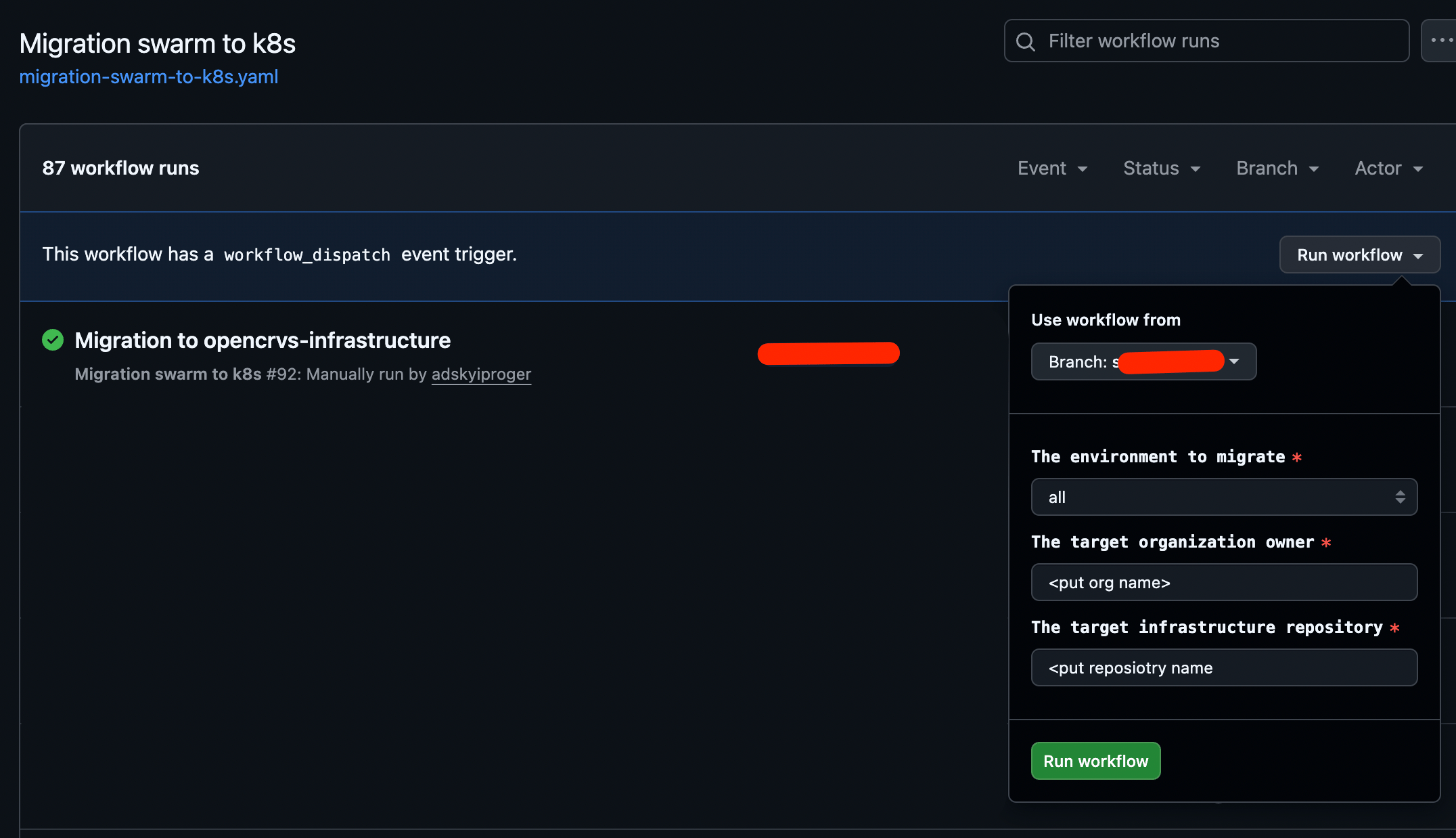
"The environment to migrate": Environment chosen for migration, you may migrate environments one by one or altogether
"The target organisation owner": GitHub organisation or your personal account who owns Infrastructure repository
"The target infrastructure repository": GitHub infrastructure repository name
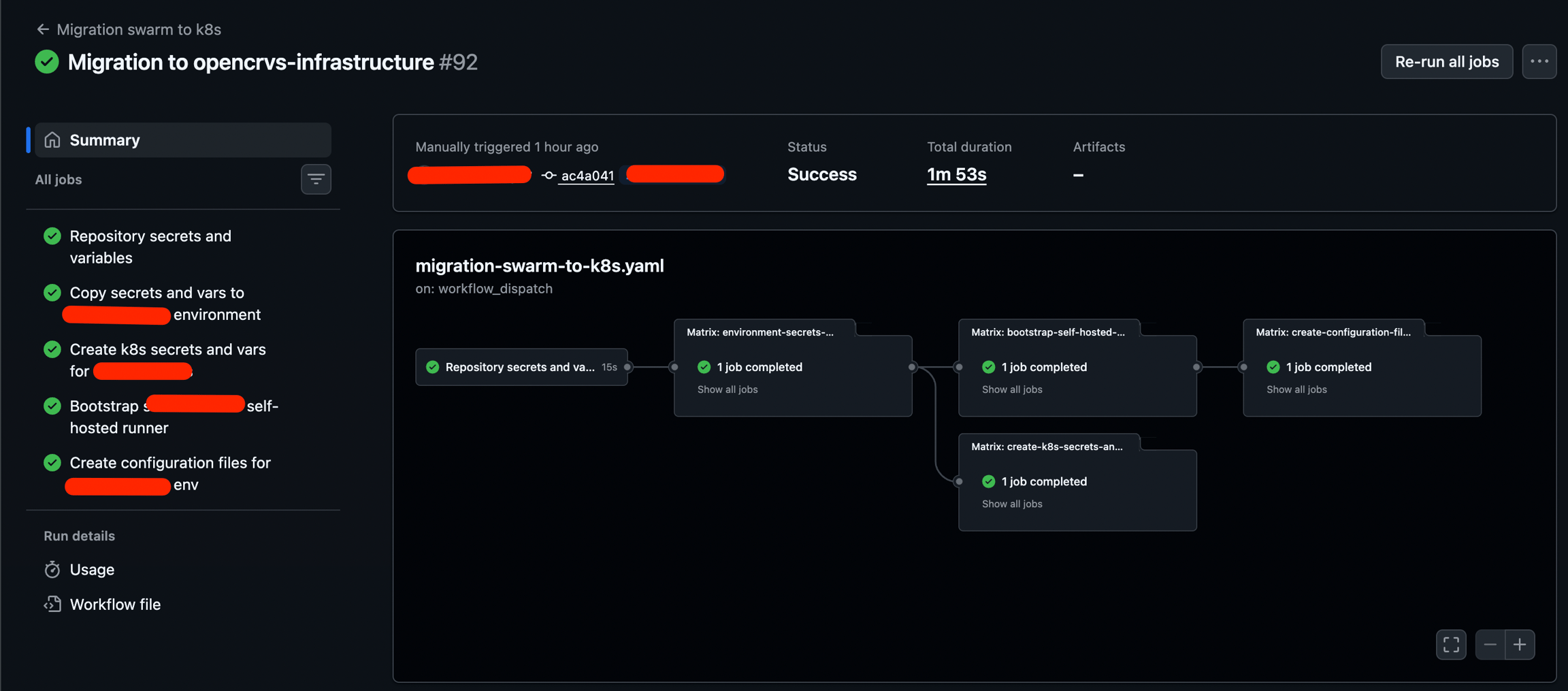
Verify workflow execution results: On the screenshot execution results for single environment are shown, make sure all steps completed successfully.
Verify target repository
Navigate to Infrastructure repository
Navigate to Settings -> Environments: Make all repository and environment level secrets and variables have been created
Navigate to Settings -> Actions -> Runners -> Self-hosted runners: Make sure self-hosted runners are available for each migrated environment. If you run migration for one environment only, you will find only one runner. NOTE: Environment name is a part of runner name and one of the runner tags, e/g "development" on the screenshot
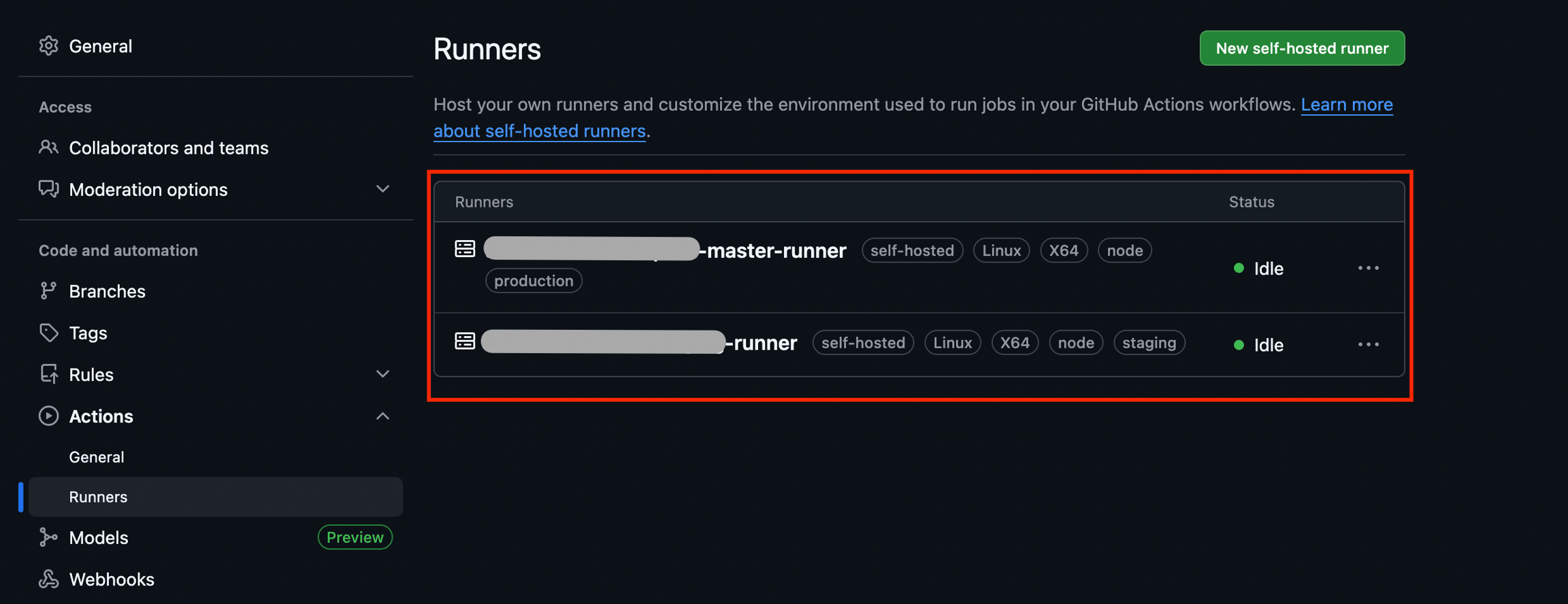
Each environment will have ows self-hosted runner Navigate to "Pull requests" section: You will find PR with all changes required to deploy new environment with Kubernetes.
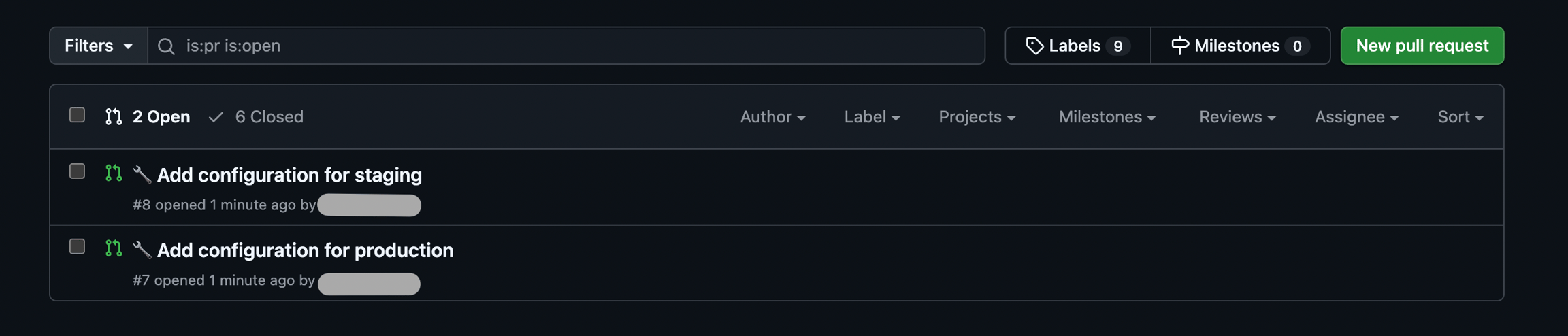
Review changes within PR:
If your docker-compose file had any customisations like environment variables, please add them to
environments/<env name>/opencrvs-services/values.yamlBy default traefik is configured to use static ssl certificates, adjust values if needed, check documentation at TLS/SSL Configuration for traefik
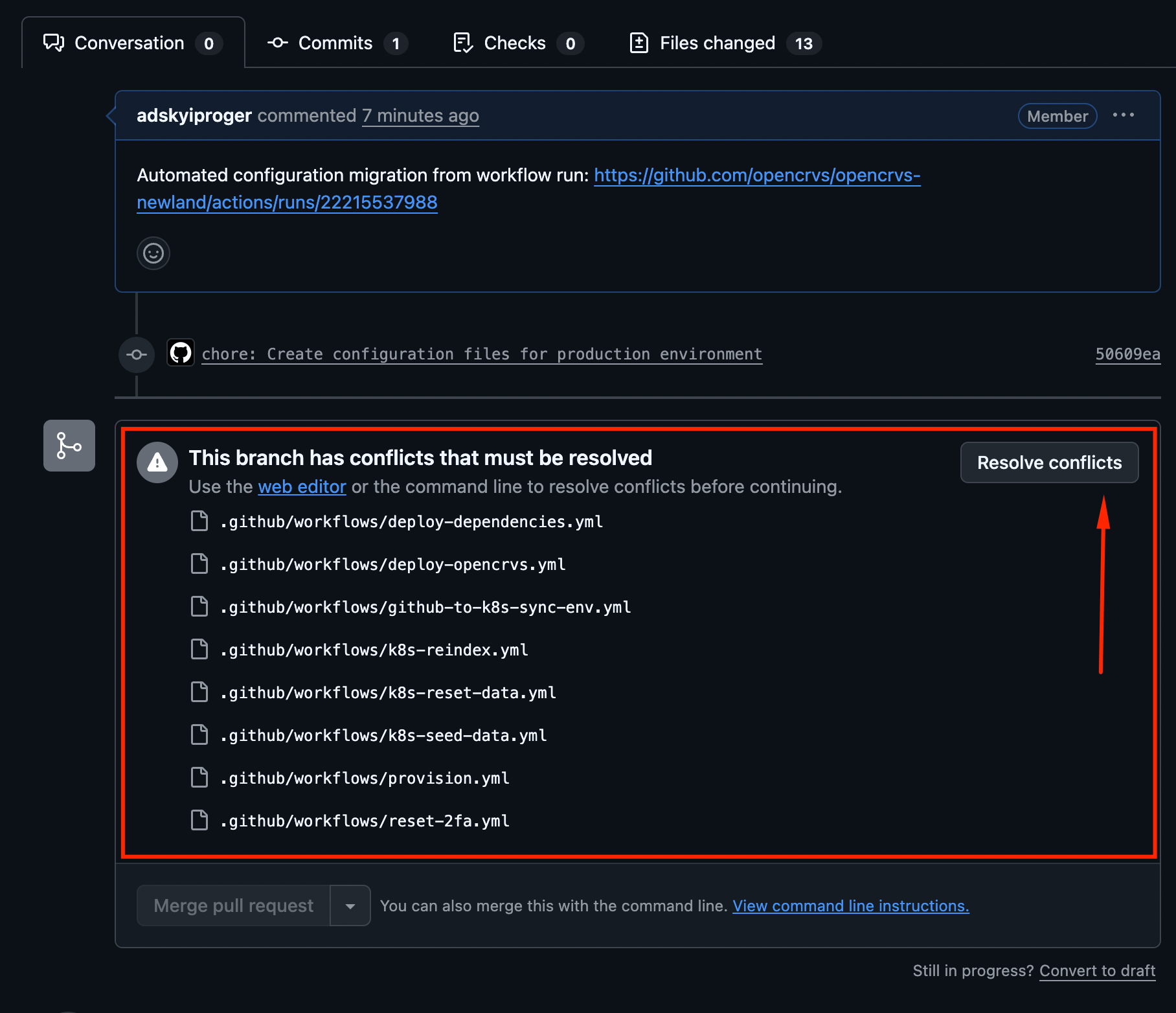
Merge Pull request to your release branch, (e/g release/2.0.0). If multiple environments were migrated at the same time, you will need to resolve pull request conflicts manually, usually effected section is
environmentinput selector: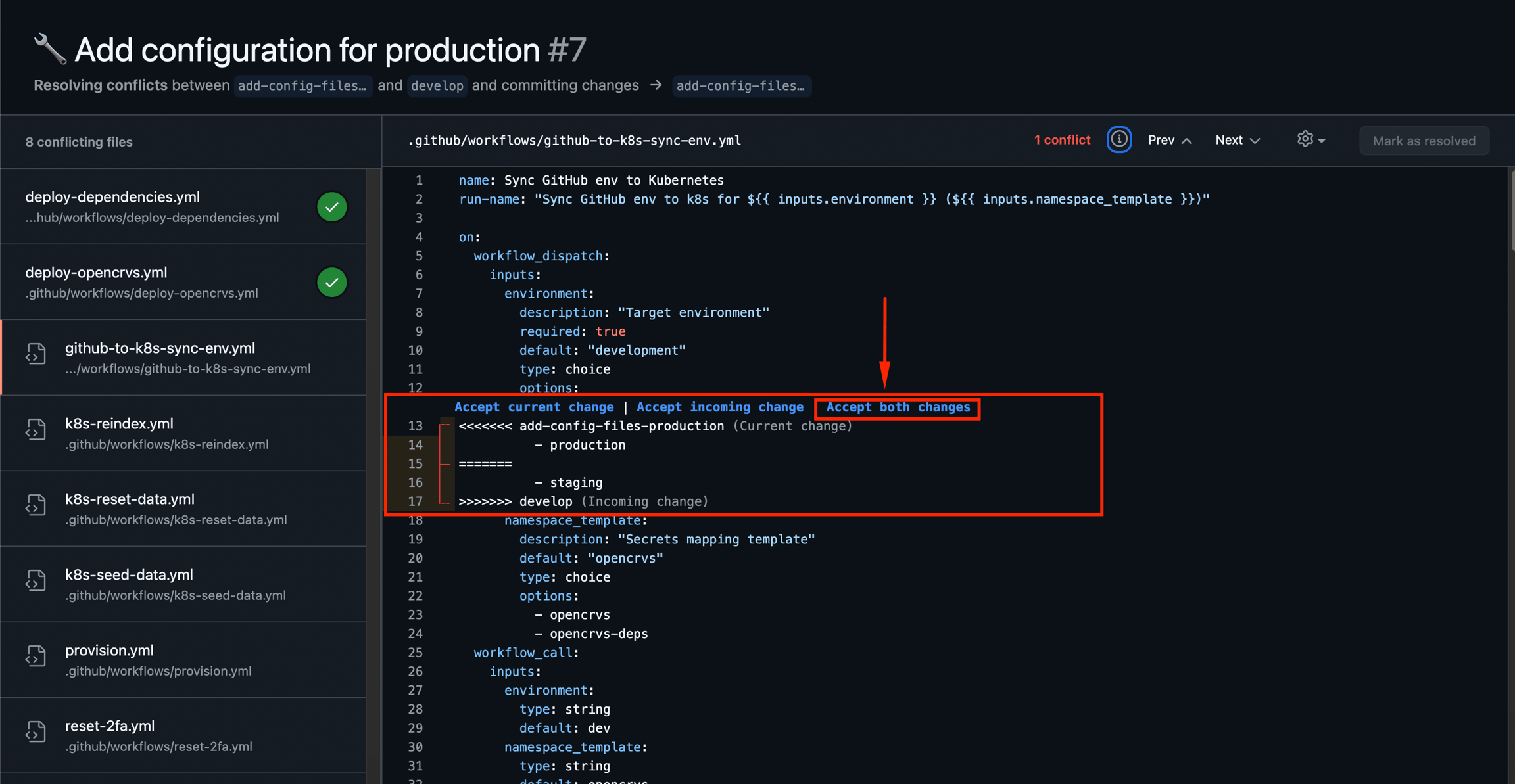
Kubernetes environment provision and deploy
Provision Kubernetes environment on top of Docker Swarm environment: Run Provision workflow from Infrastructure repository, see for more information Provisioning servers
Reboot your target server
Deploy dependencies, see for more information Running Dependencies deployment
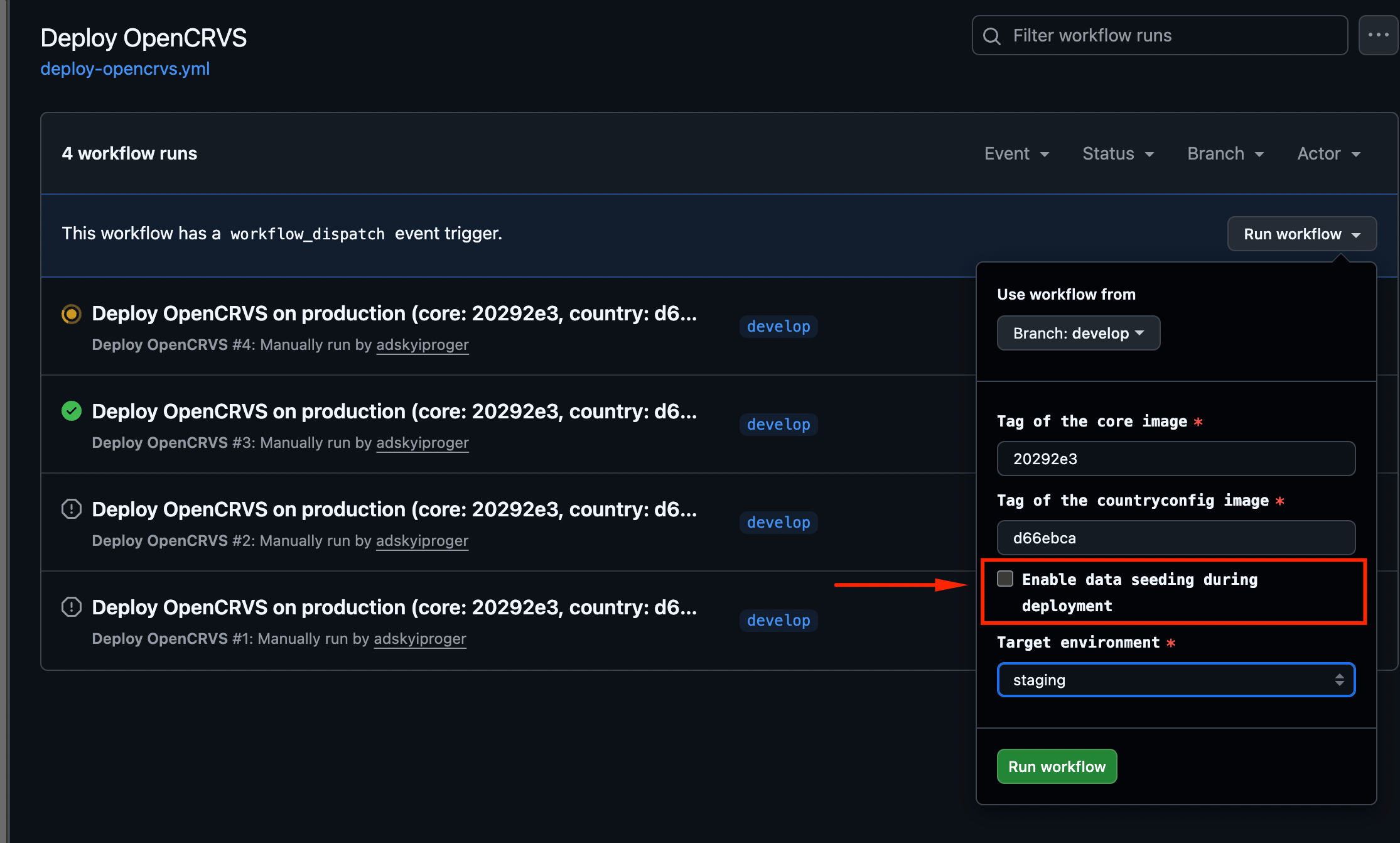
Deploy OpenCRVS: see for more information Running an OpenCRVS deployment
Use same OpenCRVS Core image tag as docker swarm
Use same Country config image tag as docker swarm
Make sure "Enable data seeding during deployment" is unchecked
Post migration steps
Configuring Workflow Approval Process
OpenCRVS now requires approval for deployment and maintenance GitHub Actions workflows on production environments. This adds an additional layer of control to prevent unexpected downtime or issues.
Environments Requiring Approval
Production: Approvals required by default
Staging and Other environments: No approval required (unless explicitly configured)
Setup Instructions
Step 1: Identify Approvers
Determine which team members should have authority to approve production deployments and maintenance tasks.
Step 2: Configure Repository Variable
Set up the GH_APPROVERS variable at the repository level:
Navigate to your repository settings
Go to Settings → Secrets and variables → Actions → Variables
Click New repository variable
Configure:
Name:
GH_APPROVERSValue: Comma-separated list of GitHub usernames (e.g.,
alice,bob,charlie)
Set Up APPROVAL_REQUIRED at environment level to control which environments require approval before workflow execution:
Navigate to your repository settings
Go to Settings → Environments
Select the environment you want to configure (e.g.,
production,staging)Scroll to Environment variables section
Click Add variable
Configure:
Name:
APPROVAL_REQUIREDValue:
true(to enable approval) orfalse(to disable)
Step 3: Verify Configuration
After configuration, workflows targeting production will pause for approval from designated users before execution.
Important Notes
GH_APPROVERSmust be defined at repository level (not environment level)APPROVAL_REQUIREDmust be defined at environment level (not repository level)Use GitHub usernames without
@symbolMultiple approvers separated by commas with no spaces
At least one designated approver must approve the workflow to proceed
Backup & Restore
This section outlines the fundamental differences in backup and restore implementation between Docker Swarm and Kubernetes deployments. Understanding these differences is critical for migration planning and operational adjustments.
Docker Swarm Approach
Architecture:
Backup and restore operations run as shell scripts on the Docker manager node
Backup script scheduled as OS cronjob on production environment
Restore script scheduled as OS cronjob on staging environment
Single monolithic script handles all datastores (PostgreSQL, MongoDB, MinIO, InfluxDB)
Uses direct filesystem access to
/datadirectory
Kubernetes Approach
Architecture:
Backup and restore jobs split by datastore (one job per database)
Backup and restore operations are environment-agnostic and can be configured on any deployment (development, QA, staging, production, etc.).
Scheduled as Kubernetes CronJobs (native k8s resources)
Scripts use remote database connections via network protocols
Each job runs as a Kubernetes pod with database client tools
The fundamental shift is from filesystem-based operations to network-based database operations. While this introduces network overhead, it provides the flexibility and portability required for modern cloud-native deployments, including support for managed database services and multi-environment consistency.
GitHub Fine-grained token
GitHub self-hosted runners could be configured to use fine-grained token.
Variable name: GH_TOKEN
Required permissions:
Actions: Read and Write
Administration: Read and Write
Metadata: Read-only
Last updated