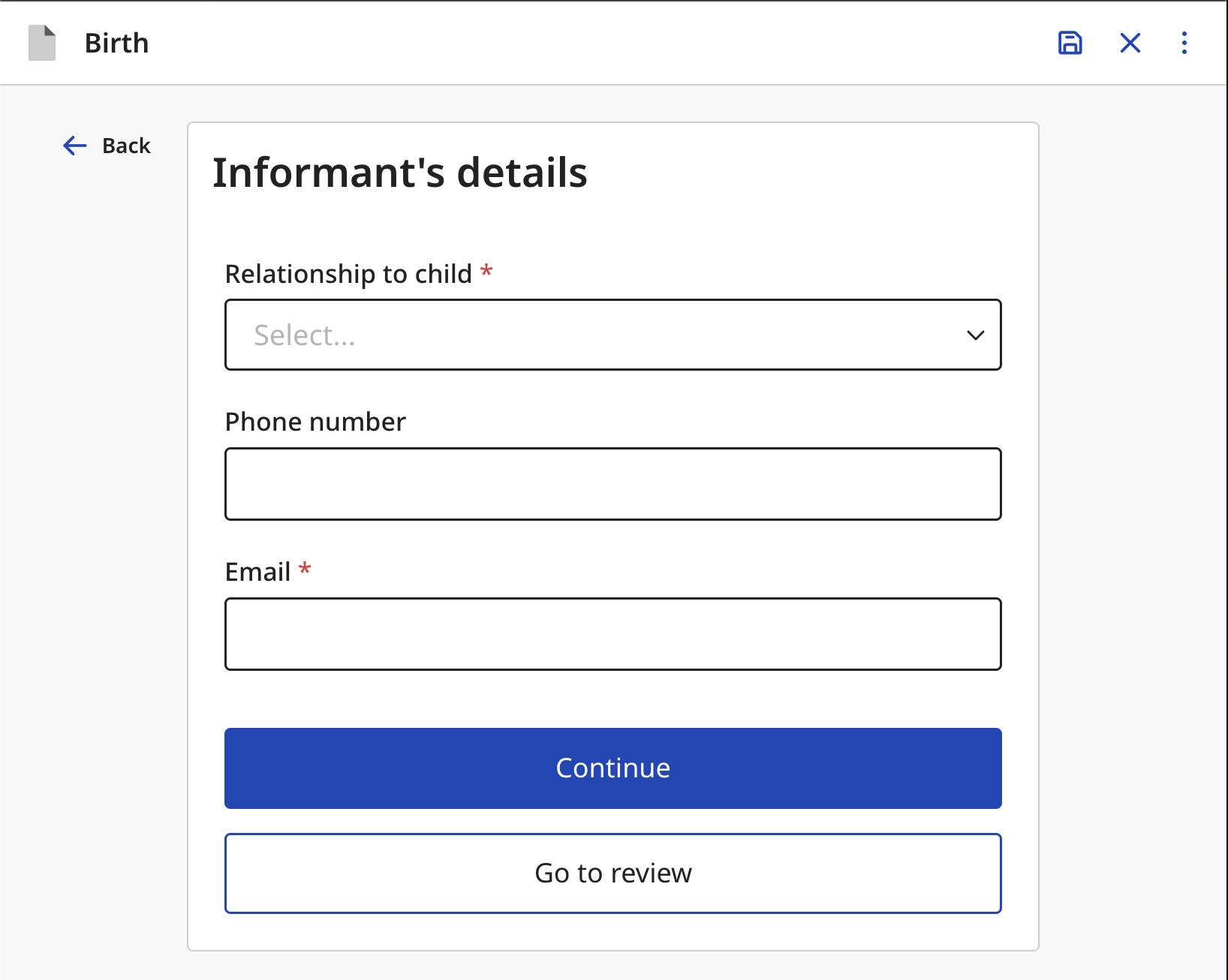
An example of a PageTypes.enum.FORM page on the declaration flow
| Configured action type | Config property | Description |
|---|---|---|
ActionType.DECLARE | review | Fields to be filled on the review page when declaring a record. This usually includes details of the employee filling the form, such as their signature and additional comments. |
ActionType.READ | review | Fields to be shown on the review page of a record. This is usually the same as the |
ActionType.PRINT_CERTIFICATE | printForm | Form pages to be filled when printing a certificate of a registered record. |
ActionType.REQUEST_CORRECTION | correctionForm | Form pages to be filled when requesting a correction on a registered record. |
ActionType.CUSTOM | form | Fields to be filled on the confirmation dialog of the custom action. |
An example of a PageTypes.enum.FORM page on the declaration flow
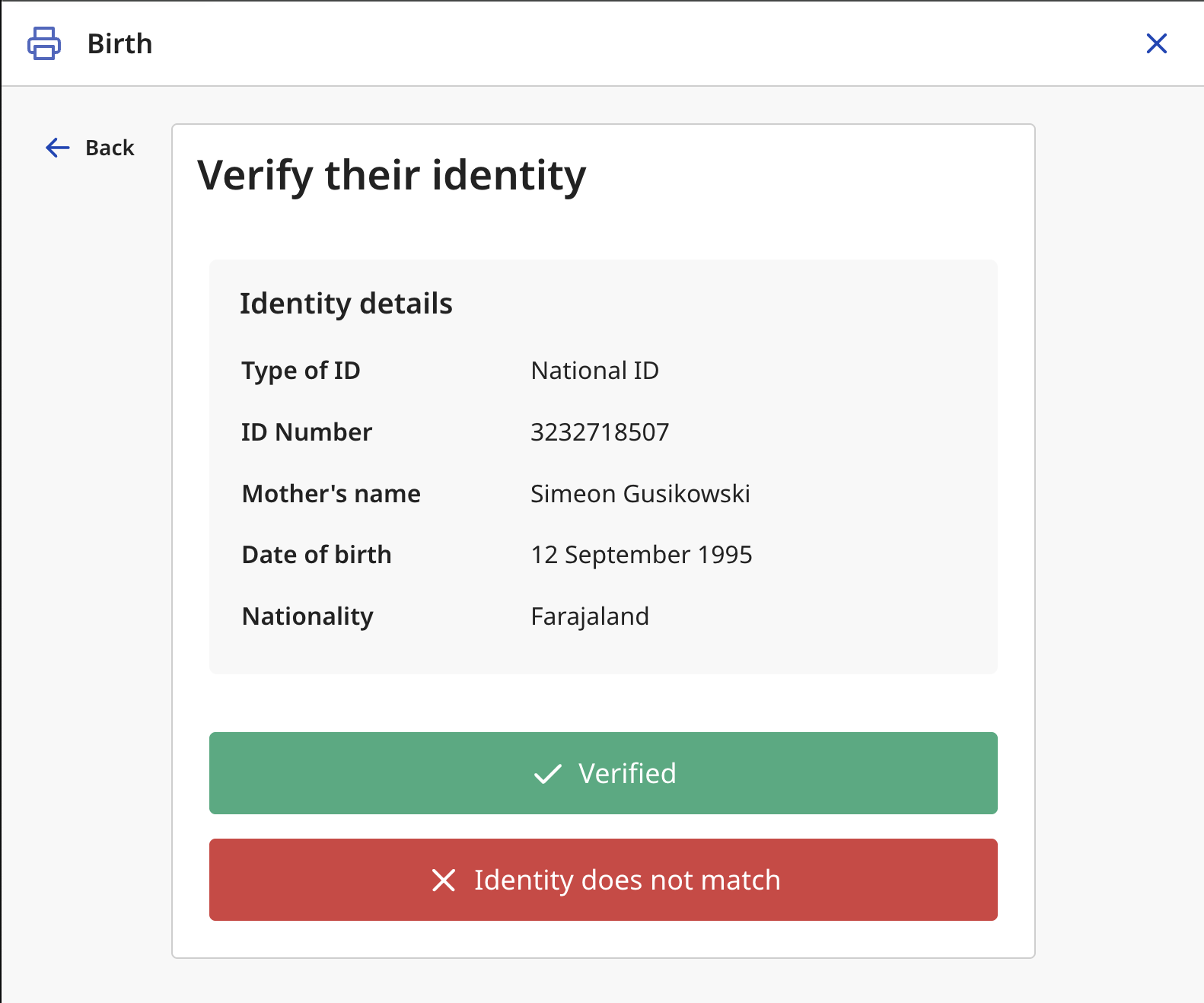
An example of a PageTypes.enum.VERIFICATION page on the certificate printing flow
paragraph"},"Heading":{"type":"object","properties":{"id":{"type":"string","description":"Unique identifier of the field."},"label":{"description":"Human-readable label of the field.","$ref":"#/components/schemas/TranslationConfigOutput"},"parent":{"description":"Reference to the parent field or fields. When a parent field changes, this field is reset.","anyOf":[{"type":"object","properties":{"$$field":{"type":"string","description":"Id of the field to reference"},"$$subfield":{"default":[],"description":"If the FieldValue is an object, subfield can be used to refer to e.g. `[\"foo\", \"bar\"]` in `{ foo: { bar: 3 } }`","type":"array","items":{"type":"string"}},"$$code":{"description":"Serialised client-side function body. When present the expression is evaluated rather than dereferenced.","type":"string"}},"required":["$$field","$$subfield"],"additionalProperties":false,"description":"Reference to a field value, with an optional client-side computation applied."},{"type":"array","items":{"type":"object","properties":{"$$field":{"type":"string","description":"Id of the field to reference"},"$$subfield":{"default":[],"description":"If the FieldValue is an object, subfield can be used to refer to e.g. `[\"foo\", \"bar\"]` in `{ foo: { bar: 3 } }`","type":"array","items":{"type":"string"}},"$$code":{"description":"Serialised client-side function body. When present the expression is evaluated rather than dereferenced.","type":"string"}},"required":["$$field","$$subfield"],"additionalProperties":false,"description":"Reference to a field value, with an optional client-side computation applied."}}]},"required":{"description":"Indicates whether the field is mandatory.","default":false,"anyOf":[{"type":"boolean"},{"type":"object","properties":{"message":{"description":"Custom required validation message","$ref":"#/components/schemas/TranslationConfigOutput"}},"required":["message"],"additionalProperties":false}]},"conditionals":{"description":"Conditions determining when the field is shown or enabled. By default, the field is always shown and enabled.","default":[],"type":"array","items":{"$ref":"#/components/schemas/FieldConditional"}},"secured":{"description":"Indicates whether the field is secured. Secured fields are not indexed for search and are only visible when explicitly assigned.","default":false,"type":"boolean"},"placeholder":{"$ref":"#/components/schemas/TranslationConfigOutput"},"validation":{"description":"Additional validation rules applied to the field.","default":[],"type":"array","items":{"$ref":"#/components/schemas/ValidationConfig"}},"helperText":{"$ref":"#/components/schemas/TranslationConfigOutput"},"hideLabel":{"default":false,"type":"boolean"},"uncorrectable":{"description":"Indicates whether the field can be modified during record correction.","default":false,"type":"boolean"},"value":{"description":"Reference to the source field or fields. When a value is defined, it is copied from the parent field when changed. If multiple references are provided, the first truthy value is used. A FieldReference with $$code computes the value via a custom client-side function.","anyOf":[{"type":"object","properties":{"$$field":{"type":"string","description":"Id of the field to reference"},"$$subfield":{"default":[],"description":"If the FieldValue is an object, subfield can be used to refer to e.g. `[\"foo\", \"bar\"]` in `{ foo: { bar: 3 } }`","type":"array","items":{"type":"string"}},"$$code":{"description":"Serialised client-side function body. When present the expression is evaluated rather than dereferenced.","type":"string"}},"required":["$$field","$$subfield"],"additionalProperties":false,"description":"Reference to a field value, with an optional client-side computation applied."},{"type":"array","items":{"type":"object","properties":{"$$field":{"type":"string","description":"Id of the field to reference"},"$$subfield":{"default":[],"description":"If the FieldValue is an object, subfield can be used to refer to e.g. `[\"foo\", \"bar\"]` in `{ foo: { bar: 3 } }`","type":"array","items":{"type":"string"}},"$$code":{"description":"Serialised client-side function body. When present the expression is evaluated rather than dereferenced.","type":"string"}},"required":["$$field","$$subfield"],"additionalProperties":false,"description":"Reference to a field value, with an optional client-side computation applied."}}]},"analytics":{"description":"Indicates whether the field is included in analytics. When enabled, its value becomes available in the analytics dashboard.","default":false,"type":"boolean"},"type":{"type":"string","const":"HEADING"},"configuration":{"default":{},"type":"object","properties":{"styles":{"type":"object","properties":{"fontVariant":{"description":"Font variant to use for the paragraph text","type":"string","enum":["reg12","reg14","reg16","reg18","h4","h3"]},"textAlign":{"description":"Text alignment for the paragraph","type":"string","enum":["left","center","right","start","end"]}},"additionalProperties":false}},"additionalProperties":false}},"required":["id","label","type","configuration"],"additionalProperties":false,"description":"A read-only heading component for form pages"},"RadioGroup":{"type":"object","properties":{"id":{"type":"string","description":"Unique identifier of the field."},"label":{"description":"Human-readable label of the field.","$ref":"#/components/schemas/TranslationConfigOutput"},"parent":{"description":"Reference to the parent field or fields. When a parent field changes, this field is reset.","anyOf":[{"type":"object","properties":{"$$field":{"type":"string","description":"Id of the field to reference"},"$$subfield":{"default":[],"description":"If the FieldValue is an object, subfield can be used to refer to e.g. `[\"foo\", \"bar\"]` in `{ foo: { bar: 3 } }`","type":"array","items":{"type":"string"}},"$$code":{"description":"Serialised client-side function body. When present the expression is evaluated rather than dereferenced.","type":"string"}},"required":["$$field","$$subfield"],"additionalProperties":false,"description":"Reference to a field value, with an optional client-side computation applied."},{"type":"array","items":{"type":"object","properties":{"$$field":{"type":"string","description":"Id of the field to reference"},"$$subfield":{"default":[],"description":"If the FieldValue is an object, subfield can be used to refer to e.g. `[\"foo\", \"bar\"]` in `{ foo: { bar: 3 } }`","type":"array","items":{"type":"string"}},"$$code":{"description":"Serialised client-side function body. When present the expression is evaluated rather than dereferenced.","type":"string"}},"required":["$$field","$$subfield"],"additionalProperties":false,"description":"Reference to a field value, with an optional client-side computation applied."}}]},"required":{"description":"Indicates whether the field is mandatory.","default":false,"anyOf":[{"type":"boolean"},{"type":"object","properties":{"message":{"description":"Custom required validation message","$ref":"#/components/schemas/TranslationConfigOutput"}},"required":["message"],"additionalProperties":false}]},"conditionals":{"description":"Conditions determining when the field is shown or enabled. By default, the field is always shown and enabled.","default":[],"type":"array","items":{"$ref":"#/components/schemas/FieldConditional"}},"secured":{"description":"Indicates whether the field is secured. Secured fields are not indexed for search and are only visible when explicitly assigned.","default":false,"type":"boolean"},"placeholder":{"$ref":"#/components/schemas/TranslationConfigOutput"},"validation":{"description":"Additional validation rules applied to the field.","default":[],"type":"array","items":{"$ref":"#/components/schemas/ValidationConfig"}},"helperText":{"$ref":"#/components/schemas/TranslationConfigOutput"},"hideLabel":{"default":false,"type":"boolean"},"uncorrectable":{"description":"Indicates whether the field can be modified during record correction.","default":false,"type":"boolean"},"value":{"description":"Reference to the source field or fields. When a value is defined, it is copied from the parent field when changed. If multiple references are provided, the first truthy value is used. A FieldReference with $$code computes the value via a custom client-side function.","anyOf":[{"type":"object","properties":{"$$field":{"type":"string","description":"Id of the field to reference"},"$$subfield":{"default":[],"description":"If the FieldValue is an object, subfield can be used to refer to e.g. `[\"foo\", \"bar\"]` in `{ foo: { bar: 3 } }`","type":"array","items":{"type":"string"}},"$$code":{"description":"Serialised client-side function body. When present the expression is evaluated rather than dereferenced.","type":"string"}},"required":["$$field","$$subfield"],"additionalProperties":false,"description":"Reference to a field value, with an optional client-side computation applied."},{"type":"array","items":{"type":"object","properties":{"$$field":{"type":"string","description":"Id of the field to reference"},"$$subfield":{"default":[],"description":"If the FieldValue is an object, subfield can be used to refer to e.g. `[\"foo\", \"bar\"]` in `{ foo: { bar: 3 } }`","type":"array","items":{"type":"string"}},"$$code":{"description":"Serialised client-side function body. When present the expression is evaluated rather than dereferenced.","type":"string"}},"required":["$$field","$$subfield"],"additionalProperties":false,"description":"Reference to a field value, with an optional client-side computation applied."}}]},"analytics":{"description":"Indicates whether the field is included in analytics. When enabled, its value becomes available in the analytics dashboard.","default":false,"type":"boolean"},"type":{"type":"string","const":"RADIO_GROUP"},"defaultValue":{"anyOf":[{"type":"string"},{"type":"object","properties":{"$$code":{"type":"string","description":"Serialised client-side function body. Receives (undefined, context) where context includes $now, $online, and system variables."}},"required":["$$code"],"additionalProperties":false,"description":"A context-only computation used as a field default value."}]},"options":{"type":"array","items":{"type":"object","properties":{"value":{"type":"string","description":"The value of the option"},"label":{"anyOf":[{"type":"string"},{"$ref":"#/components/schemas/TranslationConfigOutput"}],"description":"The label of the option"},"conditionals":{"default":[],"type":"array","items":{"$ref":"#/components/schemas/ActionConditional"}}},"required":["value","label"],"additionalProperties":false},"description":"A list of options"},"configuration":{"type":"object","properties":{"styles":{"type":"object","properties":{"size":{"type":"string","enum":["NORMAL","LARGE"]}},"additionalProperties":false}},"additionalProperties":false}},"required":["id","label","type","options"],"additionalProperties":false,"description":"A grouped radio button field"},"BulletList":{"type":"object","properties":{"id":{"type":"string","description":"Unique identifier of the field."},"label":{"description":"Human-readable label of the field.","$ref":"#/components/schemas/TranslationConfigOutput"},"parent":{"description":"Reference to the parent field or fields. When a parent field changes, this field is reset.","anyOf":[{"type":"object","properties":{"$$field":{"type":"string","description":"Id of the field to reference"},"$$subfield":{"default":[],"description":"If the FieldValue is an object, subfield can be used to refer to e.g. `[\"foo\", \"bar\"]` in `{ foo: { bar: 3 } }`","type":"array","items":{"type":"string"}},"$$code":{"description":"Serialised client-side function body. When present the expression is evaluated rather than dereferenced.","type":"string"}},"required":["$$field","$$subfield"],"additionalProperties":false,"description":"Reference to a field value, with an optional client-side computation applied."},{"type":"array","items":{"type":"object","properties":{"$$field":{"type":"string","description":"Id of the field to reference"},"$$subfield":{"default":[],"description":"If the FieldValue is an object, subfield can be used to refer to e.g. `[\"foo\", \"bar\"]` in `{ foo: { bar: 3 } }`","type":"array","items":{"type":"string"}},"$$code":{"description":"Serialised client-side function body. When present the expression is evaluated rather than dereferenced.","type":"string"}},"required":["$$field","$$subfield"],"additionalProperties":false,"description":"Reference to a field value, with an optional client-side computation applied."}}]},"required":{"description":"Indicates whether the field is mandatory.","default":false,"anyOf":[{"type":"boolean"},{"type":"object","properties":{"message":{"description":"Custom required validation message","$ref":"#/components/schemas/TranslationConfigOutput"}},"required":["message"],"additionalProperties":false}]},"conditionals":{"description":"Conditions determining when the field is shown or enabled. By default, the field is always shown and enabled.","default":[],"type":"array","items":{"$ref":"#/components/schemas/FieldConditional"}},"secured":{"description":"Indicates whether the field is secured. Secured fields are not indexed for search and are only visible when explicitly assigned.","default":false,"type":"boolean"},"placeholder":{"$ref":"#/components/schemas/TranslationConfigOutput"},"validation":{"description":"Additional validation rules applied to the field.","default":[],"type":"array","items":{"$ref":"#/components/schemas/ValidationConfig"}},"helperText":{"$ref":"#/components/schemas/TranslationConfigOutput"},"hideLabel":{"default":false,"type":"boolean"},"uncorrectable":{"description":"Indicates whether the field can be modified during record correction.","default":false,"type":"boolean"},"value":{"description":"Reference to the source field or fields. When a value is defined, it is copied from the parent field when changed. If multiple references are provided, the first truthy value is used. A FieldReference with $$code computes the value via a custom client-side function.","anyOf":[{"type":"object","properties":{"$$field":{"type":"string","description":"Id of the field to reference"},"$$subfield":{"default":[],"description":"If the FieldValue is an object, subfield can be used to refer to e.g. `[\"foo\", \"bar\"]` in `{ foo: { bar: 3 } }`","type":"array","items":{"type":"string"}},"$$code":{"description":"Serialised client-side function body. When present the expression is evaluated rather than dereferenced.","type":"string"}},"required":["$$field","$$subfield"],"additionalProperties":false,"description":"Reference to a field value, with an optional client-side computation applied."},{"type":"array","items":{"type":"object","properties":{"$$field":{"type":"string","description":"Id of the field to reference"},"$$subfield":{"default":[],"description":"If the FieldValue is an object, subfield can be used to refer to e.g. `[\"foo\", \"bar\"]` in `{ foo: { bar: 3 } }`","type":"array","items":{"type":"string"}},"$$code":{"description":"Serialised client-side function body. When present the expression is evaluated rather than dereferenced.","type":"string"}},"required":["$$field","$$subfield"],"additionalProperties":false,"description":"Reference to a field value, with an optional client-side computation applied."}}]},"analytics":{"description":"Indicates whether the field is included in analytics. When enabled, its value becomes available in the analytics dashboard.","default":false,"type":"boolean"},"type":{"type":"string","const":"BULLET_LIST"},"items":{"type":"array","items":{"$ref":"#/components/schemas/TranslationConfigOutput"},"description":"A list of items"},"configuration":{"default":{},"type":"object","properties":{"styles":{"type":"object","properties":{"fontVariant":{"type":"string","enum":["reg12","reg14","reg16","reg18","h4","h3","h2","h1"]}},"additionalProperties":false}},"additionalProperties":false}},"required":["id","label","type","items","configuration"],"additionalProperties":false,"description":"A list of bullet points"},"PageHeader":{"type":"object","properties":{"id":{"type":"string","description":"Unique identifier of the field."},"label":{"description":"Human-readable label of the field.","$ref":"#/components/schemas/TranslationConfigOutput"},"parent":{"description":"Reference to the parent field or fields. When a parent field changes, this field is reset.","anyOf":[{"type":"object","properties":{"$$field":{"type":"string","description":"Id of the field to reference"},"$$subfield":{"default":[],"description":"If the FieldValue is an object, subfield can be used to refer to e.g. `[\"foo\", \"bar\"]` in `{ foo: { bar: 3 } }`","type":"array","items":{"type":"string"}},"$$code":{"description":"Serialised client-side function body. When present the expression is evaluated rather than dereferenced.","type":"string"}},"required":["$$field","$$subfield"],"additionalProperties":false,"description":"Reference to a field value, with an optional client-side computation applied."},{"type":"array","items":{"type":"object","properties":{"$$field":{"type":"string","description":"Id of the field to reference"},"$$subfield":{"default":[],"description":"If the FieldValue is an object, subfield can be used to refer to e.g. `[\"foo\", \"bar\"]` in `{ foo: { bar: 3 } }`","type":"array","items":{"type":"string"}},"$$code":{"description":"Serialised client-side function body. When present the expression is evaluated rather than dereferenced.","type":"string"}},"required":["$$field","$$subfield"],"additionalProperties":false,"description":"Reference to a field value, with an optional client-side computation applied."}}]},"required":{"description":"Indicates whether the field is mandatory.","default":false,"anyOf":[{"type":"boolean"},{"type":"object","properties":{"message":{"description":"Custom required validation message","$ref":"#/components/schemas/TranslationConfigOutput"}},"required":["message"],"additionalProperties":false}]},"conditionals":{"description":"Conditions determining when the field is shown or enabled. By default, the field is always shown and enabled.","default":[],"type":"array","items":{"$ref":"#/components/schemas/FieldConditional"}},"secured":{"description":"Indicates whether the field is secured. Secured fields are not indexed for search and are only visible when explicitly assigned.","default":false,"type":"boolean"},"placeholder":{"$ref":"#/components/schemas/TranslationConfigOutput"},"validation":{"description":"Additional validation rules applied to the field.","default":[],"type":"array","items":{"$ref":"#/components/schemas/ValidationConfig"}},"helperText":{"$ref":"#/components/schemas/TranslationConfigOutput"},"hideLabel":{"default":false,"type":"boolean"},"uncorrectable":{"description":"Indicates whether the field can be modified during record correction.","default":false,"type":"boolean"},"value":{"description":"Reference to the source field or fields. When a value is defined, it is copied from the parent field when changed. If multiple references are provided, the first truthy value is used. A FieldReference with $$code computes the value via a custom client-side function.","anyOf":[{"type":"object","properties":{"$$field":{"type":"string","description":"Id of the field to reference"},"$$subfield":{"default":[],"description":"If the FieldValue is an object, subfield can be used to refer to e.g. `[\"foo\", \"bar\"]` in `{ foo: { bar: 3 } }`","type":"array","items":{"type":"string"}},"$$code":{"description":"Serialised client-side function body. When present the expression is evaluated rather than dereferenced.","type":"string"}},"required":["$$field","$$subfield"],"additionalProperties":false,"description":"Reference to a field value, with an optional client-side computation applied."},{"type":"array","items":{"type":"object","properties":{"$$field":{"type":"string","description":"Id of the field to reference"},"$$subfield":{"default":[],"description":"If the FieldValue is an object, subfield can be used to refer to e.g. `[\"foo\", \"bar\"]` in `{ foo: { bar: 3 } }`","type":"array","items":{"type":"string"}},"$$code":{"description":"Serialised client-side function body. When present the expression is evaluated rather than dereferenced.","type":"string"}},"required":["$$field","$$subfield"],"additionalProperties":false,"description":"Reference to a field value, with an optional client-side computation applied."}}]},"analytics":{"description":"Indicates whether the field is included in analytics. When enabled, its value becomes available in the analytics dashboard.","default":false,"type":"boolean"},"type":{"type":"string","const":"PAGE_HEADER"}},"required":["id","label","type"],"additionalProperties":false,"description":"A read-only header component for form pages"},"Select":{"type":"object","properties":{"id":{"type":"string","description":"Unique identifier of the field."},"label":{"description":"Human-readable label of the field.","$ref":"#/components/schemas/TranslationConfigOutput"},"parent":{"description":"Reference to the parent field or fields. When a parent field changes, this field is reset.","anyOf":[{"type":"object","properties":{"$$field":{"type":"string","description":"Id of the field to reference"},"$$subfield":{"default":[],"description":"If the FieldValue is an object, subfield can be used to refer to e.g. `[\"foo\", \"bar\"]` in `{ foo: { bar: 3 } }`","type":"array","items":{"type":"string"}},"$$code":{"description":"Serialised client-side function body. When present the expression is evaluated rather than dereferenced.","type":"string"}},"required":["$$field","$$subfield"],"additionalProperties":false,"description":"Reference to a field value, with an optional client-side computation applied."},{"type":"array","items":{"type":"object","properties":{"$$field":{"type":"string","description":"Id of the field to reference"},"$$subfield":{"default":[],"description":"If the FieldValue is an object, subfield can be used to refer to e.g. `[\"foo\", \"bar\"]` in `{ foo: { bar: 3 } }`","type":"array","items":{"type":"string"}},"$$code":{"description":"Serialised client-side function body. When present the expression is evaluated rather than dereferenced.","type":"string"}},"required":["$$field","$$subfield"],"additionalProperties":false,"description":"Reference to a field value, with an optional client-side computation applied."}}]},"required":{"description":"Indicates whether the field is mandatory.","default":false,"anyOf":[{"type":"boolean"},{"type":"object","properties":{"message":{"description":"Custom required validation message","$ref":"#/components/schemas/TranslationConfigOutput"}},"required":["message"],"additionalProperties":false}]},"conditionals":{"description":"Conditions determining when the field is shown or enabled. By default, the field is always shown and enabled.","default":[],"type":"array","items":{"$ref":"#/components/schemas/FieldConditional"}},"secured":{"description":"Indicates whether the field is secured. Secured fields are not indexed for search and are only visible when explicitly assigned.","default":false,"type":"boolean"},"placeholder":{"$ref":"#/components/schemas/TranslationConfigOutput"},"validation":{"description":"Additional validation rules applied to the field.","default":[],"type":"array","items":{"$ref":"#/components/schemas/ValidationConfig"}},"helperText":{"$ref":"#/components/schemas/TranslationConfigOutput"},"hideLabel":{"default":false,"type":"boolean"},"uncorrectable":{"description":"Indicates whether the field can be modified during record correction.","default":false,"type":"boolean"},"value":{"description":"Reference to the source field or fields. When a value is defined, it is copied from the parent field when changed. If multiple references are provided, the first truthy value is used. A FieldReference with $$code computes the value via a custom client-side function.","anyOf":[{"type":"object","properties":{"$$field":{"type":"string","description":"Id of the field to reference"},"$$subfield":{"default":[],"description":"If the FieldValue is an object, subfield can be used to refer to e.g. `[\"foo\", \"bar\"]` in `{ foo: { bar: 3 } }`","type":"array","items":{"type":"string"}},"$$code":{"description":"Serialised client-side function body. When present the expression is evaluated rather than dereferenced.","type":"string"}},"required":["$$field","$$subfield"],"additionalProperties":false,"description":"Reference to a field value, with an optional client-side computation applied."},{"type":"array","items":{"type":"object","properties":{"$$field":{"type":"string","description":"Id of the field to reference"},"$$subfield":{"default":[],"description":"If the FieldValue is an object, subfield can be used to refer to e.g. `[\"foo\", \"bar\"]` in `{ foo: { bar: 3 } }`","type":"array","items":{"type":"string"}},"$$code":{"description":"Serialised client-side function body. When present the expression is evaluated rather than dereferenced.","type":"string"}},"required":["$$field","$$subfield"],"additionalProperties":false,"description":"Reference to a field value, with an optional client-side computation applied."}}]},"analytics":{"description":"Indicates whether the field is included in analytics. When enabled, its value becomes available in the analytics dashboard.","default":false,"type":"boolean"},"type":{"type":"string","const":"SELECT"},"defaultValue":{"anyOf":[{"type":"string"},{"type":"object","properties":{"$$code":{"type":"string","description":"Serialised client-side function body. Receives (undefined, context) where context includes $now, $online, and system variables."}},"required":["$$code"],"additionalProperties":false,"description":"A context-only computation used as a field default value."}]},"options":{"type":"array","items":{"type":"object","properties":{"value":{"type":"string","description":"The value of the option"},"label":{"anyOf":[{"type":"string"},{"$ref":"#/components/schemas/TranslationConfigOutput"}],"description":"The label of the option"},"conditionals":{"default":[],"type":"array","items":{"$ref":"#/components/schemas/ActionConditional"}}},"required":["value","label"],"additionalProperties":false},"description":"A list of options"},"noOptionsMessage":{"description":"\n A translation configuration object used to display a message when no options are available.\n It must follow the shape: { id: string; defaultMessage: string; description?: string }.\n The message is rendered via intl.formatMessage(noOptionsMessage, { input }),\n where 'input' represents the text entered in the Select field.\n You can reference this variable in your message, for example:\n { ..., defaultMessage: \"'{input}' is not listed among the health facilities.\" }\n ","$ref":"#/components/schemas/TranslationConfigOutput"}},"required":["id","label","type","options"],"additionalProperties":false,"description":"A select input field"},"NameField":{"type":"object","properties":{"id":{"type":"string","description":"Unique identifier of the field."},"label":{"description":"Human-readable label of the field.","$ref":"#/components/schemas/TranslationConfigOutput"},"parent":{"description":"Reference to the parent field or fields. When a parent field changes, this field is reset.","anyOf":[{"type":"object","properties":{"$$field":{"type":"string","description":"Id of the field to reference"},"$$subfield":{"default":[],"description":"If the FieldValue is an object, subfield can be used to refer to e.g. `[\"foo\", \"bar\"]` in `{ foo: { bar: 3 } }`","type":"array","items":{"type":"string"}},"$$code":{"description":"Serialised client-side function body. When present the expression is evaluated rather than dereferenced.","type":"string"}},"required":["$$field","$$subfield"],"additionalProperties":false,"description":"Reference to a field value, with an optional client-side computation applied."},{"type":"array","items":{"type":"object","properties":{"$$field":{"type":"string","description":"Id of the field to reference"},"$$subfield":{"default":[],"description":"If the FieldValue is an object, subfield can be used to refer to e.g. `[\"foo\", \"bar\"]` in `{ foo: { bar: 3 } }`","type":"array","items":{"type":"string"}},"$$code":{"description":"Serialised client-side function body. When present the expression is evaluated rather than dereferenced.","type":"string"}},"required":["$$field","$$subfield"],"additionalProperties":false,"description":"Reference to a field value, with an optional client-side computation applied."}}]},"required":{"description":"Indicates whether the field is mandatory.","default":false,"anyOf":[{"type":"boolean"},{"type":"object","properties":{"message":{"description":"Custom required validation message","$ref":"#/components/schemas/TranslationConfigOutput"}},"required":["message"],"additionalProperties":false}]},"conditionals":{"description":"Conditions determining when the field is shown or enabled. By default, the field is always shown and enabled.","default":[],"type":"array","items":{"$ref":"#/components/schemas/FieldConditional"}},"secured":{"description":"Indicates whether the field is secured. Secured fields are not indexed for search and are only visible when explicitly assigned.","default":false,"type":"boolean"},"placeholder":{"$ref":"#/components/schemas/TranslationConfigOutput"},"validation":{"description":"Additional validation rules applied to the field.","default":[],"type":"array","items":{"$ref":"#/components/schemas/ValidationConfig"}},"helperText":{"$ref":"#/components/schemas/TranslationConfigOutput"},"hideLabel":{"default":false,"type":"boolean"},"uncorrectable":{"description":"Indicates whether the field can be modified during record correction.","default":false,"type":"boolean"},"value":{"description":"Reference to the source field or fields. When a value is defined, it is copied from the parent field when changed. If multiple references are provided, the first truthy value is used. A FieldReference with $$code computes the value via a custom client-side function.","anyOf":[{"type":"object","properties":{"$$field":{"type":"string","description":"Id of the field to reference"},"$$subfield":{"default":[],"description":"If the FieldValue is an object, subfield can be used to refer to e.g. `[\"foo\", \"bar\"]` in `{ foo: { bar: 3 } }`","type":"array","items":{"type":"string"}},"$$code":{"description":"Serialised client-side function body. When present the expression is evaluated rather than dereferenced.","type":"string"}},"required":["$$field","$$subfield"],"additionalProperties":false,"description":"Reference to a field value, with an optional client-side computation applied."},{"type":"array","items":{"type":"object","properties":{"$$field":{"type":"string","description":"Id of the field to reference"},"$$subfield":{"default":[],"description":"If the FieldValue is an object, subfield can be used to refer to e.g. `[\"foo\", \"bar\"]` in `{ foo: { bar: 3 } }`","type":"array","items":{"type":"string"}},"$$code":{"description":"Serialised client-side function body. When present the expression is evaluated rather than dereferenced.","type":"string"}},"required":["$$field","$$subfield"],"additionalProperties":false,"description":"Reference to a field value, with an optional client-side computation applied."}}]},"analytics":{"description":"Indicates whether the field is included in analytics. When enabled, its value becomes available in the analytics dashboard.","default":false,"type":"boolean"},"type":{"type":"string","const":"NAME"},"defaultValue":{"anyOf":[{"type":"object","properties":{"firstname":{"anyOf":[{"type":"object","properties":{"$userField":{"type":"string","enum":["id","name","role","fullHonorificName","device","firstname","middlename","surname","signature","avatar","primaryOfficeId","administrativeAreaId"]},"$location":{"type":"string"}},"required":["$userField"],"additionalProperties":false},{"type":"string","minLength":1}]},"middlename":{"anyOf":[{"type":"object","properties":{"$userField":{"type":"string","enum":["id","name","role","fullHonorificName","device","firstname","middlename","surname","signature","avatar","primaryOfficeId","administrativeAreaId"]},"$location":{"type":"string"}},"required":["$userField"],"additionalProperties":false},{"type":"string","minLength":1}]},"surname":{"anyOf":[{"type":"object","properties":{"$userField":{"type":"string","enum":["id","name","role","fullHonorificName","device","firstname","middlename","surname","signature","avatar","primaryOfficeId","administrativeAreaId"]},"$location":{"type":"string"}},"required":["$userField"],"additionalProperties":false},{"type":"string","minLength":1}]}},"additionalProperties":false},{"type":"object","properties":{"$$code":{"type":"string","description":"Serialised client-side function body. Receives (undefined, context) where context includes $now, $online, and system variables."}},"required":["$$code"],"additionalProperties":false,"description":"A context-only computation used as a field default value."}]},"configuration":{"default":{"name":{"firstname":{"required":true},"surname":{"required":true}}},"type":"object","properties":{"name":{"default":{"firstname":{"required":true},"surname":{"required":true}},"type":"object","properties":{"firstname":{"type":"object","properties":{"required":{"default":false,"anyOf":[{"type":"boolean"},{"type":"object","properties":{"message":{"description":"Custom required validation message","$ref":"#/components/schemas/TranslationConfigOutput"}},"required":["message"],"additionalProperties":false}]},"label":{"$ref":"#/components/schemas/TranslationConfigOutput"}},"additionalProperties":false},"middlename":{"type":"object","properties":{"required":{"default":false,"anyOf":[{"type":"boolean"},{"type":"object","properties":{"message":{"description":"Custom required validation message","$ref":"#/components/schemas/TranslationConfigOutput"}},"required":["message"],"additionalProperties":false}]},"label":{"$ref":"#/components/schemas/TranslationConfigOutput"}},"additionalProperties":false},"surname":{"type":"object","properties":{"required":{"default":false,"anyOf":[{"type":"boolean"},{"type":"object","properties":{"message":{"description":"Custom required validation message","$ref":"#/components/schemas/TranslationConfigOutput"}},"required":["message"],"additionalProperties":false}]},"label":{"$ref":"#/components/schemas/TranslationConfigOutput"}},"additionalProperties":false}},"additionalProperties":false},"order":{"type":"array","items":{"type":"string","enum":["firstname","middlename","surname"]}},"maxLength":{"description":"Maximum length of the text","type":"number"},"prefix":{"$ref":"#/components/schemas/TranslationConfigOutput"},"postfix":{"$ref":"#/components/schemas/TranslationConfigOutput"},"showParentFieldError":{"description":"If true, shows the parent field error and hides the subfield error","default":false,"type":"boolean"}},"additionalProperties":false}},"required":["id","label","type"],"additionalProperties":false,"description":"A field for entering a persons name"},"PhoneField":{"type":"object","properties":{"id":{"type":"string","description":"Unique identifier of the field."},"label":{"description":"Human-readable label of the field.","$ref":"#/components/schemas/TranslationConfigOutput"},"parent":{"description":"Reference to the parent field or fields. When a parent field changes, this field is reset.","anyOf":[{"type":"object","properties":{"$$field":{"type":"string","description":"Id of the field to reference"},"$$subfield":{"default":[],"description":"If the FieldValue is an object, subfield can be used to refer to e.g. `[\"foo\", \"bar\"]` in `{ foo: { bar: 3 } }`","type":"array","items":{"type":"string"}},"$$code":{"description":"Serialised client-side function body. When present the expression is evaluated rather than dereferenced.","type":"string"}},"required":["$$field","$$subfield"],"additionalProperties":false,"description":"Reference to a field value, with an optional client-side computation applied."},{"type":"array","items":{"type":"object","properties":{"$$field":{"type":"string","description":"Id of the field to reference"},"$$subfield":{"default":[],"description":"If the FieldValue is an object, subfield can be used to refer to e.g. `[\"foo\", \"bar\"]` in `{ foo: { bar: 3 } }`","type":"array","items":{"type":"string"}},"$$code":{"description":"Serialised client-side function body. When present the expression is evaluated rather than dereferenced.","type":"string"}},"required":["$$field","$$subfield"],"additionalProperties":false,"description":"Reference to a field value, with an optional client-side computation applied."}}]},"required":{"description":"Indicates whether the field is mandatory.","default":false,"anyOf":[{"type":"boolean"},{"type":"object","properties":{"message":{"description":"Custom required validation message","$ref":"#/components/schemas/TranslationConfigOutput"}},"required":["message"],"additionalProperties":false}]},"conditionals":{"description":"Conditions determining when the field is shown or enabled. By default, the field is always shown and enabled.","default":[],"type":"array","items":{"$ref":"#/components/schemas/FieldConditional"}},"secured":{"description":"Indicates whether the field is secured. Secured fields are not indexed for search and are only visible when explicitly assigned.","default":false,"type":"boolean"},"placeholder":{"$ref":"#/components/schemas/TranslationConfigOutput"},"validation":{"description":"Additional validation rules applied to the field.","default":[],"type":"array","items":{"$ref":"#/components/schemas/ValidationConfig"}},"helperText":{"$ref":"#/components/schemas/TranslationConfigOutput"},"hideLabel":{"default":false,"type":"boolean"},"uncorrectable":{"description":"Indicates whether the field can be modified during record correction.","default":false,"type":"boolean"},"value":{"description":"Reference to the source field or fields. When a value is defined, it is copied from the parent field when changed. If multiple references are provided, the first truthy value is used. A FieldReference with $$code computes the value via a custom client-side function.","anyOf":[{"type":"object","properties":{"$$field":{"type":"string","description":"Id of the field to reference"},"$$subfield":{"default":[],"description":"If the FieldValue is an object, subfield can be used to refer to e.g. `[\"foo\", \"bar\"]` in `{ foo: { bar: 3 } }`","type":"array","items":{"type":"string"}},"$$code":{"description":"Serialised client-side function body. When present the expression is evaluated rather than dereferenced.","type":"string"}},"required":["$$field","$$subfield"],"additionalProperties":false,"description":"Reference to a field value, with an optional client-side computation applied."},{"type":"array","items":{"type":"object","properties":{"$$field":{"type":"string","description":"Id of the field to reference"},"$$subfield":{"default":[],"description":"If the FieldValue is an object, subfield can be used to refer to e.g. `[\"foo\", \"bar\"]` in `{ foo: { bar: 3 } }`","type":"array","items":{"type":"string"}},"$$code":{"description":"Serialised client-side function body. When present the expression is evaluated rather than dereferenced.","type":"string"}},"required":["$$field","$$subfield"],"additionalProperties":false,"description":"Reference to a field value, with an optional client-side computation applied."}}]},"analytics":{"description":"Indicates whether the field is included in analytics. When enabled, its value becomes available in the analytics dashboard.","default":false,"type":"boolean"},"defaultValue":{"anyOf":[{"type":"string","minLength":1},{"type":"object","properties":{"$$code":{"type":"string","description":"Serialised client-side function body. Receives (undefined, context) where context includes $now, $online, and system variables."}},"required":["$$code"],"additionalProperties":false,"description":"A context-only computation used as a field default value."}]},"type":{"type":"string","const":"PHONE"}},"required":["id","label","type"],"additionalProperties":false,"description":"A field for entering a phone number"},"IdField":{"type":"object","properties":{"id":{"type":"string","description":"Unique identifier of the field."},"label":{"description":"Human-readable label of the field.","$ref":"#/components/schemas/TranslationConfigOutput"},"parent":{"description":"Reference to the parent field or fields. When a parent field changes, this field is reset.","anyOf":[{"type":"object","properties":{"$$field":{"type":"string","description":"Id of the field to reference"},"$$subfield":{"default":[],"description":"If the FieldValue is an object, subfield can be used to refer to e.g. `[\"foo\", \"bar\"]` in `{ foo: { bar: 3 } }`","type":"array","items":{"type":"string"}},"$$code":{"description":"Serialised client-side function body. When present the expression is evaluated rather than dereferenced.","type":"string"}},"required":["$$field","$$subfield"],"additionalProperties":false,"description":"Reference to a field value, with an optional client-side computation applied."},{"type":"array","items":{"type":"object","properties":{"$$field":{"type":"string","description":"Id of the field to reference"},"$$subfield":{"default":[],"description":"If the FieldValue is an object, subfield can be used to refer to e.g. `[\"foo\", \"bar\"]` in `{ foo: { bar: 3 } }`","type":"array","items":{"type":"string"}},"$$code":{"description":"Serialised client-side function body. When present the expression is evaluated rather than dereferenced.","type":"string"}},"required":["$$field","$$subfield"],"additionalProperties":false,"description":"Reference to a field value, with an optional client-side computation applied."}}]},"required":{"description":"Indicates whether the field is mandatory.","default":false,"anyOf":[{"type":"boolean"},{"type":"object","properties":{"message":{"description":"Custom required validation message","$ref":"#/components/schemas/TranslationConfigOutput"}},"required":["message"],"additionalProperties":false}]},"conditionals":{"description":"Conditions determining when the field is shown or enabled. By default, the field is always shown and enabled.","default":[],"type":"array","items":{"$ref":"#/components/schemas/FieldConditional"}},"secured":{"description":"Indicates whether the field is secured. Secured fields are not indexed for search and are only visible when explicitly assigned.","default":false,"type":"boolean"},"placeholder":{"$ref":"#/components/schemas/TranslationConfigOutput"},"validation":{"description":"Additional validation rules applied to the field.","default":[],"type":"array","items":{"$ref":"#/components/schemas/ValidationConfig"}},"helperText":{"$ref":"#/components/schemas/TranslationConfigOutput"},"hideLabel":{"default":false,"type":"boolean"},"uncorrectable":{"description":"Indicates whether the field can be modified during record correction.","default":false,"type":"boolean"},"value":{"description":"Reference to the source field or fields. When a value is defined, it is copied from the parent field when changed. If multiple references are provided, the first truthy value is used. A FieldReference with $$code computes the value via a custom client-side function.","anyOf":[{"type":"object","properties":{"$$field":{"type":"string","description":"Id of the field to reference"},"$$subfield":{"default":[],"description":"If the FieldValue is an object, subfield can be used to refer to e.g. `[\"foo\", \"bar\"]` in `{ foo: { bar: 3 } }`","type":"array","items":{"type":"string"}},"$$code":{"description":"Serialised client-side function body. When present the expression is evaluated rather than dereferenced.","type":"string"}},"required":["$$field","$$subfield"],"additionalProperties":false,"description":"Reference to a field value, with an optional client-side computation applied."},{"type":"array","items":{"type":"object","properties":{"$$field":{"type":"string","description":"Id of the field to reference"},"$$subfield":{"default":[],"description":"If the FieldValue is an object, subfield can be used to refer to e.g. `[\"foo\", \"bar\"]` in `{ foo: { bar: 3 } }`","type":"array","items":{"type":"string"}},"$$code":{"description":"Serialised client-side function body. When present the expression is evaluated rather than dereferenced.","type":"string"}},"required":["$$field","$$subfield"],"additionalProperties":false,"description":"Reference to a field value, with an optional client-side computation applied."}}]},"analytics":{"description":"Indicates whether the field is included in analytics. When enabled, its value becomes available in the analytics dashboard.","default":false,"type":"boolean"},"defaultValue":{"anyOf":[{"type":"string","minLength":1},{"type":"object","properties":{"$$code":{"type":"string","description":"Serialised client-side function body. Receives (undefined, context) where context includes $now, $online, and system variables."}},"required":["$$code"],"additionalProperties":false,"description":"A context-only computation used as a field default value."}]},"type":{"type":"string","const":"ID"}},"required":["id","label","type"],"additionalProperties":false,"description":"A field for entering an ID"},"Checkbox":{"type":"object","properties":{"id":{"type":"string","description":"Unique identifier of the field."},"label":{"description":"Human-readable label of the field.","$ref":"#/components/schemas/TranslationConfigOutput"},"parent":{"description":"Reference to the parent field or fields. When a parent field changes, this field is reset.","anyOf":[{"type":"object","properties":{"$$field":{"type":"string","description":"Id of the field to reference"},"$$subfield":{"default":[],"description":"If the FieldValue is an object, subfield can be used to refer to e.g. `[\"foo\", \"bar\"]` in `{ foo: { bar: 3 } }`","type":"array","items":{"type":"string"}},"$$code":{"description":"Serialised client-side function body. When present the expression is evaluated rather than dereferenced.","type":"string"}},"required":["$$field","$$subfield"],"additionalProperties":false,"description":"Reference to a field value, with an optional client-side computation applied."},{"type":"array","items":{"type":"object","properties":{"$$field":{"type":"string","description":"Id of the field to reference"},"$$subfield":{"default":[],"description":"If the FieldValue is an object, subfield can be used to refer to e.g. `[\"foo\", \"bar\"]` in `{ foo: { bar: 3 } }`","type":"array","items":{"type":"string"}},"$$code":{"description":"Serialised client-side function body. When present the expression is evaluated rather than dereferenced.","type":"string"}},"required":["$$field","$$subfield"],"additionalProperties":false,"description":"Reference to a field value, with an optional client-side computation applied."}}]},"required":{"description":"Indicates whether the field is mandatory.","default":false,"anyOf":[{"type":"boolean"},{"type":"object","properties":{"message":{"description":"Custom required validation message","$ref":"#/components/schemas/TranslationConfigOutput"}},"required":["message"],"additionalProperties":false}]},"conditionals":{"description":"Conditions determining when the field is shown or enabled. By default, the field is always shown and enabled.","default":[],"type":"array","items":{"$ref":"#/components/schemas/FieldConditional"}},"secured":{"description":"Indicates whether the field is secured. Secured fields are not indexed for search and are only visible when explicitly assigned.","default":false,"type":"boolean"},"placeholder":{"$ref":"#/components/schemas/TranslationConfigOutput"},"validation":{"description":"Additional validation rules applied to the field.","default":[],"type":"array","items":{"$ref":"#/components/schemas/ValidationConfig"}},"helperText":{"$ref":"#/components/schemas/TranslationConfigOutput"},"hideLabel":{"default":false,"type":"boolean"},"uncorrectable":{"description":"Indicates whether the field can be modified during record correction.","default":false,"type":"boolean"},"value":{"description":"Reference to the source field or fields. When a value is defined, it is copied from the parent field when changed. If multiple references are provided, the first truthy value is used. A FieldReference with $$code computes the value via a custom client-side function.","anyOf":[{"type":"object","properties":{"$$field":{"type":"string","description":"Id of the field to reference"},"$$subfield":{"default":[],"description":"If the FieldValue is an object, subfield can be used to refer to e.g. `[\"foo\", \"bar\"]` in `{ foo: { bar: 3 } }`","type":"array","items":{"type":"string"}},"$$code":{"description":"Serialised client-side function body. When present the expression is evaluated rather than dereferenced.","type":"string"}},"required":["$$field","$$subfield"],"additionalProperties":false,"description":"Reference to a field value, with an optional client-side computation applied."},{"type":"array","items":{"type":"object","properties":{"$$field":{"type":"string","description":"Id of the field to reference"},"$$subfield":{"default":[],"description":"If the FieldValue is an object, subfield can be used to refer to e.g. `[\"foo\", \"bar\"]` in `{ foo: { bar: 3 } }`","type":"array","items":{"type":"string"}},"$$code":{"description":"Serialised client-side function body. When present the expression is evaluated rather than dereferenced.","type":"string"}},"required":["$$field","$$subfield"],"additionalProperties":false,"description":"Reference to a field value, with an optional client-side computation applied."}}]},"analytics":{"description":"Indicates whether the field is included in analytics. When enabled, its value becomes available in the analytics dashboard.","default":false,"type":"boolean"},"type":{"type":"string","const":"CHECKBOX"},"defaultValue":{"default":false,"anyOf":[{"type":"boolean"},{"type":"object","properties":{"$$code":{"type":"string","description":"Serialised client-side function body. Receives (undefined, context) where context includes $now, $online, and system variables."}},"required":["$$code"],"additionalProperties":false,"description":"A context-only computation used as a field default value."}]}},"required":["id","label","type","defaultValue"],"additionalProperties":false,"description":"A boolean checkbox field"},"File":{"type":"object","properties":{"id":{"type":"string","description":"Unique identifier of the field."},"label":{"description":"Human-readable label of the field.","$ref":"#/components/schemas/TranslationConfigOutput"},"parent":{"description":"Reference to the parent field or fields. When a parent field changes, this field is reset.","anyOf":[{"type":"object","properties":{"$$field":{"type":"string","description":"Id of the field to reference"},"$$subfield":{"default":[],"description":"If the FieldValue is an object, subfield can be used to refer to e.g. `[\"foo\", \"bar\"]` in `{ foo: { bar: 3 } }`","type":"array","items":{"type":"string"}},"$$code":{"description":"Serialised client-side function body. When present the expression is evaluated rather than dereferenced.","type":"string"}},"required":["$$field","$$subfield"],"additionalProperties":false,"description":"Reference to a field value, with an optional client-side computation applied."},{"type":"array","items":{"type":"object","properties":{"$$field":{"type":"string","description":"Id of the field to reference"},"$$subfield":{"default":[],"description":"If the FieldValue is an object, subfield can be used to refer to e.g. `[\"foo\", \"bar\"]` in `{ foo: { bar: 3 } }`","type":"array","items":{"type":"string"}},"$$code":{"description":"Serialised client-side function body. When present the expression is evaluated rather than dereferenced.","type":"string"}},"required":["$$field","$$subfield"],"additionalProperties":false,"description":"Reference to a field value, with an optional client-side computation applied."}}]},"required":{"description":"Indicates whether the field is mandatory.","default":false,"anyOf":[{"type":"boolean"},{"type":"object","properties":{"message":{"description":"Custom required validation message","$ref":"#/components/schemas/TranslationConfigOutput"}},"required":["message"],"additionalProperties":false}]},"conditionals":{"description":"Conditions determining when the field is shown or enabled. By default, the field is always shown and enabled.","default":[],"type":"array","items":{"$ref":"#/components/schemas/FieldConditional"}},"secured":{"description":"Indicates whether the field is secured. Secured fields are not indexed for search and are only visible when explicitly assigned.","default":false,"type":"boolean"},"placeholder":{"$ref":"#/components/schemas/TranslationConfigOutput"},"validation":{"description":"Additional validation rules applied to the field.","default":[],"type":"array","items":{"$ref":"#/components/schemas/ValidationConfig"}},"helperText":{"$ref":"#/components/schemas/TranslationConfigOutput"},"hideLabel":{"default":false,"type":"boolean"},"uncorrectable":{"description":"Indicates whether the field can be modified during record correction.","default":false,"type":"boolean"},"value":{"description":"Reference to the source field or fields. When a value is defined, it is copied from the parent field when changed. If multiple references are provided, the first truthy value is used. A FieldReference with $$code computes the value via a custom client-side function.","anyOf":[{"type":"object","properties":{"$$field":{"type":"string","description":"Id of the field to reference"},"$$subfield":{"default":[],"description":"If the FieldValue is an object, subfield can be used to refer to e.g. `[\"foo\", \"bar\"]` in `{ foo: { bar: 3 } }`","type":"array","items":{"type":"string"}},"$$code":{"description":"Serialised client-side function body. When present the expression is evaluated rather than dereferenced.","type":"string"}},"required":["$$field","$$subfield"],"additionalProperties":false,"description":"Reference to a field value, with an optional client-side computation applied."},{"type":"array","items":{"type":"object","properties":{"$$field":{"type":"string","description":"Id of the field to reference"},"$$subfield":{"default":[],"description":"If the FieldValue is an object, subfield can be used to refer to e.g. `[\"foo\", \"bar\"]` in `{ foo: { bar: 3 } }`","type":"array","items":{"type":"string"}},"$$code":{"description":"Serialised client-side function body. When present the expression is evaluated rather than dereferenced.","type":"string"}},"required":["$$field","$$subfield"],"additionalProperties":false,"description":"Reference to a field value, with an optional client-side computation applied."}}]},"analytics":{"description":"Indicates whether the field is included in analytics. When enabled, its value becomes available in the analytics dashboard.","default":false,"type":"boolean"},"type":{"type":"string","const":"FILE"},"defaultValue":{"anyOf":[{"type":"object","properties":{"path":{"type":"string","description":"A relative path within the S3 bucket, never starting with /. e.g. document-id.jpg or directory/document-id.jpg. The document service constructs the full /bucket/path internally."},"originalFilename":{"type":"string"},"type":{"type":"string"}},"required":["path","originalFilename","type"],"additionalProperties":false},{"type":"object","properties":{"$$code":{"type":"string","description":"Serialised client-side function body. Receives (undefined, context) where context includes $now, $online, and system variables."}},"required":["$$code"],"additionalProperties":false,"description":"A context-only computation used as a field default value."}]},"configuration":{"default":{"maxFileSize":5242880},"type":"object","properties":{"maxFileSize":{"default":5242880,"type":"number","description":"Maximum file size in bytes"},"acceptedFileTypes":{"description":"List of allowed file formats for the signature","type":"array","items":{"type":"string","enum":["image/png","image/jpg","image/jpeg","image/svg+xml","application/pdf","application/msword","application/vnd.openxmlformats-officedocument.wordprocessingml.document","application/vnd.oasis.opendocument.text"]}},"maxImageSize":{"type":"object","properties":{"targetSize":{"type":"object","properties":{"width":{"type":"number"},"height":{"type":"number"}},"required":["width","height"],"additionalProperties":false}},"required":["targetSize"],"additionalProperties":false},"style":{"type":"object","properties":{"width":{"description":"Whether the file upload button should take the full width of the container or not","type":"string","enum":["full","auto"]}},"additionalProperties":false},"fileName":{"$ref":"#/components/schemas/TranslationConfigOutput"}},"required":["maxFileSize"],"additionalProperties":false}},"required":["id","label","type","configuration"],"additionalProperties":false,"description":"A file upload field"},"Country":{"type":"object","properties":{"id":{"type":"string","description":"Unique identifier of the field."},"label":{"description":"Human-readable label of the field.","$ref":"#/components/schemas/TranslationConfigOutput"},"parent":{"description":"Reference to the parent field or fields. When a parent field changes, this field is reset.","anyOf":[{"type":"object","properties":{"$$field":{"type":"string","description":"Id of the field to reference"},"$$subfield":{"default":[],"description":"If the FieldValue is an object, subfield can be used to refer to e.g. `[\"foo\", \"bar\"]` in `{ foo: { bar: 3 } }`","type":"array","items":{"type":"string"}},"$$code":{"description":"Serialised client-side function body. When present the expression is evaluated rather than dereferenced.","type":"string"}},"required":["$$field","$$subfield"],"additionalProperties":false,"description":"Reference to a field value, with an optional client-side computation applied."},{"type":"array","items":{"type":"object","properties":{"$$field":{"type":"string","description":"Id of the field to reference"},"$$subfield":{"default":[],"description":"If the FieldValue is an object, subfield can be used to refer to e.g. `[\"foo\", \"bar\"]` in `{ foo: { bar: 3 } }`","type":"array","items":{"type":"string"}},"$$code":{"description":"Serialised client-side function body. When present the expression is evaluated rather than dereferenced.","type":"string"}},"required":["$$field","$$subfield"],"additionalProperties":false,"description":"Reference to a field value, with an optional client-side computation applied."}}]},"required":{"description":"Indicates whether the field is mandatory.","default":false,"anyOf":[{"type":"boolean"},{"type":"object","properties":{"message":{"description":"Custom required validation message","$ref":"#/components/schemas/TranslationConfigOutput"}},"required":["message"],"additionalProperties":false}]},"conditionals":{"description":"Conditions determining when the field is shown or enabled. By default, the field is always shown and enabled.","default":[],"type":"array","items":{"$ref":"#/components/schemas/FieldConditional"}},"secured":{"description":"Indicates whether the field is secured. Secured fields are not indexed for search and are only visible when explicitly assigned.","default":false,"type":"boolean"},"placeholder":{"$ref":"#/components/schemas/TranslationConfigOutput"},"validation":{"description":"Additional validation rules applied to the field.","default":[],"type":"array","items":{"$ref":"#/components/schemas/ValidationConfig"}},"helperText":{"$ref":"#/components/schemas/TranslationConfigOutput"},"hideLabel":{"default":false,"type":"boolean"},"uncorrectable":{"description":"Indicates whether the field can be modified during record correction.","default":false,"type":"boolean"},"value":{"description":"Reference to the source field or fields. When a value is defined, it is copied from the parent field when changed. If multiple references are provided, the first truthy value is used. A FieldReference with $$code computes the value via a custom client-side function.","anyOf":[{"type":"object","properties":{"$$field":{"type":"string","description":"Id of the field to reference"},"$$subfield":{"default":[],"description":"If the FieldValue is an object, subfield can be used to refer to e.g. `[\"foo\", \"bar\"]` in `{ foo: { bar: 3 } }`","type":"array","items":{"type":"string"}},"$$code":{"description":"Serialised client-side function body. When present the expression is evaluated rather than dereferenced.","type":"string"}},"required":["$$field","$$subfield"],"additionalProperties":false,"description":"Reference to a field value, with an optional client-side computation applied."},{"type":"array","items":{"type":"object","properties":{"$$field":{"type":"string","description":"Id of the field to reference"},"$$subfield":{"default":[],"description":"If the FieldValue is an object, subfield can be used to refer to e.g. `[\"foo\", \"bar\"]` in `{ foo: { bar: 3 } }`","type":"array","items":{"type":"string"}},"$$code":{"description":"Serialised client-side function body. When present the expression is evaluated rather than dereferenced.","type":"string"}},"required":["$$field","$$subfield"],"additionalProperties":false,"description":"Reference to a field value, with an optional client-side computation applied."}}]},"analytics":{"description":"Indicates whether the field is included in analytics. When enabled, its value becomes available in the analytics dashboard.","default":false,"type":"boolean"},"type":{"type":"string","const":"COUNTRY"},"defaultValue":{"anyOf":[{"type":"string","minLength":1},{"type":"object","properties":{"$$code":{"type":"string","description":"Serialised client-side function body. Receives (undefined, context) where context includes $now, $online, and system variables."}},"required":["$$code"],"additionalProperties":false,"description":"A context-only computation used as a field default value."}]},"optionOverrides":{"description":"Conditionals for specific countries. Countries not listed are always shown and enabled.","type":"array","items":{"type":"object","properties":{"value":{"type":"string","description":"The value of the option"},"conditionals":{"default":[],"type":"array","items":{"$ref":"#/components/schemas/ActionConditional"}}},"required":["value"],"additionalProperties":false}}},"required":["id","label","type"],"additionalProperties":false,"description":"A field for selecting a country"},"AdministrativeAreaField":{"type":"object","properties":{"id":{"type":"string","description":"Unique identifier of the field."},"label":{"description":"Human-readable label of the field.","$ref":"#/components/schemas/TranslationConfigOutput"},"parent":{"description":"Reference to the parent field or fields. When a parent field changes, this field is reset.","anyOf":[{"type":"object","properties":{"$$field":{"type":"string","description":"Id of the field to reference"},"$$subfield":{"default":[],"description":"If the FieldValue is an object, subfield can be used to refer to e.g. `[\"foo\", \"bar\"]` in `{ foo: { bar: 3 } }`","type":"array","items":{"type":"string"}},"$$code":{"description":"Serialised client-side function body. When present the expression is evaluated rather than dereferenced.","type":"string"}},"required":["$$field","$$subfield"],"additionalProperties":false,"description":"Reference to a field value, with an optional client-side computation applied."},{"type":"array","items":{"type":"object","properties":{"$$field":{"type":"string","description":"Id of the field to reference"},"$$subfield":{"default":[],"description":"If the FieldValue is an object, subfield can be used to refer to e.g. `[\"foo\", \"bar\"]` in `{ foo: { bar: 3 } }`","type":"array","items":{"type":"string"}},"$$code":{"description":"Serialised client-side function body. When present the expression is evaluated rather than dereferenced.","type":"string"}},"required":["$$field","$$subfield"],"additionalProperties":false,"description":"Reference to a field value, with an optional client-side computation applied."}}]},"required":{"description":"Indicates whether the field is mandatory.","default":false,"anyOf":[{"type":"boolean"},{"type":"object","properties":{"message":{"description":"Custom required validation message","$ref":"#/components/schemas/TranslationConfigOutput"}},"required":["message"],"additionalProperties":false}]},"conditionals":{"description":"Conditions determining when the field is shown or enabled. By default, the field is always shown and enabled.","default":[],"type":"array","items":{"$ref":"#/components/schemas/FieldConditional"}},"secured":{"description":"Indicates whether the field is secured. Secured fields are not indexed for search and are only visible when explicitly assigned.","default":false,"type":"boolean"},"placeholder":{"$ref":"#/components/schemas/TranslationConfigOutput"},"validation":{"description":"Additional validation rules applied to the field.","default":[],"type":"array","items":{"$ref":"#/components/schemas/ValidationConfig"}},"helperText":{"$ref":"#/components/schemas/TranslationConfigOutput"},"hideLabel":{"default":false,"type":"boolean"},"uncorrectable":{"description":"Indicates whether the field can be modified during record correction.","default":false,"type":"boolean"},"value":{"description":"Reference to the source field or fields. When a value is defined, it is copied from the parent field when changed. If multiple references are provided, the first truthy value is used. A FieldReference with $$code computes the value via a custom client-side function.","anyOf":[{"type":"object","properties":{"$$field":{"type":"string","description":"Id of the field to reference"},"$$subfield":{"default":[],"description":"If the FieldValue is an object, subfield can be used to refer to e.g. `[\"foo\", \"bar\"]` in `{ foo: { bar: 3 } }`","type":"array","items":{"type":"string"}},"$$code":{"description":"Serialised client-side function body. When present the expression is evaluated rather than dereferenced.","type":"string"}},"required":["$$field","$$subfield"],"additionalProperties":false,"description":"Reference to a field value, with an optional client-side computation applied."},{"type":"array","items":{"type":"object","properties":{"$$field":{"type":"string","description":"Id of the field to reference"},"$$subfield":{"default":[],"description":"If the FieldValue is an object, subfield can be used to refer to e.g. `[\"foo\", \"bar\"]` in `{ foo: { bar: 3 } }`","type":"array","items":{"type":"string"}},"$$code":{"description":"Serialised client-side function body. When present the expression is evaluated rather than dereferenced.","type":"string"}},"required":["$$field","$$subfield"],"additionalProperties":false,"description":"Reference to a field value, with an optional client-side computation applied."}}]},"analytics":{"description":"Indicates whether the field is included in analytics. When enabled, its value becomes available in the analytics dashboard.","default":false,"type":"boolean"},"type":{"type":"string","const":"ADMINISTRATIVE_AREA"},"defaultValue":{"anyOf":[{"type":"string","minLength":1},{"type":"object","properties":{"$userField":{"type":"string","enum":["id","name","role","fullHonorificName","device","firstname","middlename","surname","signature","avatar","primaryOfficeId","administrativeAreaId"]},"$location":{"type":"string"}},"required":["$userField"],"additionalProperties":false},{"type":"object","properties":{"$$code":{"type":"string","description":"Serialised client-side function body. Receives (undefined, context) where context includes $now, $online, and system variables."}},"required":["$$code"],"additionalProperties":false,"description":"A context-only computation used as a field default value."}]},"configuration":{"type":"object","properties":{"partOf":{"description":"Parent location","type":"object","properties":{"$$field":{"type":"string","description":"Id of the field to reference"},"$$subfield":{"default":[],"description":"If the FieldValue is an object, subfield can be used to refer to e.g. `[\"foo\", \"bar\"]` in `{ foo: { bar: 3 } }`","type":"array","items":{"type":"string"}},"$$code":{"description":"Serialised client-side function body. When present the expression is evaluated rather than dereferenced.","type":"string"}},"required":["$$field","$$subfield"],"additionalProperties":false},"type":{"type":"string","enum":["ADMIN_STRUCTURE","HEALTH_FACILITY","CRVS_OFFICE"]},"allowedLocations":{"description":"Limits which location options are selectable depending on user jurisdiction and location.","type":"object","properties":{"$jurisdiction":{"anyOf":[{"type":"string","enum":["administrativeArea","location","all"],"description":"Filters based on user jurisdiction relative to their office location in hierarchy."},{"type":"object","properties":{"$scope":{"type":"string","enum":["organisation.read-locations","user.read","user.create","user.edit","user.search","record.search","record.create","record.read","record.declare","record.notify","record.edit","record.reject","record.archive","record.review-duplicates","record.register","record.print-certified-copies","record.request-correction","record.correct","record.unassign-others","record.custom-action","bypassratelimit","record.reindex","user.data-seeding","integration.create","record.import","config.update-all","attachment.upload","profile.electronic-signature","user.read-only-my-audit","performance.read","performance.read-dashboards","performance.vital-statistics-export","record.confirm-registration","record.reject-registration","workqueue","dashboard.view"]},"$option":{"type":"string","enum":["event","placeOfEvent","declaredIn","declaredBy","registeredIn","registeredBy","accessLevel","role","ids"]}},"required":["$scope","$option"],"additionalProperties":false}]}},"required":["$jurisdiction"],"additionalProperties":false}},"required":["type"],"additionalProperties":false,"description":"Administrative area options"}},"required":["id","label","type","configuration"],"additionalProperties":false,"description":"Administrative area input field"},"Divider":{"type":"object","properties":{"id":{"type":"string","description":"Unique identifier of the field."},"label":{"description":"Human-readable label of the field.","$ref":"#/components/schemas/TranslationConfigOutput"},"parent":{"description":"Reference to the parent field or fields. When a parent field changes, this field is reset.","anyOf":[{"type":"object","properties":{"$$field":{"type":"string","description":"Id of the field to reference"},"$$subfield":{"default":[],"description":"If the FieldValue is an object, subfield can be used to refer to e.g. `[\"foo\", \"bar\"]` in `{ foo: { bar: 3 } }`","type":"array","items":{"type":"string"}},"$$code":{"description":"Serialised client-side function body. When present the expression is evaluated rather than dereferenced.","type":"string"}},"required":["$$field","$$subfield"],"additionalProperties":false,"description":"Reference to a field value, with an optional client-side computation applied."},{"type":"array","items":{"type":"object","properties":{"$$field":{"type":"string","description":"Id of the field to reference"},"$$subfield":{"default":[],"description":"If the FieldValue is an object, subfield can be used to refer to e.g. `[\"foo\", \"bar\"]` in `{ foo: { bar: 3 } }`","type":"array","items":{"type":"string"}},"$$code":{"description":"Serialised client-side function body. When present the expression is evaluated rather than dereferenced.","type":"string"}},"required":["$$field","$$subfield"],"additionalProperties":false,"description":"Reference to a field value, with an optional client-side computation applied."}}]},"required":{"description":"Indicates whether the field is mandatory.","default":false,"anyOf":[{"type":"boolean"},{"type":"object","properties":{"message":{"description":"Custom required validation message","$ref":"#/components/schemas/TranslationConfigOutput"}},"required":["message"],"additionalProperties":false}]},"conditionals":{"description":"Conditions determining when the field is shown or enabled. By default, the field is always shown and enabled.","default":[],"type":"array","items":{"$ref":"#/components/schemas/FieldConditional"}},"secured":{"description":"Indicates whether the field is secured. Secured fields are not indexed for search and are only visible when explicitly assigned.","default":false,"type":"boolean"},"placeholder":{"$ref":"#/components/schemas/TranslationConfigOutput"},"validation":{"description":"Additional validation rules applied to the field.","default":[],"type":"array","items":{"$ref":"#/components/schemas/ValidationConfig"}},"helperText":{"$ref":"#/components/schemas/TranslationConfigOutput"},"hideLabel":{"default":false,"type":"boolean"},"uncorrectable":{"description":"Indicates whether the field can be modified during record correction.","default":false,"type":"boolean"},"value":{"description":"Reference to the source field or fields. When a value is defined, it is copied from the parent field when changed. If multiple references are provided, the first truthy value is used. A FieldReference with $$code computes the value via a custom client-side function.","anyOf":[{"type":"object","properties":{"$$field":{"type":"string","description":"Id of the field to reference"},"$$subfield":{"default":[],"description":"If the FieldValue is an object, subfield can be used to refer to e.g. `[\"foo\", \"bar\"]` in `{ foo: { bar: 3 } }`","type":"array","items":{"type":"string"}},"$$code":{"description":"Serialised client-side function body. When present the expression is evaluated rather than dereferenced.","type":"string"}},"required":["$$field","$$subfield"],"additionalProperties":false,"description":"Reference to a field value, with an optional client-side computation applied."},{"type":"array","items":{"type":"object","properties":{"$$field":{"type":"string","description":"Id of the field to reference"},"$$subfield":{"default":[],"description":"If the FieldValue is an object, subfield can be used to refer to e.g. `[\"foo\", \"bar\"]` in `{ foo: { bar: 3 } }`","type":"array","items":{"type":"string"}},"$$code":{"description":"Serialised client-side function body. When present the expression is evaluated rather than dereferenced.","type":"string"}},"required":["$$field","$$subfield"],"additionalProperties":false,"description":"Reference to a field value, with an optional client-side computation applied."}}]},"analytics":{"description":"Indicates whether the field is included in analytics. When enabled, its value becomes available in the analytics dashboard.","default":false,"type":"boolean"},"type":{"type":"string","const":"DIVIDER"}},"required":["id","label","type"],"additionalProperties":false,"description":"A horizontal line divider"},"LocationInput":{"type":"object","properties":{"id":{"type":"string","description":"Unique identifier of the field."},"label":{"description":"Human-readable label of the field.","$ref":"#/components/schemas/TranslationConfigOutput"},"parent":{"description":"Reference to the parent field or fields. When a parent field changes, this field is reset.","anyOf":[{"type":"object","properties":{"$$field":{"type":"string","description":"Id of the field to reference"},"$$subfield":{"default":[],"description":"If the FieldValue is an object, subfield can be used to refer to e.g. `[\"foo\", \"bar\"]` in `{ foo: { bar: 3 } }`","type":"array","items":{"type":"string"}},"$$code":{"description":"Serialised client-side function body. When present the expression is evaluated rather than dereferenced.","type":"string"}},"required":["$$field","$$subfield"],"additionalProperties":false,"description":"Reference to a field value, with an optional client-side computation applied."},{"type":"array","items":{"type":"object","properties":{"$$field":{"type":"string","description":"Id of the field to reference"},"$$subfield":{"default":[],"description":"If the FieldValue is an object, subfield can be used to refer to e.g. `[\"foo\", \"bar\"]` in `{ foo: { bar: 3 } }`","type":"array","items":{"type":"string"}},"$$code":{"description":"Serialised client-side function body. When present the expression is evaluated rather than dereferenced.","type":"string"}},"required":["$$field","$$subfield"],"additionalProperties":false,"description":"Reference to a field value, with an optional client-side computation applied."}}]},"required":{"description":"Indicates whether the field is mandatory.","default":false,"anyOf":[{"type":"boolean"},{"type":"object","properties":{"message":{"description":"Custom required validation message","$ref":"#/components/schemas/TranslationConfigOutput"}},"required":["message"],"additionalProperties":false}]},"conditionals":{"description":"Conditions determining when the field is shown or enabled. By default, the field is always shown and enabled.","default":[],"type":"array","items":{"$ref":"#/components/schemas/FieldConditional"}},"secured":{"description":"Indicates whether the field is secured. Secured fields are not indexed for search and are only visible when explicitly assigned.","default":false,"type":"boolean"},"placeholder":{"$ref":"#/components/schemas/TranslationConfigOutput"},"validation":{"description":"Additional validation rules applied to the field.","default":[],"type":"array","items":{"$ref":"#/components/schemas/ValidationConfig"}},"helperText":{"$ref":"#/components/schemas/TranslationConfigOutput"},"hideLabel":{"default":false,"type":"boolean"},"uncorrectable":{"description":"Indicates whether the field can be modified during record correction.","default":false,"type":"boolean"},"value":{"description":"Reference to the source field or fields. When a value is defined, it is copied from the parent field when changed. If multiple references are provided, the first truthy value is used. A FieldReference with $$code computes the value via a custom client-side function.","anyOf":[{"type":"object","properties":{"$$field":{"type":"string","description":"Id of the field to reference"},"$$subfield":{"default":[],"description":"If the FieldValue is an object, subfield can be used to refer to e.g. `[\"foo\", \"bar\"]` in `{ foo: { bar: 3 } }`","type":"array","items":{"type":"string"}},"$$code":{"description":"Serialised client-side function body. When present the expression is evaluated rather than dereferenced.","type":"string"}},"required":["$$field","$$subfield"],"additionalProperties":false,"description":"Reference to a field value, with an optional client-side computation applied."},{"type":"array","items":{"type":"object","properties":{"$$field":{"type":"string","description":"Id of the field to reference"},"$$subfield":{"default":[],"description":"If the FieldValue is an object, subfield can be used to refer to e.g. `[\"foo\", \"bar\"]` in `{ foo: { bar: 3 } }`","type":"array","items":{"type":"string"}},"$$code":{"description":"Serialised client-side function body. When present the expression is evaluated rather than dereferenced.","type":"string"}},"required":["$$field","$$subfield"],"additionalProperties":false,"description":"Reference to a field value, with an optional client-side computation applied."}}]},"analytics":{"description":"Indicates whether the field is included in analytics. When enabled, its value becomes available in the analytics dashboard.","default":false,"type":"boolean"},"type":{"type":"string","const":"LOCATION"},"defaultValue":{"anyOf":[{"type":"string","minLength":1},{"type":"object","properties":{"$userField":{"type":"string","enum":["id","name","role","fullHonorificName","device","firstname","middlename","surname","signature","avatar","primaryOfficeId","administrativeAreaId"]},"$location":{"type":"string"}},"required":["$userField"],"additionalProperties":false},{"type":"object","properties":{"$$code":{"type":"string","description":"Serialised client-side function body. Receives (undefined, context) where context includes $now, $online, and system variables."}},"required":["$$code"],"additionalProperties":false,"description":"A context-only computation used as a field default value."}]},"configuration":{"type":"object","properties":{"locationTypes":{"description":"Types of the locations that are available for selection.","type":"array","items":{"type":"string"}},"allowedLocations":{"description":"Limits which location options are selectable depending on user jurisdiction and location.","type":"object","properties":{"$jurisdiction":{"anyOf":[{"type":"string","enum":["administrativeArea","location","all"],"description":"Filters based on user jurisdiction relative to their office location in hierarchy."},{"type":"object","properties":{"$scope":{"type":"string","enum":["organisation.read-locations","user.read","user.create","user.edit","user.search","record.search","record.create","record.read","record.declare","record.notify","record.edit","record.reject","record.archive","record.review-duplicates","record.register","record.print-certified-copies","record.request-correction","record.correct","record.unassign-others","record.custom-action","bypassratelimit","record.reindex","user.data-seeding","integration.create","record.import","config.update-all","attachment.upload","profile.electronic-signature","user.read-only-my-audit","performance.read","performance.read-dashboards","performance.vital-statistics-export","record.confirm-registration","record.reject-registration","workqueue","dashboard.view"]},"$option":{"type":"string","enum":["event","placeOfEvent","declaredIn","declaredBy","registeredIn","registeredBy","accessLevel","role","ids"]}},"required":["$scope","$option"],"additionalProperties":false}]}},"required":["$jurisdiction"],"additionalProperties":false}},"additionalProperties":false}},"required":["id","label","type"],"additionalProperties":false,"description":"A field for selecting a location"},"SignatureField":{"type":"object","properties":{"id":{"type":"string","description":"Unique identifier of the field."},"label":{"description":"Human-readable label of the field.","$ref":"#/components/schemas/TranslationConfigOutput"},"parent":{"description":"Reference to the parent field or fields. When a parent field changes, this field is reset.","anyOf":[{"type":"object","properties":{"$$field":{"type":"string","description":"Id of the field to reference"},"$$subfield":{"default":[],"description":"If the FieldValue is an object, subfield can be used to refer to e.g. `[\"foo\", \"bar\"]` in `{ foo: { bar: 3 } }`","type":"array","items":{"type":"string"}},"$$code":{"description":"Serialised client-side function body. When present the expression is evaluated rather than dereferenced.","type":"string"}},"required":["$$field","$$subfield"],"additionalProperties":false,"description":"Reference to a field value, with an optional client-side computation applied."},{"type":"array","items":{"type":"object","properties":{"$$field":{"type":"string","description":"Id of the field to reference"},"$$subfield":{"default":[],"description":"If the FieldValue is an object, subfield can be used to refer to e.g. `[\"foo\", \"bar\"]` in `{ foo: { bar: 3 } }`","type":"array","items":{"type":"string"}},"$$code":{"description":"Serialised client-side function body. When present the expression is evaluated rather than dereferenced.","type":"string"}},"required":["$$field","$$subfield"],"additionalProperties":false,"description":"Reference to a field value, with an optional client-side computation applied."}}]},"required":{"description":"Indicates whether the field is mandatory.","default":false,"anyOf":[{"type":"boolean"},{"type":"object","properties":{"message":{"description":"Custom required validation message","$ref":"#/components/schemas/TranslationConfigOutput"}},"required":["message"],"additionalProperties":false}]},"conditionals":{"description":"Conditions determining when the field is shown or enabled. By default, the field is always shown and enabled.","default":[],"type":"array","items":{"$ref":"#/components/schemas/FieldConditional"}},"secured":{"description":"Indicates whether the field is secured. Secured fields are not indexed for search and are only visible when explicitly assigned.","default":false,"type":"boolean"},"placeholder":{"$ref":"#/components/schemas/TranslationConfigOutput"},"validation":{"description":"Additional validation rules applied to the field.","default":[],"type":"array","items":{"$ref":"#/components/schemas/ValidationConfig"}},"helperText":{"$ref":"#/components/schemas/TranslationConfigOutput"},"hideLabel":{"default":false,"type":"boolean"},"uncorrectable":{"description":"Indicates whether the field can be modified during record correction.","default":false,"type":"boolean"},"value":{"description":"Reference to the source field or fields. When a value is defined, it is copied from the parent field when changed. If multiple references are provided, the first truthy value is used. A FieldReference with $$code computes the value via a custom client-side function.","anyOf":[{"type":"object","properties":{"$$field":{"type":"string","description":"Id of the field to reference"},"$$subfield":{"default":[],"description":"If the FieldValue is an object, subfield can be used to refer to e.g. `[\"foo\", \"bar\"]` in `{ foo: { bar: 3 } }`","type":"array","items":{"type":"string"}},"$$code":{"description":"Serialised client-side function body. When present the expression is evaluated rather than dereferenced.","type":"string"}},"required":["$$field","$$subfield"],"additionalProperties":false,"description":"Reference to a field value, with an optional client-side computation applied."},{"type":"array","items":{"type":"object","properties":{"$$field":{"type":"string","description":"Id of the field to reference"},"$$subfield":{"default":[],"description":"If the FieldValue is an object, subfield can be used to refer to e.g. `[\"foo\", \"bar\"]` in `{ foo: { bar: 3 } }`","type":"array","items":{"type":"string"}},"$$code":{"description":"Serialised client-side function body. When present the expression is evaluated rather than dereferenced.","type":"string"}},"required":["$$field","$$subfield"],"additionalProperties":false,"description":"Reference to a field value, with an optional client-side computation applied."}}]},"analytics":{"description":"Indicates whether the field is included in analytics. When enabled, its value becomes available in the analytics dashboard.","default":false,"type":"boolean"},"type":{"type":"string","const":"SIGNATURE"},"signaturePromptLabel":{"description":"Title of the signature modal","$ref":"#/components/schemas/TranslationConfigOutput"},"defaultValue":{"anyOf":[{"type":"object","properties":{"path":{"type":"string","description":"A relative path within the S3 bucket, never starting with /. e.g. document-id.jpg or directory/document-id.jpg. The document service constructs the full /bucket/path internally."},"originalFilename":{"type":"string"},"type":{"type":"string"}},"required":["path","originalFilename","type"],"additionalProperties":false},{"type":"object","properties":{"$$code":{"type":"string","description":"Serialised client-side function body. Receives (undefined, context) where context includes $now, $online, and system variables."}},"required":["$$code"],"additionalProperties":false,"description":"A context-only computation used as a field default value."}]},"configuration":{"default":{"maxFileSize":5242880},"type":"object","properties":{"maxFileSize":{"default":5242880,"type":"number","description":"Maximum file size in bytes"},"acceptedFileTypes":{"description":"List of allowed file formats for the signature","type":"array","items":{"type":"string","enum":["image/png","image/jpg","image/jpeg","image/svg+xml","application/pdf","application/msword","application/vnd.openxmlformats-officedocument.wordprocessingml.document","application/vnd.oasis.opendocument.text"]}}},"required":["maxFileSize"],"additionalProperties":false}},"required":["id","label","type","signaturePromptLabel","configuration"],"additionalProperties":false,"description":"A signature input field"},"EmailField":{"type":"object","properties":{"id":{"type":"string","description":"Unique identifier of the field."},"label":{"description":"Human-readable label of the field.","$ref":"#/components/schemas/TranslationConfigOutput"},"parent":{"description":"Reference to the parent field or fields. When a parent field changes, this field is reset.","anyOf":[{"type":"object","properties":{"$$field":{"type":"string","description":"Id of the field to reference"},"$$subfield":{"default":[],"description":"If the FieldValue is an object, subfield can be used to refer to e.g. `[\"foo\", \"bar\"]` in `{ foo: { bar: 3 } }`","type":"array","items":{"type":"string"}},"$$code":{"description":"Serialised client-side function body. When present the expression is evaluated rather than dereferenced.","type":"string"}},"required":["$$field","$$subfield"],"additionalProperties":false,"description":"Reference to a field value, with an optional client-side computation applied."},{"type":"array","items":{"type":"object","properties":{"$$field":{"type":"string","description":"Id of the field to reference"},"$$subfield":{"default":[],"description":"If the FieldValue is an object, subfield can be used to refer to e.g. `[\"foo\", \"bar\"]` in `{ foo: { bar: 3 } }`","type":"array","items":{"type":"string"}},"$$code":{"description":"Serialised client-side function body. When present the expression is evaluated rather than dereferenced.","type":"string"}},"required":["$$field","$$subfield"],"additionalProperties":false,"description":"Reference to a field value, with an optional client-side computation applied."}}]},"required":{"description":"Indicates whether the field is mandatory.","default":false,"anyOf":[{"type":"boolean"},{"type":"object","properties":{"message":{"description":"Custom required validation message","$ref":"#/components/schemas/TranslationConfigOutput"}},"required":["message"],"additionalProperties":false}]},"conditionals":{"description":"Conditions determining when the field is shown or enabled. By default, the field is always shown and enabled.","default":[],"type":"array","items":{"$ref":"#/components/schemas/FieldConditional"}},"secured":{"description":"Indicates whether the field is secured. Secured fields are not indexed for search and are only visible when explicitly assigned.","default":false,"type":"boolean"},"placeholder":{"$ref":"#/components/schemas/TranslationConfigOutput"},"validation":{"description":"Additional validation rules applied to the field.","default":[],"type":"array","items":{"$ref":"#/components/schemas/ValidationConfig"}},"helperText":{"$ref":"#/components/schemas/TranslationConfigOutput"},"hideLabel":{"default":false,"type":"boolean"},"uncorrectable":{"description":"Indicates whether the field can be modified during record correction.","default":false,"type":"boolean"},"value":{"description":"Reference to the source field or fields. When a value is defined, it is copied from the parent field when changed. If multiple references are provided, the first truthy value is used. A FieldReference with $$code computes the value via a custom client-side function.","anyOf":[{"type":"object","properties":{"$$field":{"type":"string","description":"Id of the field to reference"},"$$subfield":{"default":[],"description":"If the FieldValue is an object, subfield can be used to refer to e.g. `[\"foo\", \"bar\"]` in `{ foo: { bar: 3 } }`","type":"array","items":{"type":"string"}},"$$code":{"description":"Serialised client-side function body. When present the expression is evaluated rather than dereferenced.","type":"string"}},"required":["$$field","$$subfield"],"additionalProperties":false,"description":"Reference to a field value, with an optional client-side computation applied."},{"type":"array","items":{"type":"object","properties":{"$$field":{"type":"string","description":"Id of the field to reference"},"$$subfield":{"default":[],"description":"If the FieldValue is an object, subfield can be used to refer to e.g. `[\"foo\", \"bar\"]` in `{ foo: { bar: 3 } }`","type":"array","items":{"type":"string"}},"$$code":{"description":"Serialised client-side function body. When present the expression is evaluated rather than dereferenced.","type":"string"}},"required":["$$field","$$subfield"],"additionalProperties":false,"description":"Reference to a field value, with an optional client-side computation applied."}}]},"analytics":{"description":"Indicates whether the field is included in analytics. When enabled, its value becomes available in the analytics dashboard.","default":false,"type":"boolean"},"type":{"type":"string","const":"EMAIL"},"configuration":{"default":{"maxLength":255},"type":"object","properties":{"maxLength":{"description":"Maximum length of the text","type":"number"}},"additionalProperties":false},"defaultValue":{"anyOf":[{"type":"string","minLength":1},{"type":"object","properties":{"$$code":{"type":"string","description":"Serialised client-side function body. Receives (undefined, context) where context includes $now, $online, and system variables."}},"required":["$$code"],"additionalProperties":false,"description":"A context-only computation used as a field default value."}]}},"required":["id","label","type"],"additionalProperties":false,"description":"An email input field"},"FileUploadWithOptions":{"type":"object","properties":{"id":{"type":"string","description":"Unique identifier of the field."},"label":{"description":"Human-readable label of the field.","$ref":"#/components/schemas/TranslationConfigOutput"},"parent":{"description":"Reference to the parent field or fields. When a parent field changes, this field is reset.","anyOf":[{"type":"object","properties":{"$$field":{"type":"string","description":"Id of the field to reference"},"$$subfield":{"default":[],"description":"If the FieldValue is an object, subfield can be used to refer to e.g. `[\"foo\", \"bar\"]` in `{ foo: { bar: 3 } }`","type":"array","items":{"type":"string"}},"$$code":{"description":"Serialised client-side function body. When present the expression is evaluated rather than dereferenced.","type":"string"}},"required":["$$field","$$subfield"],"additionalProperties":false,"description":"Reference to a field value, with an optional client-side computation applied."},{"type":"array","items":{"type":"object","properties":{"$$field":{"type":"string","description":"Id of the field to reference"},"$$subfield":{"default":[],"description":"If the FieldValue is an object, subfield can be used to refer to e.g. `[\"foo\", \"bar\"]` in `{ foo: { bar: 3 } }`","type":"array","items":{"type":"string"}},"$$code":{"description":"Serialised client-side function body. When present the expression is evaluated rather than dereferenced.","type":"string"}},"required":["$$field","$$subfield"],"additionalProperties":false,"description":"Reference to a field value, with an optional client-side computation applied."}}]},"required":{"description":"Indicates whether the field is mandatory.","default":false,"anyOf":[{"type":"boolean"},{"type":"object","properties":{"message":{"description":"Custom required validation message","$ref":"#/components/schemas/TranslationConfigOutput"}},"required":["message"],"additionalProperties":false}]},"conditionals":{"description":"Conditions determining when the field is shown or enabled. By default, the field is always shown and enabled.","default":[],"type":"array","items":{"$ref":"#/components/schemas/FieldConditional"}},"secured":{"description":"Indicates whether the field is secured. Secured fields are not indexed for search and are only visible when explicitly assigned.","default":false,"type":"boolean"},"placeholder":{"$ref":"#/components/schemas/TranslationConfigOutput"},"validation":{"description":"Additional validation rules applied to the field.","default":[],"type":"array","items":{"$ref":"#/components/schemas/ValidationConfig"}},"helperText":{"$ref":"#/components/schemas/TranslationConfigOutput"},"hideLabel":{"default":false,"type":"boolean"},"uncorrectable":{"description":"Indicates whether the field can be modified during record correction.","default":false,"type":"boolean"},"value":{"description":"Reference to the source field or fields. When a value is defined, it is copied from the parent field when changed. If multiple references are provided, the first truthy value is used. A FieldReference with $$code computes the value via a custom client-side function.","anyOf":[{"type":"object","properties":{"$$field":{"type":"string","description":"Id of the field to reference"},"$$subfield":{"default":[],"description":"If the FieldValue is an object, subfield can be used to refer to e.g. `[\"foo\", \"bar\"]` in `{ foo: { bar: 3 } }`","type":"array","items":{"type":"string"}},"$$code":{"description":"Serialised client-side function body. When present the expression is evaluated rather than dereferenced.","type":"string"}},"required":["$$field","$$subfield"],"additionalProperties":false,"description":"Reference to a field value, with an optional client-side computation applied."},{"type":"array","items":{"type":"object","properties":{"$$field":{"type":"string","description":"Id of the field to reference"},"$$subfield":{"default":[],"description":"If the FieldValue is an object, subfield can be used to refer to e.g. `[\"foo\", \"bar\"]` in `{ foo: { bar: 3 } }`","type":"array","items":{"type":"string"}},"$$code":{"description":"Serialised client-side function body. When present the expression is evaluated rather than dereferenced.","type":"string"}},"required":["$$field","$$subfield"],"additionalProperties":false,"description":"Reference to a field value, with an optional client-side computation applied."}}]},"analytics":{"description":"Indicates whether the field is included in analytics. When enabled, its value becomes available in the analytics dashboard.","default":false,"type":"boolean"},"type":{"type":"string","const":"FILE_WITH_OPTIONS"},"options":{"type":"array","items":{"type":"object","properties":{"value":{"type":"string","description":"The value of the option"},"label":{"anyOf":[{"type":"string"},{"$ref":"#/components/schemas/TranslationConfigOutput"}],"description":"The label of the option"},"conditionals":{"default":[],"type":"array","items":{"$ref":"#/components/schemas/ActionConditional"}}},"required":["value","label"],"additionalProperties":false},"description":"A list of options"},"defaultValue":{"anyOf":[{"type":"array","items":{"type":"object","properties":{"path":{"type":"string","description":"A relative path within the S3 bucket, never starting with /. e.g. document-id.jpg or directory/document-id.jpg. The document service constructs the full /bucket/path internally."},"originalFilename":{"type":"string"},"type":{"type":"string"},"option":{"type":"string"}},"required":["path","originalFilename","type","option"],"additionalProperties":false}},{"type":"object","properties":{"$$code":{"type":"string","description":"Serialised client-side function body. Receives (undefined, context) where context includes $now, $online, and system variables."}},"required":["$$code"],"additionalProperties":false,"description":"A context-only computation used as a field default value."}]},"configuration":{"default":{"maxFileSize":5242880},"type":"object","properties":{"maxFileSize":{"default":5242880,"type":"number","description":"Maximum file size in bytes"},"maxImageSize":{"type":"object","properties":{"targetSize":{"type":"object","properties":{"width":{"type":"number"},"height":{"type":"number"}},"required":["width","height"],"additionalProperties":false}},"required":["targetSize"],"additionalProperties":false},"acceptedFileTypes":{"description":"List of allowed file formats for the signature","type":"array","items":{"type":"string","enum":["image/png","image/jpg","image/jpeg","image/svg+xml","application/pdf","application/msword","application/vnd.openxmlformats-officedocument.wordprocessingml.document","application/vnd.oasis.opendocument.text"]}}},"required":["maxFileSize"],"additionalProperties":false}},"required":["id","label","type","options","configuration"],"additionalProperties":false,"description":"A field for uploading files with file type options"},"DataField":{"type":"object","properties":{"id":{"type":"string","description":"Unique identifier of the field."},"label":{"description":"Human-readable label of the field.","$ref":"#/components/schemas/TranslationConfigOutput"},"parent":{"description":"Reference to the parent field or fields. When a parent field changes, this field is reset.","anyOf":[{"type":"object","properties":{"$$field":{"type":"string","description":"Id of the field to reference"},"$$subfield":{"default":[],"description":"If the FieldValue is an object, subfield can be used to refer to e.g. `[\"foo\", \"bar\"]` in `{ foo: { bar: 3 } }`","type":"array","items":{"type":"string"}},"$$code":{"description":"Serialised client-side function body. When present the expression is evaluated rather than dereferenced.","type":"string"}},"required":["$$field","$$subfield"],"additionalProperties":false,"description":"Reference to a field value, with an optional client-side computation applied."},{"type":"array","items":{"type":"object","properties":{"$$field":{"type":"string","description":"Id of the field to reference"},"$$subfield":{"default":[],"description":"If the FieldValue is an object, subfield can be used to refer to e.g. `[\"foo\", \"bar\"]` in `{ foo: { bar: 3 } }`","type":"array","items":{"type":"string"}},"$$code":{"description":"Serialised client-side function body. When present the expression is evaluated rather than dereferenced.","type":"string"}},"required":["$$field","$$subfield"],"additionalProperties":false,"description":"Reference to a field value, with an optional client-side computation applied."}}]},"required":{"description":"Indicates whether the field is mandatory.","default":false,"anyOf":[{"type":"boolean"},{"type":"object","properties":{"message":{"description":"Custom required validation message","$ref":"#/components/schemas/TranslationConfigOutput"}},"required":["message"],"additionalProperties":false}]},"conditionals":{"description":"Conditions determining when the field is shown or enabled. By default, the field is always shown and enabled.","default":[],"type":"array","items":{"$ref":"#/components/schemas/FieldConditional"}},"secured":{"description":"Indicates whether the field is secured. Secured fields are not indexed for search and are only visible when explicitly assigned.","default":false,"type":"boolean"},"placeholder":{"$ref":"#/components/schemas/TranslationConfigOutput"},"validation":{"description":"Additional validation rules applied to the field.","default":[],"type":"array","items":{"$ref":"#/components/schemas/ValidationConfig"}},"helperText":{"$ref":"#/components/schemas/TranslationConfigOutput"},"hideLabel":{"default":false,"type":"boolean"},"uncorrectable":{"description":"Indicates whether the field can be modified during record correction.","default":false,"type":"boolean"},"value":{"description":"Reference to the source field or fields. When a value is defined, it is copied from the parent field when changed. If multiple references are provided, the first truthy value is used. A FieldReference with $$code computes the value via a custom client-side function.","anyOf":[{"type":"object","properties":{"$$field":{"type":"string","description":"Id of the field to reference"},"$$subfield":{"default":[],"description":"If the FieldValue is an object, subfield can be used to refer to e.g. `[\"foo\", \"bar\"]` in `{ foo: { bar: 3 } }`","type":"array","items":{"type":"string"}},"$$code":{"description":"Serialised client-side function body. When present the expression is evaluated rather than dereferenced.","type":"string"}},"required":["$$field","$$subfield"],"additionalProperties":false,"description":"Reference to a field value, with an optional client-side computation applied."},{"type":"array","items":{"type":"object","properties":{"$$field":{"type":"string","description":"Id of the field to reference"},"$$subfield":{"default":[],"description":"If the FieldValue is an object, subfield can be used to refer to e.g. `[\"foo\", \"bar\"]` in `{ foo: { bar: 3 } }`","type":"array","items":{"type":"string"}},"$$code":{"description":"Serialised client-side function body. When present the expression is evaluated rather than dereferenced.","type":"string"}},"required":["$$field","$$subfield"],"additionalProperties":false,"description":"Reference to a field value, with an optional client-side computation applied."}}]},"analytics":{"description":"Indicates whether the field is included in analytics. When enabled, its value becomes available in the analytics dashboard.","default":false,"type":"boolean"},"type":{"type":"string","const":"DATA"},"configuration":{"type":"object","properties":{"subtitle":{"$ref":"#/components/schemas/TranslationConfigOutput"},"data":{"type":"array","items":{"anyOf":[{"type":"object","properties":{"id":{"type":"string","description":"ID for the data entry."},"label":{"$ref":"#/components/schemas/TranslationConfigOutput"},"value":{"anyOf":[{"anyOf":[{"$ref":"#/components/schemas/TranslationConfigOutput"},{"type":"string"}]},{"type":"object","properties":{"$$field":{"type":"string","description":"Id of the field to reference"},"$$subfield":{"default":[],"description":"If the FieldValue is an object, subfield can be used to refer to e.g. `[\"foo\", \"bar\"]` in `{ foo: { bar: 3 } }`","type":"array","items":{"type":"string"}},"$$code":{"description":"Serialised client-side function body. When present the expression is evaluated rather than dereferenced.","type":"string"}},"required":["$$field","$$subfield"],"additionalProperties":false,"description":"Reference to a field value, with an optional client-side computation applied."}]}},"required":["id","label","value"],"additionalProperties":false,"description":"Static data entry"},{"type":"object","properties":{"fieldId":{"type":"string"}},"required":["fieldId"],"additionalProperties":false}],"description":"Data entry can be either a static data entry, or a reference to another field in the current form or the declaration."}}},"required":["data"],"additionalProperties":false}},"required":["id","label","type","configuration"],"additionalProperties":false,"description":"A field for displaying a table of read-only data"},"ButtonField":{"type":"object","properties":{"id":{"type":"string","description":"Unique identifier of the field."},"label":{"description":"Human-readable label of the field.","$ref":"#/components/schemas/TranslationConfigOutput"},"parent":{"description":"Reference to the parent field or fields. When a parent field changes, this field is reset.","anyOf":[{"type":"object","properties":{"$$field":{"type":"string","description":"Id of the field to reference"},"$$subfield":{"default":[],"description":"If the FieldValue is an object, subfield can be used to refer to e.g. `[\"foo\", \"bar\"]` in `{ foo: { bar: 3 } }`","type":"array","items":{"type":"string"}},"$$code":{"description":"Serialised client-side function body. When present the expression is evaluated rather than dereferenced.","type":"string"}},"required":["$$field","$$subfield"],"additionalProperties":false,"description":"Reference to a field value, with an optional client-side computation applied."},{"type":"array","items":{"type":"object","properties":{"$$field":{"type":"string","description":"Id of the field to reference"},"$$subfield":{"default":[],"description":"If the FieldValue is an object, subfield can be used to refer to e.g. `[\"foo\", \"bar\"]` in `{ foo: { bar: 3 } }`","type":"array","items":{"type":"string"}},"$$code":{"description":"Serialised client-side function body. When present the expression is evaluated rather than dereferenced.","type":"string"}},"required":["$$field","$$subfield"],"additionalProperties":false,"description":"Reference to a field value, with an optional client-side computation applied."}}]},"required":{"description":"Indicates whether the field is mandatory.","default":false,"anyOf":[{"type":"boolean"},{"type":"object","properties":{"message":{"description":"Custom required validation message","$ref":"#/components/schemas/TranslationConfigOutput"}},"required":["message"],"additionalProperties":false}]},"conditionals":{"description":"Conditions determining when the field is shown or enabled. By default, the field is always shown and enabled.","default":[],"type":"array","items":{"$ref":"#/components/schemas/FieldConditional"}},"secured":{"description":"Indicates whether the field is secured. Secured fields are not indexed for search and are only visible when explicitly assigned.","default":false,"type":"boolean"},"placeholder":{"$ref":"#/components/schemas/TranslationConfigOutput"},"validation":{"description":"Additional validation rules applied to the field.","default":[],"type":"array","items":{"$ref":"#/components/schemas/ValidationConfig"}},"helperText":{"$ref":"#/components/schemas/TranslationConfigOutput"},"hideLabel":{"default":false,"type":"boolean"},"uncorrectable":{"description":"Indicates whether the field can be modified during record correction.","default":false,"type":"boolean"},"value":{"description":"Reference to the source field or fields. When a value is defined, it is copied from the parent field when changed. If multiple references are provided, the first truthy value is used. A FieldReference with $$code computes the value via a custom client-side function.","anyOf":[{"type":"object","properties":{"$$field":{"type":"string","description":"Id of the field to reference"},"$$subfield":{"default":[],"description":"If the FieldValue is an object, subfield can be used to refer to e.g. `[\"foo\", \"bar\"]` in `{ foo: { bar: 3 } }`","type":"array","items":{"type":"string"}},"$$code":{"description":"Serialised client-side function body. When present the expression is evaluated rather than dereferenced.","type":"string"}},"required":["$$field","$$subfield"],"additionalProperties":false,"description":"Reference to a field value, with an optional client-side computation applied."},{"type":"array","items":{"type":"object","properties":{"$$field":{"type":"string","description":"Id of the field to reference"},"$$subfield":{"default":[],"description":"If the FieldValue is an object, subfield can be used to refer to e.g. `[\"foo\", \"bar\"]` in `{ foo: { bar: 3 } }`","type":"array","items":{"type":"string"}},"$$code":{"description":"Serialised client-side function body. When present the expression is evaluated rather than dereferenced.","type":"string"}},"required":["$$field","$$subfield"],"additionalProperties":false,"description":"Reference to a field value, with an optional client-side computation applied."}}]},"analytics":{"description":"Indicates whether the field is included in analytics. When enabled, its value becomes available in the analytics dashboard.","default":false,"type":"boolean"},"type":{"type":"string","const":"BUTTON"},"defaultValue":{"anyOf":[{"type":"number"},{"type":"object","properties":{"$$code":{"type":"string","description":"Serialised client-side function body. Receives (undefined, context) where context includes $now, $online, and system variables."}},"required":["$$code"],"additionalProperties":false,"description":"A context-only computation used as a field default value."}]},"configuration":{"type":"object","properties":{"icon":{"description":"Icon for the button. You can find icons from OpenCRVS UI-Kit.","type":"string"},"loading":{"description":"Whether the button is in a loading state and shows a spinner","type":"boolean"},"buttonSize":{"description":"Size of the button.","type":"string","enum":["small","medium","large"]},"buttonType":{"description":"Type of the button.","type":"string","enum":["primary","secondary","tertiary","positive","negative","secondaryNegative","icon","iconPrimary"]},"textColor":{"description":"Color of the text.","type":"string","enum":["primary","copy"]},"textVariant":{"description":"Variant of the text.","type":"string","enum":["bold14","reg14"]},"text":{"description":"Text to display on the button","$ref":"#/components/schemas/TranslationConfigOutput"}},"required":["text"],"additionalProperties":false}},"required":["id","label","type","configuration"],"additionalProperties":false,"description":"A generic button that can be used to trigger an action"},"AlphaPrintButton":{"type":"object","properties":{"id":{"type":"string","description":"Unique identifier of the field."},"label":{"description":"Human-readable label of the field.","$ref":"#/components/schemas/TranslationConfigOutput"},"parent":{"description":"Reference to the parent field or fields. When a parent field changes, this field is reset.","anyOf":[{"type":"object","properties":{"$$field":{"type":"string","description":"Id of the field to reference"},"$$subfield":{"default":[],"description":"If the FieldValue is an object, subfield can be used to refer to e.g. `[\"foo\", \"bar\"]` in `{ foo: { bar: 3 } }`","type":"array","items":{"type":"string"}},"$$code":{"description":"Serialised client-side function body. When present the expression is evaluated rather than dereferenced.","type":"string"}},"required":["$$field","$$subfield"],"additionalProperties":false,"description":"Reference to a field value, with an optional client-side computation applied."},{"type":"array","items":{"type":"object","properties":{"$$field":{"type":"string","description":"Id of the field to reference"},"$$subfield":{"default":[],"description":"If the FieldValue is an object, subfield can be used to refer to e.g. `[\"foo\", \"bar\"]` in `{ foo: { bar: 3 } }`","type":"array","items":{"type":"string"}},"$$code":{"description":"Serialised client-side function body. When present the expression is evaluated rather than dereferenced.","type":"string"}},"required":["$$field","$$subfield"],"additionalProperties":false,"description":"Reference to a field value, with an optional client-side computation applied."}}]},"required":{"description":"Indicates whether the field is mandatory.","default":false,"anyOf":[{"type":"boolean"},{"type":"object","properties":{"message":{"description":"Custom required validation message","$ref":"#/components/schemas/TranslationConfigOutput"}},"required":["message"],"additionalProperties":false}]},"conditionals":{"description":"Conditions determining when the field is shown or enabled. By default, the field is always shown and enabled.","default":[],"type":"array","items":{"$ref":"#/components/schemas/FieldConditional"}},"secured":{"description":"Indicates whether the field is secured. Secured fields are not indexed for search and are only visible when explicitly assigned.","default":false,"type":"boolean"},"placeholder":{"$ref":"#/components/schemas/TranslationConfigOutput"},"validation":{"description":"Additional validation rules applied to the field.","default":[],"type":"array","items":{"$ref":"#/components/schemas/ValidationConfig"}},"helperText":{"$ref":"#/components/schemas/TranslationConfigOutput"},"hideLabel":{"default":false,"type":"boolean"},"uncorrectable":{"description":"Indicates whether the field can be modified during record correction.","default":false,"type":"boolean"},"value":{"description":"Reference to the source field or fields. When a value is defined, it is copied from the parent field when changed. If multiple references are provided, the first truthy value is used. A FieldReference with $$code computes the value via a custom client-side function.","anyOf":[{"type":"object","properties":{"$$field":{"type":"string","description":"Id of the field to reference"},"$$subfield":{"default":[],"description":"If the FieldValue is an object, subfield can be used to refer to e.g. `[\"foo\", \"bar\"]` in `{ foo: { bar: 3 } }`","type":"array","items":{"type":"string"}},"$$code":{"description":"Serialised client-side function body. When present the expression is evaluated rather than dereferenced.","type":"string"}},"required":["$$field","$$subfield"],"additionalProperties":false,"description":"Reference to a field value, with an optional client-side computation applied."},{"type":"array","items":{"type":"object","properties":{"$$field":{"type":"string","description":"Id of the field to reference"},"$$subfield":{"default":[],"description":"If the FieldValue is an object, subfield can be used to refer to e.g. `[\"foo\", \"bar\"]` in `{ foo: { bar: 3 } }`","type":"array","items":{"type":"string"}},"$$code":{"description":"Serialised client-side function body. When present the expression is evaluated rather than dereferenced.","type":"string"}},"required":["$$field","$$subfield"],"additionalProperties":false,"description":"Reference to a field value, with an optional client-side computation applied."}}]},"analytics":{"description":"Indicates whether the field is included in analytics. When enabled, its value becomes available in the analytics dashboard.","default":false,"type":"boolean"},"type":{"type":"string","const":"ALPHA_PRINT_BUTTON"},"configuration":{"type":"object","properties":{"template":{"type":"string","description":"Template ID from countryconfig templates to use for printing"},"buttonLabel":{"description":"Label for the print button","$ref":"#/components/schemas/TranslationConfigOutput"}},"required":["template"],"additionalProperties":false}},"required":["id","label","type","configuration"],"additionalProperties":false,"description":"An experimental print button field for printing certificates during the declaration process"},"HttpField":{"type":"object","properties":{"id":{"type":"string","description":"Unique identifier of the field."},"label":{"description":"Human-readable label of the field.","$ref":"#/components/schemas/TranslationConfigOutput"},"parent":{"description":"Reference to the parent field or fields. When a parent field changes, this field is reset.","anyOf":[{"type":"object","properties":{"$$field":{"type":"string","description":"Id of the field to reference"},"$$subfield":{"default":[],"description":"If the FieldValue is an object, subfield can be used to refer to e.g. `[\"foo\", \"bar\"]` in `{ foo: { bar: 3 } }`","type":"array","items":{"type":"string"}},"$$code":{"description":"Serialised client-side function body. When present the expression is evaluated rather than dereferenced.","type":"string"}},"required":["$$field","$$subfield"],"additionalProperties":false,"description":"Reference to a field value, with an optional client-side computation applied."},{"type":"array","items":{"type":"object","properties":{"$$field":{"type":"string","description":"Id of the field to reference"},"$$subfield":{"default":[],"description":"If the FieldValue is an object, subfield can be used to refer to e.g. `[\"foo\", \"bar\"]` in `{ foo: { bar: 3 } }`","type":"array","items":{"type":"string"}},"$$code":{"description":"Serialised client-side function body. When present the expression is evaluated rather than dereferenced.","type":"string"}},"required":["$$field","$$subfield"],"additionalProperties":false,"description":"Reference to a field value, with an optional client-side computation applied."}}]},"required":{"description":"Indicates whether the field is mandatory.","default":false,"anyOf":[{"type":"boolean"},{"type":"object","properties":{"message":{"description":"Custom required validation message","$ref":"#/components/schemas/TranslationConfigOutput"}},"required":["message"],"additionalProperties":false}]},"conditionals":{"description":"Conditions determining when the field is shown or enabled. By default, the field is always shown and enabled.","default":[],"type":"array","items":{"$ref":"#/components/schemas/FieldConditional"}},"secured":{"description":"Indicates whether the field is secured. Secured fields are not indexed for search and are only visible when explicitly assigned.","default":false,"type":"boolean"},"placeholder":{"$ref":"#/components/schemas/TranslationConfigOutput"},"validation":{"description":"Additional validation rules applied to the field.","default":[],"type":"array","items":{"$ref":"#/components/schemas/ValidationConfig"}},"helperText":{"$ref":"#/components/schemas/TranslationConfigOutput"},"hideLabel":{"default":false,"type":"boolean"},"uncorrectable":{"description":"Indicates whether the field can be modified during record correction.","default":false,"type":"boolean"},"value":{"description":"Reference to the source field or fields. When a value is defined, it is copied from the parent field when changed. If multiple references are provided, the first truthy value is used. A FieldReference with $$code computes the value via a custom client-side function.","anyOf":[{"type":"object","properties":{"$$field":{"type":"string","description":"Id of the field to reference"},"$$subfield":{"default":[],"description":"If the FieldValue is an object, subfield can be used to refer to e.g. `[\"foo\", \"bar\"]` in `{ foo: { bar: 3 } }`","type":"array","items":{"type":"string"}},"$$code":{"description":"Serialised client-side function body. When present the expression is evaluated rather than dereferenced.","type":"string"}},"required":["$$field","$$subfield"],"additionalProperties":false,"description":"Reference to a field value, with an optional client-side computation applied."},{"type":"array","items":{"type":"object","properties":{"$$field":{"type":"string","description":"Id of the field to reference"},"$$subfield":{"default":[],"description":"If the FieldValue is an object, subfield can be used to refer to e.g. `[\"foo\", \"bar\"]` in `{ foo: { bar: 3 } }`","type":"array","items":{"type":"string"}},"$$code":{"description":"Serialised client-side function body. When present the expression is evaluated rather than dereferenced.","type":"string"}},"required":["$$field","$$subfield"],"additionalProperties":false,"description":"Reference to a field value, with an optional client-side computation applied."}}]},"analytics":{"description":"Indicates whether the field is included in analytics. When enabled, its value becomes available in the analytics dashboard.","default":false,"type":"boolean"},"type":{"type":"string","const":"HTTP"},"defaultValue":{"anyOf":[{"type":"object","properties":{"loading":{"type":"boolean"},"error":{"anyOf":[{"type":"object","properties":{"statusCode":{"type":"number"},"message":{"type":"string"}},"required":["statusCode","message"],"additionalProperties":false},{"type":"null"}]},"data":{}},"required":["loading","data"],"additionalProperties":false},{"type":"object","properties":{"$$code":{"type":"string","description":"Serialised client-side function body. Receives (undefined, context) where context includes $now, $online, and system variables."}},"required":["$$code"],"additionalProperties":false,"description":"A context-only computation used as a field default value."}]},"configuration":{"type":"object","properties":{"trigger":{"description":"Reference to the field that triggers the HTTP request when its value changes. If not provided, the HTTP request is triggered once on component mount.","type":"object","properties":{"$$field":{"type":"string","description":"Id of the field to reference"},"$$subfield":{"default":[],"description":"If the FieldValue is an object, subfield can be used to refer to e.g. `[\"foo\", \"bar\"]` in `{ foo: { bar: 3 } }`","type":"array","items":{"type":"string"}},"$$code":{"description":"Serialised client-side function body. When present the expression is evaluated rather than dereferenced.","type":"string"}},"required":["$$field","$$subfield"],"additionalProperties":false},"url":{"type":"string","description":"URL to send the HTTP request to"},"method":{"type":"string","enum":["GET","POST","PUT","DELETE"]},"headers":{"type":"object","propertyNames":{"type":"string"},"additionalProperties":{"type":"string"}},"body":{"type":"object","propertyNames":{"type":"string"},"additionalProperties":{}},"errorValue":{"description":"Value to set if the request fails"},"params":{"type":"object","propertyNames":{"type":"string"},"additionalProperties":{"anyOf":[{"type":"string"},{"type":"object","properties":{"$$field":{"type":"string","description":"Id of the field to reference"},"$$subfield":{"default":[],"description":"If the FieldValue is an object, subfield can be used to refer to e.g. `[\"foo\", \"bar\"]` in `{ foo: { bar: 3 } }`","type":"array","items":{"type":"string"}},"$$code":{"description":"Serialised client-side function body. When present the expression is evaluated rather than dereferenced.","type":"string"}},"required":["$$field","$$subfield"],"additionalProperties":false,"description":"Reference to a field value, with an optional client-side computation applied."}]}},"timeout":{"default":15000,"description":"Request timeout in milliseconds","type":"number"}},"required":["url","method","timeout"],"additionalProperties":false}},"required":["id","label","type","configuration"],"additionalProperties":false,"description":"Makes a background HTTP request to an external service and stores the response so other fields can use it. Has no visible UI — pair with LOADER to show request status."},"AutocompleteField":{"type":"object","properties":{"id":{"type":"string","description":"Unique identifier of the field."},"label":{"description":"Human-readable label of the field.","$ref":"#/components/schemas/TranslationConfigOutput"},"parent":{"description":"Reference to the parent field or fields. When a parent field changes, this field is reset.","anyOf":[{"type":"object","properties":{"$$field":{"type":"string","description":"Id of the field to reference"},"$$subfield":{"default":[],"description":"If the FieldValue is an object, subfield can be used to refer to e.g. `[\"foo\", \"bar\"]` in `{ foo: { bar: 3 } }`","type":"array","items":{"type":"string"}},"$$code":{"description":"Serialised client-side function body. When present the expression is evaluated rather than dereferenced.","type":"string"}},"required":["$$field","$$subfield"],"additionalProperties":false,"description":"Reference to a field value, with an optional client-side computation applied."},{"type":"array","items":{"type":"object","properties":{"$$field":{"type":"string","description":"Id of the field to reference"},"$$subfield":{"default":[],"description":"If the FieldValue is an object, subfield can be used to refer to e.g. `[\"foo\", \"bar\"]` in `{ foo: { bar: 3 } }`","type":"array","items":{"type":"string"}},"$$code":{"description":"Serialised client-side function body. When present the expression is evaluated rather than dereferenced.","type":"string"}},"required":["$$field","$$subfield"],"additionalProperties":false,"description":"Reference to a field value, with an optional client-side computation applied."}}]},"required":{"description":"Indicates whether the field is mandatory.","default":false,"anyOf":[{"type":"boolean"},{"type":"object","properties":{"message":{"description":"Custom required validation message","$ref":"#/components/schemas/TranslationConfigOutput"}},"required":["message"],"additionalProperties":false}]},"conditionals":{"description":"Conditions determining when the field is shown or enabled. By default, the field is always shown and enabled.","default":[],"type":"array","items":{"$ref":"#/components/schemas/FieldConditional"}},"secured":{"description":"Indicates whether the field is secured. Secured fields are not indexed for search and are only visible when explicitly assigned.","default":false,"type":"boolean"},"placeholder":{"$ref":"#/components/schemas/TranslationConfigOutput"},"validation":{"description":"Additional validation rules applied to the field.","default":[],"type":"array","items":{"$ref":"#/components/schemas/ValidationConfig"}},"helperText":{"$ref":"#/components/schemas/TranslationConfigOutput"},"hideLabel":{"default":false,"type":"boolean"},"uncorrectable":{"description":"Indicates whether the field can be modified during record correction.","default":false,"type":"boolean"},"value":{"description":"Reference to the source field or fields. When a value is defined, it is copied from the parent field when changed. If multiple references are provided, the first truthy value is used. A FieldReference with $$code computes the value via a custom client-side function.","anyOf":[{"type":"object","properties":{"$$field":{"type":"string","description":"Id of the field to reference"},"$$subfield":{"default":[],"description":"If the FieldValue is an object, subfield can be used to refer to e.g. `[\"foo\", \"bar\"]` in `{ foo: { bar: 3 } }`","type":"array","items":{"type":"string"}},"$$code":{"description":"Serialised client-side function body. When present the expression is evaluated rather than dereferenced.","type":"string"}},"required":["$$field","$$subfield"],"additionalProperties":false,"description":"Reference to a field value, with an optional client-side computation applied."},{"type":"array","items":{"type":"object","properties":{"$$field":{"type":"string","description":"Id of the field to reference"},"$$subfield":{"default":[],"description":"If the FieldValue is an object, subfield can be used to refer to e.g. `[\"foo\", \"bar\"]` in `{ foo: { bar: 3 } }`","type":"array","items":{"type":"string"}},"$$code":{"description":"Serialised client-side function body. When present the expression is evaluated rather than dereferenced.","type":"string"}},"required":["$$field","$$subfield"],"additionalProperties":false,"description":"Reference to a field value, with an optional client-side computation applied."}}]},"analytics":{"description":"Indicates whether the field is included in analytics. When enabled, its value becomes available in the analytics dashboard.","default":false,"type":"boolean"},"type":{"type":"string","const":"AUTOCOMPLETE"},"configuration":{"type":"object","properties":{"url":{"type":"string","description":"URL to fetch autocomplete suggestions from. This should be a country config server endpoint."},"method":{"default":"GET","type":"string","enum":["GET","POST"]},"defaultOptions":{"description":"Manual entry is supported through configuration, allowing users to provide values not currently represented in the dataset.","type":"array","items":{"type":"object","properties":{"label":{"type":"string"},"value":{"type":"string"}},"required":["label","value"],"additionalProperties":false}}},"additionalProperties":false}},"required":["id","label","type","configuration"],"additionalProperties":false,"description":"Generic autocomplete component designed for use with large dictionary-based datasets. The component supports dynamic retrieval of options from configurable data sources and is intended for datasets that may contain tens or hundreds of thousands of records."},"LinkButtonField":{"type":"object","properties":{"id":{"type":"string","description":"Unique identifier of the field."},"label":{"description":"Human-readable label of the field.","$ref":"#/components/schemas/TranslationConfigOutput"},"parent":{"description":"Reference to the parent field or fields. When a parent field changes, this field is reset.","anyOf":[{"type":"object","properties":{"$$field":{"type":"string","description":"Id of the field to reference"},"$$subfield":{"default":[],"description":"If the FieldValue is an object, subfield can be used to refer to e.g. `[\"foo\", \"bar\"]` in `{ foo: { bar: 3 } }`","type":"array","items":{"type":"string"}},"$$code":{"description":"Serialised client-side function body. When present the expression is evaluated rather than dereferenced.","type":"string"}},"required":["$$field","$$subfield"],"additionalProperties":false,"description":"Reference to a field value, with an optional client-side computation applied."},{"type":"array","items":{"type":"object","properties":{"$$field":{"type":"string","description":"Id of the field to reference"},"$$subfield":{"default":[],"description":"If the FieldValue is an object, subfield can be used to refer to e.g. `[\"foo\", \"bar\"]` in `{ foo: { bar: 3 } }`","type":"array","items":{"type":"string"}},"$$code":{"description":"Serialised client-side function body. When present the expression is evaluated rather than dereferenced.","type":"string"}},"required":["$$field","$$subfield"],"additionalProperties":false,"description":"Reference to a field value, with an optional client-side computation applied."}}]},"required":{"description":"Indicates whether the field is mandatory.","default":false,"anyOf":[{"type":"boolean"},{"type":"object","properties":{"message":{"description":"Custom required validation message","$ref":"#/components/schemas/TranslationConfigOutput"}},"required":["message"],"additionalProperties":false}]},"conditionals":{"description":"Conditions determining when the field is shown or enabled. By default, the field is always shown and enabled.","default":[],"type":"array","items":{"$ref":"#/components/schemas/FieldConditional"}},"secured":{"description":"Indicates whether the field is secured. Secured fields are not indexed for search and are only visible when explicitly assigned.","default":false,"type":"boolean"},"placeholder":{"$ref":"#/components/schemas/TranslationConfigOutput"},"validation":{"description":"Additional validation rules applied to the field.","default":[],"type":"array","items":{"$ref":"#/components/schemas/ValidationConfig"}},"helperText":{"$ref":"#/components/schemas/TranslationConfigOutput"},"hideLabel":{"default":false,"type":"boolean"},"uncorrectable":{"description":"Indicates whether the field can be modified during record correction.","default":false,"type":"boolean"},"value":{"description":"Reference to the source field or fields. When a value is defined, it is copied from the parent field when changed. If multiple references are provided, the first truthy value is used. A FieldReference with $$code computes the value via a custom client-side function.","anyOf":[{"type":"object","properties":{"$$field":{"type":"string","description":"Id of the field to reference"},"$$subfield":{"default":[],"description":"If the FieldValue is an object, subfield can be used to refer to e.g. `[\"foo\", \"bar\"]` in `{ foo: { bar: 3 } }`","type":"array","items":{"type":"string"}},"$$code":{"description":"Serialised client-side function body. When present the expression is evaluated rather than dereferenced.","type":"string"}},"required":["$$field","$$subfield"],"additionalProperties":false,"description":"Reference to a field value, with an optional client-side computation applied."},{"type":"array","items":{"type":"object","properties":{"$$field":{"type":"string","description":"Id of the field to reference"},"$$subfield":{"default":[],"description":"If the FieldValue is an object, subfield can be used to refer to e.g. `[\"foo\", \"bar\"]` in `{ foo: { bar: 3 } }`","type":"array","items":{"type":"string"}},"$$code":{"description":"Serialised client-side function body. When present the expression is evaluated rather than dereferenced.","type":"string"}},"required":["$$field","$$subfield"],"additionalProperties":false,"description":"Reference to a field value, with an optional client-side computation applied."}}]},"analytics":{"description":"Indicates whether the field is included in analytics. When enabled, its value becomes available in the analytics dashboard.","default":false,"type":"boolean"},"type":{"type":"string","const":"LINK_BUTTON"},"configuration":{"type":"object","properties":{"url":{"type":"string","description":"URL to open"},"text":{"description":"Text to display on the button","$ref":"#/components/schemas/TranslationConfigOutput"},"icon":{"description":"Icon for the button. You can find icons from OpenCRVS UI-Kit.","type":"string"}},"required":["url","text"],"additionalProperties":false}},"required":["id","label","type","configuration"],"additionalProperties":false,"description":"A button that opens a URL link"},"VerificationStatus":{"type":"object","properties":{"id":{"type":"string","description":"Unique identifier of the field."},"label":{"description":"Human-readable label of the field.","$ref":"#/components/schemas/TranslationConfigOutput"},"parent":{"description":"Reference to the parent field or fields. When a parent field changes, this field is reset.","anyOf":[{"type":"object","properties":{"$$field":{"type":"string","description":"Id of the field to reference"},"$$subfield":{"default":[],"description":"If the FieldValue is an object, subfield can be used to refer to e.g. `[\"foo\", \"bar\"]` in `{ foo: { bar: 3 } }`","type":"array","items":{"type":"string"}},"$$code":{"description":"Serialised client-side function body. When present the expression is evaluated rather than dereferenced.","type":"string"}},"required":["$$field","$$subfield"],"additionalProperties":false,"description":"Reference to a field value, with an optional client-side computation applied."},{"type":"array","items":{"type":"object","properties":{"$$field":{"type":"string","description":"Id of the field to reference"},"$$subfield":{"default":[],"description":"If the FieldValue is an object, subfield can be used to refer to e.g. `[\"foo\", \"bar\"]` in `{ foo: { bar: 3 } }`","type":"array","items":{"type":"string"}},"$$code":{"description":"Serialised client-side function body. When present the expression is evaluated rather than dereferenced.","type":"string"}},"required":["$$field","$$subfield"],"additionalProperties":false,"description":"Reference to a field value, with an optional client-side computation applied."}}]},"required":{"description":"Indicates whether the field is mandatory.","default":false,"anyOf":[{"type":"boolean"},{"type":"object","properties":{"message":{"description":"Custom required validation message","$ref":"#/components/schemas/TranslationConfigOutput"}},"required":["message"],"additionalProperties":false}]},"conditionals":{"description":"Conditions determining when the field is shown or enabled. By default, the field is always shown and enabled.","default":[],"type":"array","items":{"$ref":"#/components/schemas/FieldConditional"}},"secured":{"description":"Indicates whether the field is secured. Secured fields are not indexed for search and are only visible when explicitly assigned.","default":false,"type":"boolean"},"placeholder":{"$ref":"#/components/schemas/TranslationConfigOutput"},"validation":{"description":"Additional validation rules applied to the field.","default":[],"type":"array","items":{"$ref":"#/components/schemas/ValidationConfig"}},"helperText":{"$ref":"#/components/schemas/TranslationConfigOutput"},"hideLabel":{"default":false,"type":"boolean"},"uncorrectable":{"description":"Indicates whether the field can be modified during record correction.","default":false,"type":"boolean"},"value":{"description":"Reference to the source field or fields. When a value is defined, it is copied from the parent field when changed. If multiple references are provided, the first truthy value is used. A FieldReference with $$code computes the value via a custom client-side function.","anyOf":[{"type":"object","properties":{"$$field":{"type":"string","description":"Id of the field to reference"},"$$subfield":{"default":[],"description":"If the FieldValue is an object, subfield can be used to refer to e.g. `[\"foo\", \"bar\"]` in `{ foo: { bar: 3 } }`","type":"array","items":{"type":"string"}},"$$code":{"description":"Serialised client-side function body. When present the expression is evaluated rather than dereferenced.","type":"string"}},"required":["$$field","$$subfield"],"additionalProperties":false,"description":"Reference to a field value, with an optional client-side computation applied."},{"type":"array","items":{"type":"object","properties":{"$$field":{"type":"string","description":"Id of the field to reference"},"$$subfield":{"default":[],"description":"If the FieldValue is an object, subfield can be used to refer to e.g. `[\"foo\", \"bar\"]` in `{ foo: { bar: 3 } }`","type":"array","items":{"type":"string"}},"$$code":{"description":"Serialised client-side function body. When present the expression is evaluated rather than dereferenced.","type":"string"}},"required":["$$field","$$subfield"],"additionalProperties":false,"description":"Reference to a field value, with an optional client-side computation applied."}}]},"analytics":{"description":"Indicates whether the field is included in analytics. When enabled, its value becomes available in the analytics dashboard.","default":false,"type":"boolean"},"type":{"type":"string","const":"VERIFICATION_STATUS"},"defaultValue":{"anyOf":[{"type":"string","enum":["verified","authenticated","failed","pending"]},{"type":"object","properties":{"$$code":{"type":"string","description":"Serialised client-side function body. Receives (undefined, context) where context includes $now, $online, and system variables."}},"required":["$$code"],"additionalProperties":false,"description":"A context-only computation used as a field default value."}]},"configuration":{"type":"object","properties":{"status":{"description":"Text to display on the status pill.","$ref":"#/components/schemas/TranslationConfigOutput"},"description":{"description":"Explaining text on the banner in form.","$ref":"#/components/schemas/TranslationConfigOutput"}},"required":["status","description"],"additionalProperties":false}},"required":["id","label","type","configuration"],"additionalProperties":false,"description":"Displays a verification state (e.g. ID verified / pending). Often paired with ID_READER — it can read its value off an ID_READER rather than holding its own."},"QrReaderField":{"type":"object","properties":{"id":{"type":"string","description":"Unique identifier of the field."},"label":{"description":"Human-readable label of the field.","$ref":"#/components/schemas/TranslationConfigOutput"},"parent":{"description":"Reference to the parent field or fields. When a parent field changes, this field is reset.","anyOf":[{"type":"object","properties":{"$$field":{"type":"string","description":"Id of the field to reference"},"$$subfield":{"default":[],"description":"If the FieldValue is an object, subfield can be used to refer to e.g. `[\"foo\", \"bar\"]` in `{ foo: { bar: 3 } }`","type":"array","items":{"type":"string"}},"$$code":{"description":"Serialised client-side function body. When present the expression is evaluated rather than dereferenced.","type":"string"}},"required":["$$field","$$subfield"],"additionalProperties":false,"description":"Reference to a field value, with an optional client-side computation applied."},{"type":"array","items":{"type":"object","properties":{"$$field":{"type":"string","description":"Id of the field to reference"},"$$subfield":{"default":[],"description":"If the FieldValue is an object, subfield can be used to refer to e.g. `[\"foo\", \"bar\"]` in `{ foo: { bar: 3 } }`","type":"array","items":{"type":"string"}},"$$code":{"description":"Serialised client-side function body. When present the expression is evaluated rather than dereferenced.","type":"string"}},"required":["$$field","$$subfield"],"additionalProperties":false,"description":"Reference to a field value, with an optional client-side computation applied."}}]},"required":{"description":"Indicates whether the field is mandatory.","default":false,"anyOf":[{"type":"boolean"},{"type":"object","properties":{"message":{"description":"Custom required validation message","$ref":"#/components/schemas/TranslationConfigOutput"}},"required":["message"],"additionalProperties":false}]},"conditionals":{"description":"Conditions determining when the field is shown or enabled. By default, the field is always shown and enabled.","default":[],"type":"array","items":{"$ref":"#/components/schemas/FieldConditional"}},"secured":{"description":"Indicates whether the field is secured. Secured fields are not indexed for search and are only visible when explicitly assigned.","default":false,"type":"boolean"},"placeholder":{"$ref":"#/components/schemas/TranslationConfigOutput"},"validation":{"description":"Additional validation rules applied to the field.","default":[],"type":"array","items":{"$ref":"#/components/schemas/ValidationConfig"}},"helperText":{"$ref":"#/components/schemas/TranslationConfigOutput"},"hideLabel":{"default":false,"type":"boolean"},"uncorrectable":{"description":"Indicates whether the field can be modified during record correction.","default":false,"type":"boolean"},"value":{"description":"Reference to the source field or fields. When a value is defined, it is copied from the parent field when changed. If multiple references are provided, the first truthy value is used. A FieldReference with $$code computes the value via a custom client-side function.","anyOf":[{"type":"object","properties":{"$$field":{"type":"string","description":"Id of the field to reference"},"$$subfield":{"default":[],"description":"If the FieldValue is an object, subfield can be used to refer to e.g. `[\"foo\", \"bar\"]` in `{ foo: { bar: 3 } }`","type":"array","items":{"type":"string"}},"$$code":{"description":"Serialised client-side function body. When present the expression is evaluated rather than dereferenced.","type":"string"}},"required":["$$field","$$subfield"],"additionalProperties":false,"description":"Reference to a field value, with an optional client-side computation applied."},{"type":"array","items":{"type":"object","properties":{"$$field":{"type":"string","description":"Id of the field to reference"},"$$subfield":{"default":[],"description":"If the FieldValue is an object, subfield can be used to refer to e.g. `[\"foo\", \"bar\"]` in `{ foo: { bar: 3 } }`","type":"array","items":{"type":"string"}},"$$code":{"description":"Serialised client-side function body. When present the expression is evaluated rather than dereferenced.","type":"string"}},"required":["$$field","$$subfield"],"additionalProperties":false,"description":"Reference to a field value, with an optional client-side computation applied."}}]},"analytics":{"description":"Indicates whether the field is included in analytics. When enabled, its value becomes available in the analytics dashboard.","default":false,"type":"boolean"},"type":{"type":"string","const":"QR_READER"},"defaultValue":{"anyOf":[{"type":"object","properties":{"data":{}},"required":["data"],"additionalProperties":false},{"type":"object","properties":{"$$code":{"type":"string","description":"Serialised client-side function body. Receives (undefined, context) where context includes $now, $online, and system variables."}},"required":["$$code"],"additionalProperties":false,"description":"A context-only computation used as a field default value."}]},"configuration":{"type":"object","properties":{"validator":{"$ref":"#/components/schemas/QrReaderFieldValidator"}},"required":["validator"],"additionalProperties":false}},"required":["id","label","type"],"additionalProperties":false,"description":"QR code reader field, including optional JSON Schema validator."},"QrReaderFieldValidator":{"description":"JSON Schema to validate the scanned QR code data against before populating the form fields."},"IdReaderField":{"type":"object","properties":{"id":{"type":"string","description":"Unique identifier of the field."},"label":{"description":"Human-readable label of the field.","$ref":"#/components/schemas/TranslationConfigOutput"},"parent":{"description":"Reference to the parent field or fields. When a parent field changes, this field is reset.","anyOf":[{"type":"object","properties":{"$$field":{"type":"string","description":"Id of the field to reference"},"$$subfield":{"default":[],"description":"If the FieldValue is an object, subfield can be used to refer to e.g. `[\"foo\", \"bar\"]` in `{ foo: { bar: 3 } }`","type":"array","items":{"type":"string"}},"$$code":{"description":"Serialised client-side function body. When present the expression is evaluated rather than dereferenced.","type":"string"}},"required":["$$field","$$subfield"],"additionalProperties":false,"description":"Reference to a field value, with an optional client-side computation applied."},{"type":"array","items":{"type":"object","properties":{"$$field":{"type":"string","description":"Id of the field to reference"},"$$subfield":{"default":[],"description":"If the FieldValue is an object, subfield can be used to refer to e.g. `[\"foo\", \"bar\"]` in `{ foo: { bar: 3 } }`","type":"array","items":{"type":"string"}},"$$code":{"description":"Serialised client-side function body. When present the expression is evaluated rather than dereferenced.","type":"string"}},"required":["$$field","$$subfield"],"additionalProperties":false,"description":"Reference to a field value, with an optional client-side computation applied."}}]},"required":{"description":"Indicates whether the field is mandatory.","default":false,"anyOf":[{"type":"boolean"},{"type":"object","properties":{"message":{"description":"Custom required validation message","$ref":"#/components/schemas/TranslationConfigOutput"}},"required":["message"],"additionalProperties":false}]},"conditionals":{"description":"Conditions determining when the field is shown or enabled. By default, the field is always shown and enabled.","default":[],"type":"array","items":{"$ref":"#/components/schemas/FieldConditional"}},"secured":{"description":"Indicates whether the field is secured. Secured fields are not indexed for search and are only visible when explicitly assigned.","default":false,"type":"boolean"},"placeholder":{"$ref":"#/components/schemas/TranslationConfigOutput"},"validation":{"description":"Additional validation rules applied to the field.","default":[],"type":"array","items":{"$ref":"#/components/schemas/ValidationConfig"}},"helperText":{"$ref":"#/components/schemas/TranslationConfigOutput"},"hideLabel":{"default":false,"type":"boolean"},"uncorrectable":{"description":"Indicates whether the field can be modified during record correction.","default":false,"type":"boolean"},"value":{"description":"Reference to the source field or fields. When a value is defined, it is copied from the parent field when changed. If multiple references are provided, the first truthy value is used. A FieldReference with $$code computes the value via a custom client-side function.","anyOf":[{"type":"object","properties":{"$$field":{"type":"string","description":"Id of the field to reference"},"$$subfield":{"default":[],"description":"If the FieldValue is an object, subfield can be used to refer to e.g. `[\"foo\", \"bar\"]` in `{ foo: { bar: 3 } }`","type":"array","items":{"type":"string"}},"$$code":{"description":"Serialised client-side function body. When present the expression is evaluated rather than dereferenced.","type":"string"}},"required":["$$field","$$subfield"],"additionalProperties":false,"description":"Reference to a field value, with an optional client-side computation applied."},{"type":"array","items":{"type":"object","properties":{"$$field":{"type":"string","description":"Id of the field to reference"},"$$subfield":{"default":[],"description":"If the FieldValue is an object, subfield can be used to refer to e.g. `[\"foo\", \"bar\"]` in `{ foo: { bar: 3 } }`","type":"array","items":{"type":"string"}},"$$code":{"description":"Serialised client-side function body. When present the expression is evaluated rather than dereferenced.","type":"string"}},"required":["$$field","$$subfield"],"additionalProperties":false,"description":"Reference to a field value, with an optional client-side computation applied."}}]},"analytics":{"description":"Indicates whether the field is included in analytics. When enabled, its value becomes available in the analytics dashboard.","default":false,"type":"boolean"},"type":{"type":"string","const":"ID_READER"},"defaultValue":{"anyOf":[{"type":"object","properties":{"data":{}},"required":["data"],"additionalProperties":false},{"type":"object","properties":{"$$code":{"type":"string","description":"Serialised client-side function body. Receives (undefined, context) where context includes $now, $online, and system variables."}},"required":["$$code"],"additionalProperties":false,"description":"A context-only computation used as a field default value."}]},"methods":{"type":"array","items":{"anyOf":[{"$ref":"#/components/schemas/QrReaderField"},{"$ref":"#/components/schemas/LinkButtonField"}],"description":"Methods for reading an ID"}}},"required":["id","label","type","methods"],"additionalProperties":false,"description":"A wrapper around nested form fields, specifically QR_READER and LINK_BUTTON. It can hold the QR_READERs value."},"QueryParamReaderField":{"type":"object","properties":{"id":{"type":"string","description":"Unique identifier of the field."},"label":{"description":"Human-readable label of the field.","$ref":"#/components/schemas/TranslationConfigOutput"},"parent":{"description":"Reference to the parent field or fields. When a parent field changes, this field is reset.","anyOf":[{"type":"object","properties":{"$$field":{"type":"string","description":"Id of the field to reference"},"$$subfield":{"default":[],"description":"If the FieldValue is an object, subfield can be used to refer to e.g. `[\"foo\", \"bar\"]` in `{ foo: { bar: 3 } }`","type":"array","items":{"type":"string"}},"$$code":{"description":"Serialised client-side function body. When present the expression is evaluated rather than dereferenced.","type":"string"}},"required":["$$field","$$subfield"],"additionalProperties":false,"description":"Reference to a field value, with an optional client-side computation applied."},{"type":"array","items":{"type":"object","properties":{"$$field":{"type":"string","description":"Id of the field to reference"},"$$subfield":{"default":[],"description":"If the FieldValue is an object, subfield can be used to refer to e.g. `[\"foo\", \"bar\"]` in `{ foo: { bar: 3 } }`","type":"array","items":{"type":"string"}},"$$code":{"description":"Serialised client-side function body. When present the expression is evaluated rather than dereferenced.","type":"string"}},"required":["$$field","$$subfield"],"additionalProperties":false,"description":"Reference to a field value, with an optional client-side computation applied."}}]},"required":{"description":"Indicates whether the field is mandatory.","default":false,"anyOf":[{"type":"boolean"},{"type":"object","properties":{"message":{"description":"Custom required validation message","$ref":"#/components/schemas/TranslationConfigOutput"}},"required":["message"],"additionalProperties":false}]},"conditionals":{"description":"Conditions determining when the field is shown or enabled. By default, the field is always shown and enabled.","default":[],"type":"array","items":{"$ref":"#/components/schemas/FieldConditional"}},"secured":{"description":"Indicates whether the field is secured. Secured fields are not indexed for search and are only visible when explicitly assigned.","default":false,"type":"boolean"},"placeholder":{"$ref":"#/components/schemas/TranslationConfigOutput"},"validation":{"description":"Additional validation rules applied to the field.","default":[],"type":"array","items":{"$ref":"#/components/schemas/ValidationConfig"}},"helperText":{"$ref":"#/components/schemas/TranslationConfigOutput"},"hideLabel":{"default":false,"type":"boolean"},"uncorrectable":{"description":"Indicates whether the field can be modified during record correction.","default":false,"type":"boolean"},"value":{"description":"Reference to the source field or fields. When a value is defined, it is copied from the parent field when changed. If multiple references are provided, the first truthy value is used. A FieldReference with $$code computes the value via a custom client-side function.","anyOf":[{"type":"object","properties":{"$$field":{"type":"string","description":"Id of the field to reference"},"$$subfield":{"default":[],"description":"If the FieldValue is an object, subfield can be used to refer to e.g. `[\"foo\", \"bar\"]` in `{ foo: { bar: 3 } }`","type":"array","items":{"type":"string"}},"$$code":{"description":"Serialised client-side function body. When present the expression is evaluated rather than dereferenced.","type":"string"}},"required":["$$field","$$subfield"],"additionalProperties":false,"description":"Reference to a field value, with an optional client-side computation applied."},{"type":"array","items":{"type":"object","properties":{"$$field":{"type":"string","description":"Id of the field to reference"},"$$subfield":{"default":[],"description":"If the FieldValue is an object, subfield can be used to refer to e.g. `[\"foo\", \"bar\"]` in `{ foo: { bar: 3 } }`","type":"array","items":{"type":"string"}},"$$code":{"description":"Serialised client-side function body. When present the expression is evaluated rather than dereferenced.","type":"string"}},"required":["$$field","$$subfield"],"additionalProperties":false,"description":"Reference to a field value, with an optional client-side computation applied."}}]},"analytics":{"description":"Indicates whether the field is included in analytics. When enabled, its value becomes available in the analytics dashboard.","default":false,"type":"boolean"},"type":{"type":"string","const":"QUERY_PARAM_READER"},"configuration":{"type":"object","properties":{"pickParams":{"type":"array","items":{"type":"string"},"description":"List of query parameters to read from the URL"}},"required":["pickParams"],"additionalProperties":false}},"required":["id","label","type","configuration"],"additionalProperties":false,"description":"A field that maps URL query params into form values and clears them afterward"},"LoaderField":{"type":"object","properties":{"id":{"type":"string","description":"Unique identifier of the field."},"label":{"description":"Human-readable label of the field.","$ref":"#/components/schemas/TranslationConfigOutput"},"parent":{"description":"Reference to the parent field or fields. When a parent field changes, this field is reset.","anyOf":[{"type":"object","properties":{"$$field":{"type":"string","description":"Id of the field to reference"},"$$subfield":{"default":[],"description":"If the FieldValue is an object, subfield can be used to refer to e.g. `[\"foo\", \"bar\"]` in `{ foo: { bar: 3 } }`","type":"array","items":{"type":"string"}},"$$code":{"description":"Serialised client-side function body. When present the expression is evaluated rather than dereferenced.","type":"string"}},"required":["$$field","$$subfield"],"additionalProperties":false,"description":"Reference to a field value, with an optional client-side computation applied."},{"type":"array","items":{"type":"object","properties":{"$$field":{"type":"string","description":"Id of the field to reference"},"$$subfield":{"default":[],"description":"If the FieldValue is an object, subfield can be used to refer to e.g. `[\"foo\", \"bar\"]` in `{ foo: { bar: 3 } }`","type":"array","items":{"type":"string"}},"$$code":{"description":"Serialised client-side function body. When present the expression is evaluated rather than dereferenced.","type":"string"}},"required":["$$field","$$subfield"],"additionalProperties":false,"description":"Reference to a field value, with an optional client-side computation applied."}}]},"required":{"description":"Indicates whether the field is mandatory.","default":false,"anyOf":[{"type":"boolean"},{"type":"object","properties":{"message":{"description":"Custom required validation message","$ref":"#/components/schemas/TranslationConfigOutput"}},"required":["message"],"additionalProperties":false}]},"conditionals":{"description":"Conditions determining when the field is shown or enabled. By default, the field is always shown and enabled.","default":[],"type":"array","items":{"$ref":"#/components/schemas/FieldConditional"}},"secured":{"description":"Indicates whether the field is secured. Secured fields are not indexed for search and are only visible when explicitly assigned.","default":false,"type":"boolean"},"placeholder":{"$ref":"#/components/schemas/TranslationConfigOutput"},"validation":{"description":"Additional validation rules applied to the field.","default":[],"type":"array","items":{"$ref":"#/components/schemas/ValidationConfig"}},"helperText":{"$ref":"#/components/schemas/TranslationConfigOutput"},"hideLabel":{"description":"Loader field does not show a label by default","default":true,"type":"boolean"},"uncorrectable":{"description":"Indicates whether the field can be modified during record correction.","default":false,"type":"boolean"},"value":{"description":"Reference to the source field or fields. When a value is defined, it is copied from the parent field when changed. If multiple references are provided, the first truthy value is used. A FieldReference with $$code computes the value via a custom client-side function.","anyOf":[{"type":"object","properties":{"$$field":{"type":"string","description":"Id of the field to reference"},"$$subfield":{"default":[],"description":"If the FieldValue is an object, subfield can be used to refer to e.g. `[\"foo\", \"bar\"]` in `{ foo: { bar: 3 } }`","type":"array","items":{"type":"string"}},"$$code":{"description":"Serialised client-side function body. When present the expression is evaluated rather than dereferenced.","type":"string"}},"required":["$$field","$$subfield"],"additionalProperties":false,"description":"Reference to a field value, with an optional client-side computation applied."},{"type":"array","items":{"type":"object","properties":{"$$field":{"type":"string","description":"Id of the field to reference"},"$$subfield":{"default":[],"description":"If the FieldValue is an object, subfield can be used to refer to e.g. `[\"foo\", \"bar\"]` in `{ foo: { bar: 3 } }`","type":"array","items":{"type":"string"}},"$$code":{"description":"Serialised client-side function body. When present the expression is evaluated rather than dereferenced.","type":"string"}},"required":["$$field","$$subfield"],"additionalProperties":false,"description":"Reference to a field value, with an optional client-side computation applied."}}]},"analytics":{"description":"Indicates whether the field is included in analytics. When enabled, its value becomes available in the analytics dashboard.","default":false,"type":"boolean"},"type":{"type":"string","const":"LOADER"},"variant":{"default":"default","type":"string","enum":["default","highlighted"]},"configuration":{"type":"object","properties":{"text":{"description":"Display text above the loading spinner","$ref":"#/components/schemas/TranslationConfigOutput"}},"required":["text"],"additionalProperties":false}},"required":["id","label","type","configuration"],"additionalProperties":false,"description":"A non-interactive field that indicates an in progress operation in form"},"SearchField":{"type":"object","properties":{"id":{"type":"string","description":"Unique identifier of the field."},"label":{"description":"Human-readable label of the field.","$ref":"#/components/schemas/TranslationConfigOutput"},"parent":{"description":"Reference to the parent field or fields. When a parent field changes, this field is reset.","anyOf":[{"type":"object","properties":{"$$field":{"type":"string","description":"Id of the field to reference"},"$$subfield":{"default":[],"description":"If the FieldValue is an object, subfield can be used to refer to e.g. `[\"foo\", \"bar\"]` in `{ foo: { bar: 3 } }`","type":"array","items":{"type":"string"}},"$$code":{"description":"Serialised client-side function body. When present the expression is evaluated rather than dereferenced.","type":"string"}},"required":["$$field","$$subfield"],"additionalProperties":false,"description":"Reference to a field value, with an optional client-side computation applied."},{"type":"array","items":{"type":"object","properties":{"$$field":{"type":"string","description":"Id of the field to reference"},"$$subfield":{"default":[],"description":"If the FieldValue is an object, subfield can be used to refer to e.g. `[\"foo\", \"bar\"]` in `{ foo: { bar: 3 } }`","type":"array","items":{"type":"string"}},"$$code":{"description":"Serialised client-side function body. When present the expression is evaluated rather than dereferenced.","type":"string"}},"required":["$$field","$$subfield"],"additionalProperties":false,"description":"Reference to a field value, with an optional client-side computation applied."}}]},"required":{"description":"Indicates whether the field is mandatory.","default":false,"anyOf":[{"type":"boolean"},{"type":"object","properties":{"message":{"description":"Custom required validation message","$ref":"#/components/schemas/TranslationConfigOutput"}},"required":["message"],"additionalProperties":false}]},"conditionals":{"description":"Conditions determining when the field is shown or enabled. By default, the field is always shown and enabled.","default":[],"type":"array","items":{"$ref":"#/components/schemas/FieldConditional"}},"secured":{"description":"Indicates whether the field is secured. Secured fields are not indexed for search and are only visible when explicitly assigned.","default":false,"type":"boolean"},"placeholder":{"$ref":"#/components/schemas/TranslationConfigOutput"},"validation":{"description":"Additional validation rules applied to the field.","default":[],"type":"array","items":{"$ref":"#/components/schemas/ValidationConfig"}},"helperText":{"$ref":"#/components/schemas/TranslationConfigOutput"},"hideLabel":{"default":false,"type":"boolean"},"uncorrectable":{"description":"Indicates whether the field can be modified during record correction.","default":false,"type":"boolean"},"value":{"description":"Reference to the source field or fields. When a value is defined, it is copied from the parent field when changed. If multiple references are provided, the first truthy value is used. A FieldReference with $$code computes the value via a custom client-side function.","anyOf":[{"type":"object","properties":{"$$field":{"type":"string","description":"Id of the field to reference"},"$$subfield":{"default":[],"description":"If the FieldValue is an object, subfield can be used to refer to e.g. `[\"foo\", \"bar\"]` in `{ foo: { bar: 3 } }`","type":"array","items":{"type":"string"}},"$$code":{"description":"Serialised client-side function body. When present the expression is evaluated rather than dereferenced.","type":"string"}},"required":["$$field","$$subfield"],"additionalProperties":false,"description":"Reference to a field value, with an optional client-side computation applied."},{"type":"array","items":{"type":"object","properties":{"$$field":{"type":"string","description":"Id of the field to reference"},"$$subfield":{"default":[],"description":"If the FieldValue is an object, subfield can be used to refer to e.g. `[\"foo\", \"bar\"]` in `{ foo: { bar: 3 } }`","type":"array","items":{"type":"string"}},"$$code":{"description":"Serialised client-side function body. When present the expression is evaluated rather than dereferenced.","type":"string"}},"required":["$$field","$$subfield"],"additionalProperties":false,"description":"Reference to a field value, with an optional client-side computation applied."}}]},"analytics":{"description":"Indicates whether the field is included in analytics. When enabled, its value becomes available in the analytics dashboard.","default":false,"type":"boolean"},"type":{"type":"string","const":"SEARCH"},"defaultValue":{"anyOf":[{"type":"object","properties":{"loading":{"type":"boolean"},"error":{"anyOf":[{"type":"object","properties":{"statusCode":{"type":"number"},"message":{"type":"string"}},"required":["statusCode","message"],"additionalProperties":false},{"type":"null"}]},"data":{}},"required":["loading","data"],"additionalProperties":false},{"type":"object","properties":{"$$code":{"type":"string","description":"Serialised client-side function body. Receives (undefined, context) where context includes $now, $online, and system variables."}},"required":["$$code"],"additionalProperties":false,"description":"A context-only computation used as a field default value."}]},"configuration":{"type":"object","properties":{"query":{"default":{"type":"and","clauses":[{"eventType":"tennis-club-membership","status":{"type":"anyOf","terms":["CREATED","NOTIFIED","DECLARED","REGISTERED","ARCHIVED"]},"updatedAt":{"type":"range","gte":"2025-05-22","lte":"2025-05-29"},"data":{}}]},"$ref":"#/components/schemas/QueryTypeOutput"},"limit":{"default":100,"type":"number"},"offset":{"default":0,"type":"number"},"validation":{"$ref":"#/components/schemas/ValidationConfig"},"indicators":{"type":"object","properties":{"loading":{"description":"Text to display while the search is in progress","$ref":"#/components/schemas/TranslationConfigOutput"},"offline":{"description":"Text to display when the application is offline","$ref":"#/components/schemas/TranslationConfigOutput"},"noResultsError":{"description":"Text to display when no results are found during the search","$ref":"#/components/schemas/TranslationConfigOutput"},"httpError":{"description":"Text to display when there is an HTTP error during the search","$ref":"#/components/schemas/TranslationConfigOutput"},"confirmButton":{"$ref":"#/components/schemas/TranslationConfigOutput"},"clearButton":{"$ref":"#/components/schemas/TranslationConfigOutput"},"clearModal":{"type":"object","properties":{"title":{"$ref":"#/components/schemas/TranslationConfigOutput"},"description":{"$ref":"#/components/schemas/TranslationConfigOutput"},"cancel":{"$ref":"#/components/schemas/TranslationConfigOutput"},"confirm":{"$ref":"#/components/schemas/TranslationConfigOutput"}},"additionalProperties":false},"ok":{"$ref":"#/components/schemas/TranslationConfigOutput"}},"additionalProperties":false}},"required":["query","limit","offset","validation"],"additionalProperties":false}},"required":["id","label","type","configuration"],"additionalProperties":false,"description":"A search input field"},"QueryTypeOutput":{"type":"object","properties":{"type":{"anyOf":[{"type":"string","const":"and"},{"type":"string","const":"or"}],"default":"and"},"clauses":{"minItems":1,"type":"array","items":{"anyOf":[{"$ref":"#/components/schemas/QueryExpressionOutput"},{"$ref":"#/components/schemas/QueryTypeOutput"}]},"default":[{"eventType":"tennis-club-membership","status":{"type":"anyOf","terms":["CREATED","NOTIFIED","DECLARED","REGISTERED","ARCHIVED"]},"updatedAt":{"type":"range","gte":"2025-05-22","lte":"2025-05-29"},"data":{}}]}},"required":["type","clauses"],"additionalProperties":false},"QueryExpressionOutput":{"type":"object","properties":{"id":{"type":"string"},"eventType":{"type":"string"},"status":{"anyOf":[{"$ref":"#/components/schemas/AnyOfStatusOutput"},{"$ref":"#/components/schemas/ExactStatusOutput"}]},"createdAt":{"$ref":"#/components/schemas/DateConditionOutput"},"updatedAt":{"$ref":"#/components/schemas/DateConditionOutput"},"legalStatuses.DECLARED.createdAtLocation":{"anyOf":[{"$ref":"#/components/schemas/WithinOutput"},{"type":"null"}]},"legalStatuses.DECLARED.createdByRole":{"$ref":"#/components/schemas/AnyOfOutput"},"legalStatuses.REGISTERED.acceptedAt":{"$ref":"#/components/schemas/DateConditionOutput"},"legalStatuses.REGISTERED.createdAtLocation":{"anyOf":[{"$ref":"#/components/schemas/WithinOutput"},{"type":"null"}]},"legalStatuses.REGISTERED.createdByRole":{"$ref":"#/components/schemas/AnyOfOutput"},"legalStatuses.REGISTERED.registrationNumber":{"$ref":"#/components/schemas/ExactOutput"},"createdAtLocation":{"anyOf":[{"$ref":"#/components/schemas/WithinOutput"},{"$ref":"#/components/schemas/ExactOutput"}]},"updatedAtLocation":{"anyOf":[{"$ref":"#/components/schemas/WithinOutput"},{"$ref":"#/components/schemas/ExactOutput"}]},"assignedTo":{"$ref":"#/components/schemas/ExactOutput"},"createdByUserType":{"$ref":"#/components/schemas/ExactUserTypeOutput"},"updatedByUserRole":{"$ref":"#/components/schemas/ExactOutput"},"createdBy":{"$ref":"#/components/schemas/ExactOutput"},"updatedBy":{"$ref":"#/components/schemas/ExactOutput"},"trackingId":{"$ref":"#/components/schemas/ExactOutput"},"flags":{"$ref":"#/components/schemas/ContainsFlagsOutput"},"data":{"$ref":"#/components/schemas/QueryInputOutput"}},"additionalProperties":false},"AnyOfStatusOutput":{"type":"object","properties":{"type":{"type":"string","const":"anyOf"},"terms":{"type":"array","items":{"type":"string","enum":["CREATED","NOTIFIED","DECLARED","REGISTERED","ARCHIVED"]}}},"required":["type","terms"],"additionalProperties":false},"ExactStatusOutput":{"type":"object","properties":{"type":{"type":"string","const":"exact"},"term":{"type":"string","enum":["CREATED","NOTIFIED","DECLARED","REGISTERED","ARCHIVED"]}},"required":["type","term"],"additionalProperties":false},"DateConditionOutput":{"anyOf":[{"$ref":"#/components/schemas/ExactDateOutput"},{"$ref":"#/components/schemas/RangeDateOutput"},{"$ref":"#/components/schemas/TimePeriodOutput"}]},"ExactDateOutput":{"type":"object","properties":{"type":{"type":"string","const":"exact"},"term":{"anyOf":[{"type":"string","format":"date","pattern":"^(?:(?:\\d\\d[2468][048]|\\d\\d[13579][26]|\\d\\d0[48]|[02468][048]00|[13579][26]00)-02-29|\\d{4}-(?:(?:0[13578]|1[02])-(?:0[1-9]|[12]\\d|3[01])|(?:0[469]|11)-(?:0[1-9]|[12]\\d|30)|(?:02)-(?:0[1-9]|1\\d|2[0-8])))$"},{"type":"string","format":"date-time","pattern":"^(?:(?:\\d\\d[2468][048]|\\d\\d[13579][26]|\\d\\d0[48]|[02468][048]00|[13579][26]00)-02-29|\\d{4}-(?:(?:0[13578]|1[02])-(?:0[1-9]|[12]\\d|3[01])|(?:0[469]|11)-(?:0[1-9]|[12]\\d|30)|(?:02)-(?:0[1-9]|1\\d|2[0-8])))T(?:(?:[01]\\d|2[0-3]):[0-5]\\d(?::[0-5]\\d(?:\\.\\d+)?)?(?:Z))$"}]}},"required":["type","term"],"additionalProperties":false},"RangeDateOutput":{"type":"object","properties":{"type":{"type":"string","const":"range"},"gte":{"anyOf":[{"type":"string","format":"date","pattern":"^(?:(?:\\d\\d[2468][048]|\\d\\d[13579][26]|\\d\\d0[48]|[02468][048]00|[13579][26]00)-02-29|\\d{4}-(?:(?:0[13578]|1[02])-(?:0[1-9]|[12]\\d|3[01])|(?:0[469]|11)-(?:0[1-9]|[12]\\d|30)|(?:02)-(?:0[1-9]|1\\d|2[0-8])))$"},{"type":"string","format":"date-time","pattern":"^(?:(?:\\d\\d[2468][048]|\\d\\d[13579][26]|\\d\\d0[48]|[02468][048]00|[13579][26]00)-02-29|\\d{4}-(?:(?:0[13578]|1[02])-(?:0[1-9]|[12]\\d|3[01])|(?:0[469]|11)-(?:0[1-9]|[12]\\d|30)|(?:02)-(?:0[1-9]|1\\d|2[0-8])))T(?:(?:[01]\\d|2[0-3]):[0-5]\\d(?::[0-5]\\d(?:\\.\\d+)?)?(?:Z))$"}]},"lte":{"anyOf":[{"type":"string","format":"date","pattern":"^(?:(?:\\d\\d[2468][048]|\\d\\d[13579][26]|\\d\\d0[48]|[02468][048]00|[13579][26]00)-02-29|\\d{4}-(?:(?:0[13578]|1[02])-(?:0[1-9]|[12]\\d|3[01])|(?:0[469]|11)-(?:0[1-9]|[12]\\d|30)|(?:02)-(?:0[1-9]|1\\d|2[0-8])))$"},{"type":"string","format":"date-time","pattern":"^(?:(?:\\d\\d[2468][048]|\\d\\d[13579][26]|\\d\\d0[48]|[02468][048]00|[13579][26]00)-02-29|\\d{4}-(?:(?:0[13578]|1[02])-(?:0[1-9]|[12]\\d|3[01])|(?:0[469]|11)-(?:0[1-9]|[12]\\d|30)|(?:02)-(?:0[1-9]|1\\d|2[0-8])))T(?:(?:[01]\\d|2[0-3]):[0-5]\\d(?::[0-5]\\d(?:\\.\\d+)?)?(?:Z))$"}]}},"required":["type","gte","lte"],"additionalProperties":false},"TimePeriodOutput":{"type":"object","properties":{"type":{"type":"string","const":"timePeriod"},"term":{"type":"string","enum":["last7Days","last30Days","last90Days","last365Days"]}},"required":["type","term"],"additionalProperties":false},"WithinOutput":{"type":"object","properties":{"type":{"type":"string","const":"within"},"location":{"type":"string"}},"required":["type","location"],"additionalProperties":false},"AnyOfOutput":{"type":"object","properties":{"type":{"type":"string","const":"anyOf"},"terms":{"type":"array","items":{"type":"string"}}},"required":["type","terms"],"additionalProperties":false},"ExactOutput":{"type":"object","properties":{"type":{"type":"string","const":"exact"},"term":{"type":"string"}},"required":["type","term"],"additionalProperties":false},"ExactUserTypeOutput":{"type":"object","properties":{"type":{"type":"string","const":"exact"},"term":{"type":"string","enum":["user","system"]}},"required":["type","term"],"additionalProperties":false},"ContainsFlagsOutput":{"type":"object","properties":{"anyOf":{"type":"array","items":{"anyOf":[{"anyOf":[{"type":"string","pattern":"^(delete|create|notify|declare|register|edit|duplicate_detected|reject|mark_as_duplicate|mark_as_not_duplicate|archive|print_certificate|request_correction|reject_correction|approve_correction|read|assign|unassign|custom):(requested|accepted|rejected)$"},{"type":"string","enum":["incomplete","rejected","correction-requested","potential-duplicate","edit-in-progress"]}]},{"type":"string","description":"Custom flag identifier defined by the country config."}]}},"noneOf":{"type":"array","items":{"anyOf":[{"anyOf":[{"type":"string","pattern":"^(delete|create|notify|declare|register|edit|duplicate_detected|reject|mark_as_duplicate|mark_as_not_duplicate|archive|print_certificate|request_correction|reject_correction|approve_correction|read|assign|unassign|custom):(requested|accepted|rejected)$"},{"type":"string","enum":["incomplete","rejected","correction-requested","potential-duplicate","edit-in-progress"]}]},{"type":"string","description":"Custom flag identifier defined by the country config."}]}}},"additionalProperties":false},"QueryInputOutput":{"anyOf":[{"oneOf":[{"$ref":"#/components/schemas/FuzzyOutput"},{"$ref":"#/components/schemas/ExactOutput"},{"$ref":"#/components/schemas/RangeOutput"},{"$ref":"#/components/schemas/WithinOutput"},{"$ref":"#/components/schemas/AnyOfOutput"}],"type":"object","discriminator":{"propertyName":"type","mapping":{"fuzzy":"#/components/schemas/FuzzyOutput","exact":"#/components/schemas/ExactOutput","range":"#/components/schemas/RangeOutput","within":"#/components/schemas/WithinOutput","anyOf":"#/components/schemas/AnyOfOutput"}}},{"type":"object","propertyNames":{"type":"string"},"additionalProperties":{"$ref":"#/components/schemas/QueryInputOutput"}}]},"FuzzyOutput":{"type":"object","properties":{"type":{"type":"string","const":"fuzzy"},"term":{"type":"string"}},"required":["type","term"],"additionalProperties":false},"RangeOutput":{"type":"object","properties":{"type":{"type":"string","const":"range"},"gte":{"type":"string"},"lte":{"type":"string"}},"required":["type","gte","lte"],"additionalProperties":false},"CustomField":{"type":"object","properties":{"id":{"type":"string","description":"Unique identifier of the field."},"label":{"description":"Human-readable label of the field.","$ref":"#/components/schemas/TranslationConfigOutput"},"parent":{"description":"Reference to the parent field or fields. When a parent field changes, this field is reset.","anyOf":[{"type":"object","properties":{"$$field":{"type":"string","description":"Id of the field to reference"},"$$subfield":{"default":[],"description":"If the FieldValue is an object, subfield can be used to refer to e.g. `[\"foo\", \"bar\"]` in `{ foo: { bar: 3 } }`","type":"array","items":{"type":"string"}},"$$code":{"description":"Serialised client-side function body. When present the expression is evaluated rather than dereferenced.","type":"string"}},"required":["$$field","$$subfield"],"additionalProperties":false,"description":"Reference to a field value, with an optional client-side computation applied."},{"type":"array","items":{"type":"object","properties":{"$$field":{"type":"string","description":"Id of the field to reference"},"$$subfield":{"default":[],"description":"If the FieldValue is an object, subfield can be used to refer to e.g. `[\"foo\", \"bar\"]` in `{ foo: { bar: 3 } }`","type":"array","items":{"type":"string"}},"$$code":{"description":"Serialised client-side function body. When present the expression is evaluated rather than dereferenced.","type":"string"}},"required":["$$field","$$subfield"],"additionalProperties":false,"description":"Reference to a field value, with an optional client-side computation applied."}}]},"required":{"description":"Indicates whether the field is mandatory.","default":false,"anyOf":[{"type":"boolean"},{"type":"object","properties":{"message":{"description":"Custom required validation message","$ref":"#/components/schemas/TranslationConfigOutput"}},"required":["message"],"additionalProperties":false}]},"conditionals":{"description":"Conditions determining when the field is shown or enabled. By default, the field is always shown and enabled.","default":[],"type":"array","items":{"$ref":"#/components/schemas/FieldConditional"}},"secured":{"description":"Indicates whether the field is secured. Secured fields are not indexed for search and are only visible when explicitly assigned.","default":false,"type":"boolean"},"placeholder":{"$ref":"#/components/schemas/TranslationConfigOutput"},"validation":{"description":"Additional validation rules applied to the field.","default":[],"type":"array","items":{"$ref":"#/components/schemas/ValidationConfig"}},"helperText":{"$ref":"#/components/schemas/TranslationConfigOutput"},"hideLabel":{"default":false,"type":"boolean"},"uncorrectable":{"description":"Indicates whether the field can be modified during record correction.","default":false,"type":"boolean"},"value":{"description":"Reference to the source field or fields. When a value is defined, it is copied from the parent field when changed. If multiple references are provided, the first truthy value is used. A FieldReference with $$code computes the value via a custom client-side function.","anyOf":[{"type":"object","properties":{"$$field":{"type":"string","description":"Id of the field to reference"},"$$subfield":{"default":[],"description":"If the FieldValue is an object, subfield can be used to refer to e.g. `[\"foo\", \"bar\"]` in `{ foo: { bar: 3 } }`","type":"array","items":{"type":"string"}},"$$code":{"description":"Serialised client-side function body. When present the expression is evaluated rather than dereferenced.","type":"string"}},"required":["$$field","$$subfield"],"additionalProperties":false,"description":"Reference to a field value, with an optional client-side computation applied."},{"type":"array","items":{"type":"object","properties":{"$$field":{"type":"string","description":"Id of the field to reference"},"$$subfield":{"default":[],"description":"If the FieldValue is an object, subfield can be used to refer to e.g. `[\"foo\", \"bar\"]` in `{ foo: { bar: 3 } }`","type":"array","items":{"type":"string"}},"$$code":{"description":"Serialised client-side function body. When present the expression is evaluated rather than dereferenced.","type":"string"}},"required":["$$field","$$subfield"],"additionalProperties":false,"description":"Reference to a field value, with an optional client-side computation applied."}}]},"analytics":{"description":"Indicates whether the field is included in analytics. When enabled, its value becomes available in the analytics dashboard.","default":false,"type":"boolean"},"type":{"type":"string","const":"CUSTOM"},"defaultValue":{},"src":{"type":"string","description":"Module source path for the custom field component"},"configuration":{}},"required":["id","label","type","src"],"additionalProperties":false,"description":"An expiremental custom field that is defined by a module source path"},"HiddenField":{"type":"object","properties":{"id":{"type":"string","description":"Unique identifier of the field."},"label":{"description":"Human-readable label of the field.","$ref":"#/components/schemas/TranslationConfigOutput"},"parent":{"description":"Reference to the parent field or fields. When a parent field changes, this field is reset.","anyOf":[{"type":"object","properties":{"$$field":{"type":"string","description":"Id of the field to reference"},"$$subfield":{"default":[],"description":"If the FieldValue is an object, subfield can be used to refer to e.g. `[\"foo\", \"bar\"]` in `{ foo: { bar: 3 } }`","type":"array","items":{"type":"string"}},"$$code":{"description":"Serialised client-side function body. When present the expression is evaluated rather than dereferenced.","type":"string"}},"required":["$$field","$$subfield"],"additionalProperties":false,"description":"Reference to a field value, with an optional client-side computation applied."},{"type":"array","items":{"type":"object","properties":{"$$field":{"type":"string","description":"Id of the field to reference"},"$$subfield":{"default":[],"description":"If the FieldValue is an object, subfield can be used to refer to e.g. `[\"foo\", \"bar\"]` in `{ foo: { bar: 3 } }`","type":"array","items":{"type":"string"}},"$$code":{"description":"Serialised client-side function body. When present the expression is evaluated rather than dereferenced.","type":"string"}},"required":["$$field","$$subfield"],"additionalProperties":false,"description":"Reference to a field value, with an optional client-side computation applied."}}]},"required":{"default":false,"type":"boolean"},"conditionals":{"description":"Conditions determining when the field is shown or enabled. By default, the field is always shown and enabled.","default":[],"type":"array","items":{"$ref":"#/components/schemas/FieldConditional"}},"secured":{"description":"Indicates whether the field is secured. Secured fields are not indexed for search and are only visible when explicitly assigned.","default":false,"type":"boolean"},"placeholder":{"$ref":"#/components/schemas/TranslationConfigOutput"},"validation":{"description":"Additional validation rules applied to the field.","default":[],"type":"array","items":{"$ref":"#/components/schemas/ValidationConfig"}},"helperText":{"$ref":"#/components/schemas/TranslationConfigOutput"},"hideLabel":{"default":false,"type":"boolean"},"uncorrectable":{"description":"Indicates whether the field can be modified during record correction.","default":false,"type":"boolean"},"value":{"description":"Reference to the source field or fields. When a value is defined, it is copied from the parent field when changed. If multiple references are provided, the first truthy value is used. A FieldReference with $$code computes the value via a custom client-side function.","anyOf":[{"type":"object","properties":{"$$field":{"type":"string","description":"Id of the field to reference"},"$$subfield":{"default":[],"description":"If the FieldValue is an object, subfield can be used to refer to e.g. `[\"foo\", \"bar\"]` in `{ foo: { bar: 3 } }`","type":"array","items":{"type":"string"}},"$$code":{"description":"Serialised client-side function body. When present the expression is evaluated rather than dereferenced.","type":"string"}},"required":["$$field","$$subfield"],"additionalProperties":false,"description":"Reference to a field value, with an optional client-side computation applied."},{"type":"array","items":{"type":"object","properties":{"$$field":{"type":"string","description":"Id of the field to reference"},"$$subfield":{"default":[],"description":"If the FieldValue is an object, subfield can be used to refer to e.g. `[\"foo\", \"bar\"]` in `{ foo: { bar: 3 } }`","type":"array","items":{"type":"string"}},"$$code":{"description":"Serialised client-side function body. When present the expression is evaluated rather than dereferenced.","type":"string"}},"required":["$$field","$$subfield"],"additionalProperties":false,"description":"Reference to a field value, with an optional client-side computation applied."}}]},"analytics":{"description":"Indicates whether the field is included in analytics. When enabled, its value becomes available in the analytics dashboard.","default":false,"type":"boolean"},"type":{"type":"string","const":"ALPHA_HIDDEN"},"defaultValue":{"type":"string"}},"required":["id","label","type"],"additionalProperties":false,"description":"A non-interactive, hidden field that only hold a value in the form"},"UserRoleField":{"type":"object","properties":{"id":{"type":"string","description":"Unique identifier of the field."},"label":{"description":"Human-readable label of the field.","$ref":"#/components/schemas/TranslationConfigOutput"},"parent":{"description":"Reference to the parent field or fields. When a parent field changes, this field is reset.","anyOf":[{"type":"object","properties":{"$$field":{"type":"string","description":"Id of the field to reference"},"$$subfield":{"default":[],"description":"If the FieldValue is an object, subfield can be used to refer to e.g. `[\"foo\", \"bar\"]` in `{ foo: { bar: 3 } }`","type":"array","items":{"type":"string"}},"$$code":{"description":"Serialised client-side function body. When present the expression is evaluated rather than dereferenced.","type":"string"}},"required":["$$field","$$subfield"],"additionalProperties":false,"description":"Reference to a field value, with an optional client-side computation applied."},{"type":"array","items":{"type":"object","properties":{"$$field":{"type":"string","description":"Id of the field to reference"},"$$subfield":{"default":[],"description":"If the FieldValue is an object, subfield can be used to refer to e.g. `[\"foo\", \"bar\"]` in `{ foo: { bar: 3 } }`","type":"array","items":{"type":"string"}},"$$code":{"description":"Serialised client-side function body. When present the expression is evaluated rather than dereferenced.","type":"string"}},"required":["$$field","$$subfield"],"additionalProperties":false,"description":"Reference to a field value, with an optional client-side computation applied."}}]},"required":{"description":"Indicates whether the field is mandatory.","default":false,"anyOf":[{"type":"boolean"},{"type":"object","properties":{"message":{"description":"Custom required validation message","$ref":"#/components/schemas/TranslationConfigOutput"}},"required":["message"],"additionalProperties":false}]},"conditionals":{"description":"Conditions determining when the field is shown or enabled. By default, the field is always shown and enabled.","default":[],"type":"array","items":{"$ref":"#/components/schemas/FieldConditional"}},"secured":{"description":"Indicates whether the field is secured. Secured fields are not indexed for search and are only visible when explicitly assigned.","default":false,"type":"boolean"},"placeholder":{"$ref":"#/components/schemas/TranslationConfigOutput"},"validation":{"description":"Additional validation rules applied to the field.","default":[],"type":"array","items":{"$ref":"#/components/schemas/ValidationConfig"}},"helperText":{"$ref":"#/components/schemas/TranslationConfigOutput"},"hideLabel":{"default":false,"type":"boolean"},"uncorrectable":{"description":"Indicates whether the field can be modified during record correction.","default":false,"type":"boolean"},"value":{"description":"Reference to the source field or fields. When a value is defined, it is copied from the parent field when changed. If multiple references are provided, the first truthy value is used. A FieldReference with $$code computes the value via a custom client-side function.","anyOf":[{"type":"object","properties":{"$$field":{"type":"string","description":"Id of the field to reference"},"$$subfield":{"default":[],"description":"If the FieldValue is an object, subfield can be used to refer to e.g. `[\"foo\", \"bar\"]` in `{ foo: { bar: 3 } }`","type":"array","items":{"type":"string"}},"$$code":{"description":"Serialised client-side function body. When present the expression is evaluated rather than dereferenced.","type":"string"}},"required":["$$field","$$subfield"],"additionalProperties":false,"description":"Reference to a field value, with an optional client-side computation applied."},{"type":"array","items":{"type":"object","properties":{"$$field":{"type":"string","description":"Id of the field to reference"},"$$subfield":{"default":[],"description":"If the FieldValue is an object, subfield can be used to refer to e.g. `[\"foo\", \"bar\"]` in `{ foo: { bar: 3 } }`","type":"array","items":{"type":"string"}},"$$code":{"description":"Serialised client-side function body. When present the expression is evaluated rather than dereferenced.","type":"string"}},"required":["$$field","$$subfield"],"additionalProperties":false,"description":"Reference to a field value, with an optional client-side computation applied."}}]},"analytics":{"description":"Indicates whether the field is included in analytics. When enabled, its value becomes available in the analytics dashboard.","default":false,"type":"boolean"},"type":{"type":"string","const":"USER_ROLE"},"defaultValue":{"type":"string"}},"required":["id","label","type"],"additionalProperties":false,"description":"A select dropdown that is automatically populated with available user roles"},"VerificationActionConfig":{"type":"object","properties":{"verify":{"type":"object","properties":{"label":{"$ref":"#/components/schemas/TranslationConfigOutput"}},"required":["label"],"additionalProperties":false},"cancel":{"type":"object","properties":{"label":{"$ref":"#/components/schemas/TranslationConfigOutput"},"confirmation":{"type":"object","properties":{"title":{"$ref":"#/components/schemas/TranslationConfigOutput"},"body":{"$ref":"#/components/schemas/TranslationConfigOutput"}},"required":["title","body"],"additionalProperties":false}},"required":["label","confirmation"],"additionalProperties":false}},"required":["verify","cancel"],"additionalProperties":false,"description":"Verification action configuration"}}}}
```
---
# Agent Instructions
This documentation is published with GitBook. GitBook is the documentation platform designed so that both humans and AI agents can read, navigate, and reason over technical content effectively. Learn more at gitbook.com.
## Querying This Documentation
If you need additional information that is not directly available in this page, you can query the documentation by asking a question.
Perform an HTTP GET request on the following URL with the `ask` and `goal` query parameters:
```
GET https://documentation.opencrvs.org/technical/guides/configuration/events/declaration-and-forms.md?ask=